- Accessing SQL Server on NetBeans using JDBC, Part 1: Create a connection
- Accessing SQL Server on NetBeans using JDBC, Part 2: Perform SQL Operations
- Accessing SQL Server on NetBeans using JDBC, Part 3: Troubleshooting
Accessing SQL Server on NetBeans using JDBC, Part 1: Create a connection
This tutorial show you how to use NetBeans to connect SQL Server (2000 and 2005) by using Microsoft SQL Server JDBC Driver.
I’ll divide into 3 parts:
- Part I : Create a connection
This part which you’re reading shows about how to establish a connection between NetBeans and SQL Server. In this example, I use SQL Server 2000 SP4 and NetBeans IDE 5.5 - Part II : Perform SQL Operations
This part show how to perform some basic operations from NetBeans with SQL Server. For instance, send querys as SELECT, INSERT, UPDATE to the database. - Part III: Troubleshooting
The last part is about problems and how to fix them.
Requirements
- Microsoft SQL Server JDBC Driver
To get latest version, visit Microsoft SQL Server 2005 JDBC Driver. - NetBeans with JRE (Java Runtime Environment) version 1.4 or later
You can find at NetBeans.org.
Step-by-Step Guides
- Installation
- Install NetBeans.
- Download Microsoft SQL Server 2005 JDBC Driver, name ‘sqljdbc_1.1.1501.101_enu.exe’. (The file name may differs depends on the version if you’ve downloaded from the Official Site.)
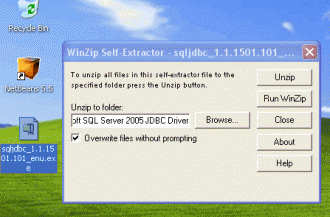
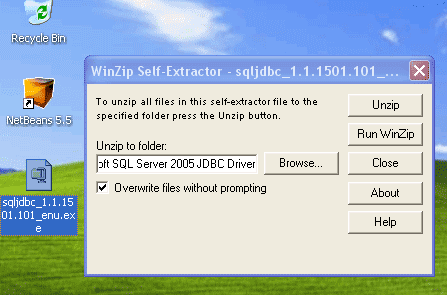
- Double-click sqljdbc_1.1.1501.101_enu.exe to extract it.
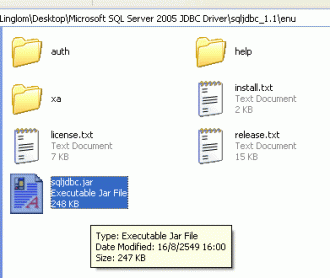
- Then, you’ll see the folder that you’ve just extracted ( \Microsoft SQL Server 2005 JDBC Driver\sqljdbc_1.1\enu\ ), the file ‘sqljdbc.jar’ which is the library that will be added to the library in NetBeans later.
- You can find more informations about JDBC Driver at \Microsoft SQL Server 2005 JDBC Driver\sqljdbc_1.1\enu\help\default.htm.
- Add JDBC Driver to the project on NetBeans. (Add a library)
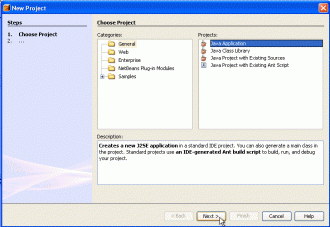
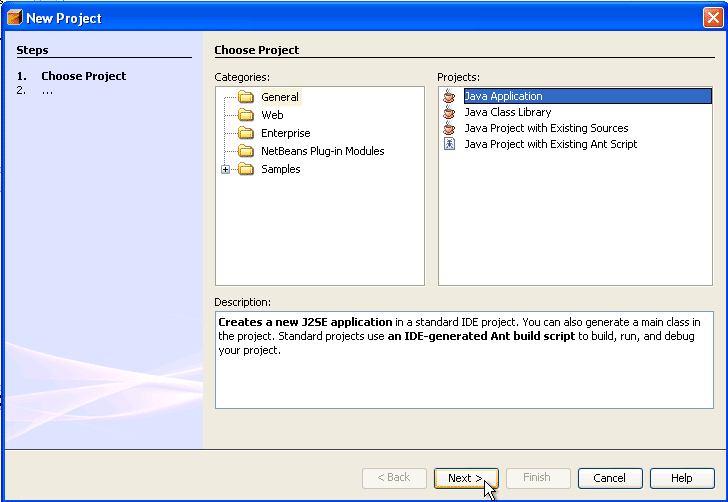
I will show by create New Java Application Project called TestSQL and add ‘sqljdbc.jar’ that just get from previous step to the project’s library.- Create New Project called TestSQL.
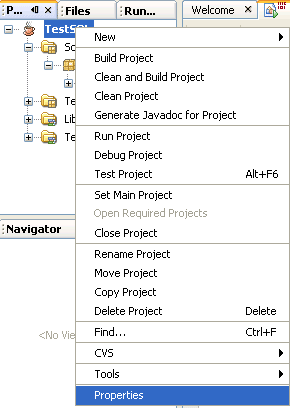
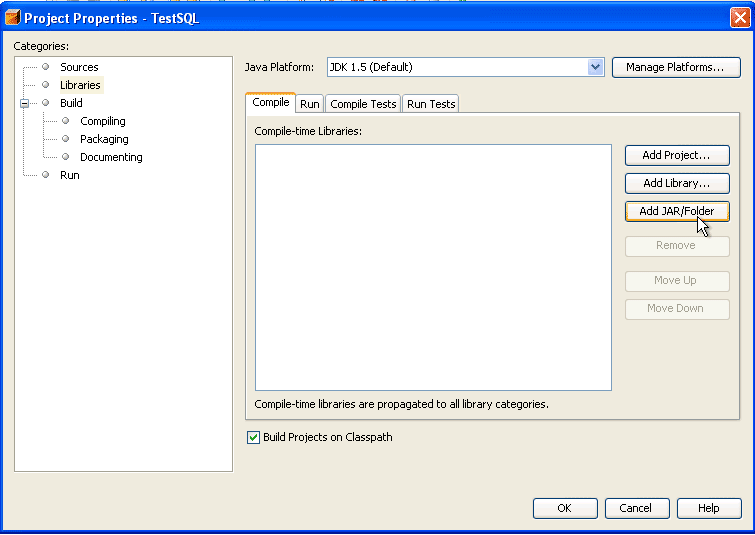
- In Projects window, right click the project name and select Properties.
- Project Properties window appears. The Categories on left side, select Libraries. And on right side in Compile tab, click Add JAR/Folder.
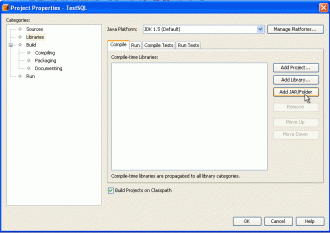
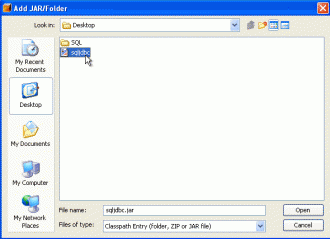
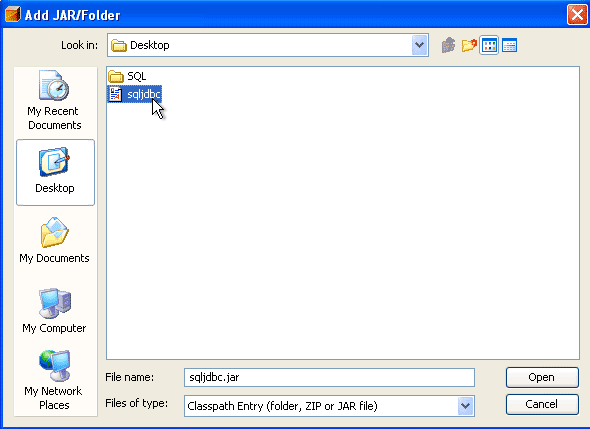
- New Window appears, browse to the file ‘sqljdbc.jar’ and click Open.
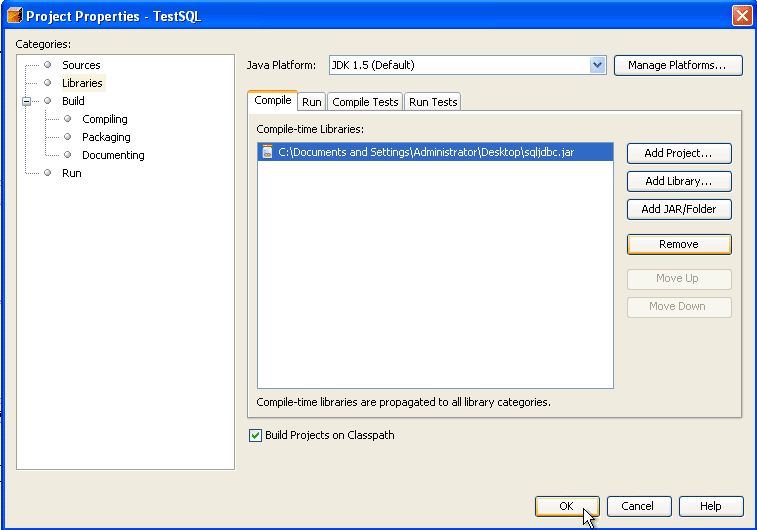
- You’ll see the .jar file was added to the project. Click OK to finish.
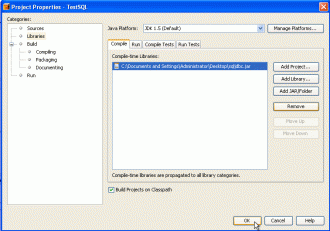
Note: You should keep sqljdbc.jar in the directory that you won’t delete it (ex. not in temp folder). May be in the same directory that keep common library files. If you delete the file without delete a link from the project, the project will show error about missing library.
- Create New Project called TestSQL.
- Connect to the database

Now it’s the coding time. I going to show how to connect to SQL Server. Assume that I have SQL Server 2000 running on local machine. Let continue from the project just created in previous step, in main.java.
- I’m going to use Connection and DriverMapper Classes so I need to import libraries.
import java.sql.*;
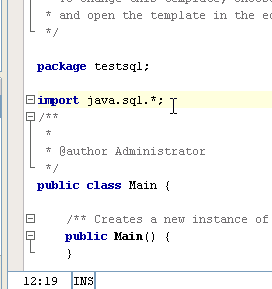
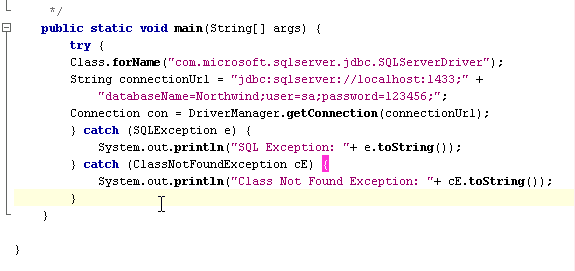
- Now I will connect to my SQL Server on local machine, the Northwind database(a sample database in SQL Server 2000). In main method, add the following code.
try {
        Class.forName("com.microsoft.sqlserver.jdbc.SQLServerDriver");
        String connectionUrl = "jdbc:sqlserver://localhost:1433;" +
            "databaseName=Northwind;user=sa;password=123456;";
        Connection con = DriverManager.getConnection(connectionUrl);
        } catch (SQLException e) {
            System.out.println("SQL Exception: "+ e.toString());
        } catch (ClassNotFoundException cE) {
            System.out.println("Class Not Found Exception: "+ cE.toString());
        }
The code explanation:
- Class.forName(“com.microsoft.sqlserver.jdbc.SQLServerDriver”); means load the SQL Server driver.
- localhost:1433 refers to connect to SQL Server at localhost port 1433 (default port).
- databaseName=Northwind refers to the database name you want to connect to.
- user and password refer Username and Password that used to connect to the SQL Server.
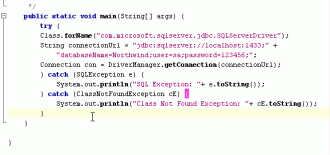
- Compile and run the project. If no error occurs, it means that the connection has established successfully.
That’s it for part I. Now you know how to connect to SQL Server on NetBeans, the part II will coming soon.
hey!,Did you have article about netbeans connect to mysql?
Very Good.
When we get the others parts of tutorial.
Thanks.
I’ll write others soon. May be next week.
Ok. Thanks for your good work.
the page wa usefull
Thank you so much. This was so helpful. This type of information is invaluable.
hI
Thanks for your blog.
I´ve a question. I did all you say to, but I ´ve got this message: SQL Exception: java.sql.SQLException: No suitable driver
I dont´knoew why. I used driver 1.0 and I fallowed yours steps. Please can yoy tell me what could be?
This is the code:
/*
* Main.java
*
* Created on 16 de agosto de 2007, 04:38 PM
*
* To change this template, choose Tools | Template Manager
* and open the template in the editor.
*/
package javaapplication1;
import java.sql.*;
/**
*
* @author maricelys
*/
public class Main {
/** Creates a new instance of Main */
public Main() {
}
/**
* @param args the command line arguments
*/
public static void main(String[] args) {
// TODO code application logic here
try{
Class.forName(“com.microsoft.sqlserver.jdbc.SQLServerDriver”);
String connectionUrl = “jdbc:sqlserver:\sidsvr_001;databaseName=siim_chacao_modelo;user=sa;password=”;
Connection con = DriverManager.getConnection(connectionUrl);
System.out.println();
}catch (ClassNotFoundException cE) {
System.out.println(“Class Not Found Exception: “+ cE.toString());
}catch (SQLException e) {
System.out.println(“SQL Exception: “+ e.toString());
}
}
}
Thanks
I think you typed incorrect connectionUrl string.
It should be in this format “jdbc:sqlserver://serverName”.
Try to change ‘jdbc:sqlserver:sidsvr_001’ to ‘jdbc:sqlserver://sidsvr_001’.
Hi, thanks!
I also had tu put the SQLJDBC_AUTH.DLL in the bin from the jdk.
Thank you very much. Goed work.
Grettings!
Hello… I am having problems with connecting NetBeans 5.5.1 with a SQL Server 2005 database.
I have this in the imports section:
import java.sql.*;
import com.microsoft.sqlserver.jdbc.*;
The second import is recognized well, meaning that the SQL Server classes are correctly reachable (I have added the JAR file to the library of the project)
When I write in code: Class.forName(“com.microsoft.sqlserver.jdbc.SQLServerDriver”);, NetBeans immediately says throws a classNotFoundexception.
What is wrong?
Thanks
Jaime
To Jaime,
I think your library file (sqljdbc.jar) may be corrupted, try to download and add the library file on NetBeans again.
And on this line, “import com.microsoft.sqlserver.jdbc.*;”
Try to change to “import com.microsoft.sqlserver.jdbc.SQLServerDriver;” and check that NetBeans show any error message on that line or not.
If the problem persists, you can mail your source code and the captured error message to me.
the program produced that error
com.microsoft.sqlserver.jdbc.SQLServerException: The TCP/IP connection to the host has failed. java.net.ConnectException: Connection refused: connect
You need to enable TCP/IP on the SQL Server to accept connection.
I am using SQL 2000 and i don’t know how to enable TCP/IP on the SQL Server
its enabled and the port is 1433
I’m not sure about SQL Server 2000.
Try read this page about SQL Server JDBC Connection Errors at
http://www.websina.com/bugzero/errors/sql-server-connection-error.html
There are many errors and how to solve that problems including SQL Server 2000.
Y try This code into my netBeans 6 but in debug mode I look that line Class.forName(“com.microsoft.sqlserver.jdbc.SQLServerDriver”); view ERROR !!!!!
I haven’t test on NetBeans 6.
What’s the error message?
To David Chacon,
I have tested on NetBeans 6 with the same code. It works fine. If you still got error on that line, may be you miss to add JDBC library.
I use NetBean 6 and try to use Database services with SQL Server 2005 JDBC Driver. my Database URL: jdbc:sqlserver://LocalHost:1433;databaseName=pubs.
It end up with error Unable to add connection. Cannot establish a connection to jdbc:sqlserver://LocalHost:1433;databaseName=pubs using com.microsoft.sqlserver.jdbc.SQLServerDriver (The TCP/IP connection has failed. javanet.ConnectionException: Connection refused: connect)
I checked TCP/IP and server already run
Can you show me your complete connection string? and what database service you try connecting to? SQL Server 2000?
If you’re connecting to SQL Server 2000, try to visit the URL in 16th comment. The error message quite the same in that page.
I’m also using Netbeans 6.0.1 and can’t get rid of the
“java.language.ClassNotFoundException”
package SqlServerCon;
import com.microsoft.sqlserver.jdbc.SQLServerDriver;
public class Main {
/**
* @param args the command line arguments
*/
public static void main(String[] args) {
// TODO code application logic here
Class.forName(“com.microsoft.sqlserver.jdbc.SQLServerDriver”);
}
}
In the prject window libraries listing is sqljdbc.jar; I can browse down the full tree to com.microsoft.sqlserver.jdbc.SQLServerDriver
BTW Netbeans tells me the import is unused.
help!
One other maddening thing – I can connect to the database using the database services inside Netbeans and I can build a desktop (Swing) database application that works. The sqljdbc.jar file is included in the library path for that project but because it is called from the Oracle persistence provider I can’t see the code used.
To Steve,
According from your code, does the error message is about uncaught exception like this “unreported exception java.lang.ClassNotFoundException; must be caught or declared to be thrown”?
To solve this, you can either throws exception or put code into try-catch block on main method.
Also, you don’t need to import this library “import com.microsoft…”. But you need to “import java.sql.*;” if you coding further.
Ling Lom,
Thank you for helping out a Java noob! I’ve added the “thows” statement to the main class and it now builds correctly.
I should have paid more attention to your example above. I’m a but surprised “Just Java 2” doesn’t warn readers about using a try/catch block.
i am using netbeans6 and the following error appeared
“The TCP/IP connection to the host has failed. java.net.ConnectException: Connection refused: connect
BUILD SUCCESSFUL “
To MMahmoud,
You need to enable TCP/IP on the SQL Server to accept connection.
Do you use SQL Server Express Edition? By default, it will deny remote connection.
Same problem as comment 12 and 26. For the error string, is something of configuration of SQL Server, I have 5 days searching how to solve it, but no answers. The documentation of the driver is so poor. If I find something, I’m sure I will post the answer. Even I have reinstalled 2 times and nothing.
If you use SQL Express Edition, have you try to enable remote access for it? I wrote one last year, how to enable remote connection to SQL Server 2005 Express.
i solve the problem
it was not related to SQL as i enabled the TCP/IP connrection, i just forget to start the Netbeans server
The following bit of code is intended to insert some data in a database. For wome reason I am getting the error about unreported exception ClassNotFoundException must be caught or declared…
I know you addressed this above, but I must have missed something. Can you tell me what I am doing wrong?
public int StoreData(String db, String user, String password, String table,
int freq, long time, double open, double high, double low,
double close, long volume, double wap) throws ClassNotFoundException, SQLException {
try {
Class.forName(“com.mysql.jdbc.Driver”);
String connectionUrl = “jdbc:” + db + “://localhost/mysql?” +
“user=” + user + “&password=” + password + “;”;
conn = DriverManager.getConnection(connectionUrl);
String strSQL = “INSERT INTO ” + table + ” (time,open,high,low,close,” +
“volume,wap) VALUES (” + time + “,” + open + “,” + high + “,” +
low + “,” + close + “,” + volume + “,” + wap + “)”;
rowsEffected = stmt.executeUpdate(strSQL);
conn.close();
} catch (SQLException e) {
System.out.println(“SQL Exception: ” + e.toString());
} catch (ClassNotFoundException cE) {
System.out.println(“Class Not Found Exception: ” + cE.toString());
}
To DavidR,
Your code seems to be OK. Can you capture what exactly error message is shown?
By the way, have you try to run the simpler code as the same as in my example before?. It may help you address the problem easier.
Thanks for the help.
I found the problem. There was a class of interfaces that I had missed. I did not understand the full tree.
Hello there..
I m trying to connect netbeans with postgreSQL.
But I found an error:
“java.lang.ClassNotFoundException”
Could you please help me out of this.
Thanks.
Hi.
I am facing a problem while connecting.
The SQL Server (am using 2005) is installed on a remote server with the login as Windows authentication. Have checked the port number, remote connection and TCP/IP settings and they are all in place.
However, when I try to create a new database connection from Net Beans 6 on my computer, it gives me a error saying: Cannot establish a connection to ….. Login failed for user…… The user is not associated with a trusted SQL Server Connection.
Don’t quite know what to do. Do I have to change the login on the SQL server to SQL Server authentication?
Thanks!
To, AB
I had never used postgreSQL before. I think you should find PostgreSQL JDBC driver instead. The error likes that means NetBeans can’t find the library you reference to.
To, PriyankaD
The error seems to be that you use SQL account to connect to the SQL Server that doesn’t enable SQL Server authentication. If you need to use SQL accounts, you have to change authentication mode to “SQL Server and Windows Authentication mode”.
For detail steps, visit Enable remote connection to SQL Server 2005 Express
I have a problem while connect:
SQL Exception: com.microsoft.sqlserver.jdbc.SQLServerException: Login failed for user ‘sa’. Reason: Not associated with a trusted SQL Server connection.
I use SQL server 2000 sp4 and netbean 6.1
Please help!
The problem seems to be the same as on comment #35 except that it is SQL Server 2000. In SQL Server 2000, You need to change the Authentication Mode of the SQL server from “Windows Authentication Mode (Windows Authentication)”
to “Mixed Mode (Windows Authentication and SQL Server Authentication)”.
Thank you…..Excellent job.
I’m using jre 1.6 and NetBeans 6.1 I get error:
EVERE: Java Runtime Environment (JRE) version 1.6 is not supported by this driver. Please use the JDBC 4 driver (sqljdbc4.jar) instead.
java.lang.UnsupportedOperationException: Java Runtime Environment (JRE) version 1.6 is not supported by this driver. Please use the JDBC 4 driver (sqljdbc4.jar) instead.
Must it revert to older jre??
What’s the JDBC Driver version you are using? Try to use the latest one on the Microsoft site.
Hi,
I’m using NetBeans 6.1 and SQL Server Express Edition 2005 and I’m unable to connect them. Here’s the error code:
SQL Exception: com.microsoft.sqlserver.jdbc.SQLServerException: La conexión TCP/IP al host ha fallado. java.net.ConnectException: Connection refused: connect
It’s the same TCP/IP connection error that almost everyone has. I have already enabled the TCP/IP connections but I still get that error.
Your help would be really appreciated.
Thanks
To Max,
You should test if you can connect to the SQL Server first by using SQL Server Management Studio with the same parameters as in your code.
If you can connect to the SQL Server, the problem should be on the coding. Recheck that you have spelled the connection string in the code correctly or not.
If you can’t connect to the SQL Server, there could be many causes. Check these advices:
– Have you use correctly Database server name? By default, the DB server name of SQL Server Express Edition is “the-computer-nameSQLEXPRESS”.
– Try to use IP Address to connect instead of Hostname.
– Is there any firewall blocking the traffic between the client and the SQL server?
– Check if the service of SQL Server is running.
I’ve found the problem, the port was not 1433.
I opened SQL Server Configuration Manager, then SQL Server 2005 Network Configuration -> Protocols for SQLEXPRESS, right click on TCP/IP and then properties. Went to the IP Addresses tab and copied the TCP Dynamic Port to the code you posted here and it all worked out.
Thanks for your help!
Great!
You’re welcome.
how to create classpath.
o/p gives the exception java.lang.ClassNotFound
Code 1
import java.sql.*;
/**
*
* @author jmocke
*/
public class Main {
/**
* @param args the command line arguments
*/
public static void main(String[] args){
try {
Class.forName(“com.microsoft.sqlserver.jdbc.SQLServerDriver”);
String connectionUrl = “jdbc:sqlserver://JMOCKE-236913B2:1433;” +
“databaseName=Northwind;user=sa;password=mysqlpwd;”;
Connection con = DriverManager.getConnection(connectionUrl);
} catch (SQLException e) {
System.out.println(“SQL Exception: “+ e.toString());
} catch (ClassNotFoundException cE) {
System.out.println(“Class Not Found Exception: “+ cE.toString());
}
}
}
code 2
import java.sql.*;
/**
*
* @author jmocke
*/
public class Test {
public Test() throws Exception {
// Get connection
DriverManager.registerDriver(new
com.microsoft.jdbc.sqlserver.SQLServerDriver());
Connection connection = DriverManager.getConnection(
“jdbc:microsoft:sqlserver://JMOCKE-236913B2:1433″,”sa”,”mysqlpwd”);
if (connection != null) {
System.out.println();
System.out.println(“Successfully connected”);
System.out.println();
// Meta data
DatabaseMetaData meta = connection.getMetaData();
System.out.println(“\nDriver Information”);
System.out.println(“Driver Name: ”
+ meta.getDriverName());
System.out.println(“Driver Version: ”
+ meta.getDriverVersion());
System.out.println(“\nDatabase Information “);
System.out.println(“Database Name: ”
+ meta.getDatabaseProductName());
System.out.println(“Database Version: “+
meta.getDatabaseProductVersion());
}
} // Test
}
After running them i got the following:
——————————————-
init:
deps-jar:
compile:
run:
SQL Exception: com.microsoft.sqlserver.jdbc.SQLServerException: The TCP/IP connection to the host JMOCKE-236913B2, port 1433 has failed.
Error: Connection refused: connect. Please verify the connection properties and check that a SQL Server instance is running on the host
and accepting TCP/IP connections at the port, and that no firewall is blocking TCP connections to the port.
BUILD SUCCESSFUL (total time: 1 second)
—————————————-
I am using MSsql 2000 and Netbeans IDE 6.1
After checking the port(1433),the Firewall,the TCP/IP and the SQL Server instance(is runnig) i had the same Error message. please help me!
Ps: i have also instaled the microsoft mssql driver (version 2.3.94.0)
First, you should try to telnet to the SQL Server on port 1433 to see that the SQL Server accepts any remote connection on this port or not. If it accepts, you’ll see a blank screen. Otherwise, it’ll display something like connection failed.
I’ve modified all of the settings as has been previously suggested. I can telnet to port 1433 and I get the blank screen. I can connect to the DB with the MS programs (Visual Web Developer and Server Management) but, when I try to setup a connection with NetBeans using it’s project tool I just sits there with a connecting message and I get a blue Cylon bar. Never times out, no errors, just continuous blue Cylon. I am using MS SQL 2008 and NetBeans 6.1.
I have been troubleshooting and reading online trying to get this setup for weeks and this is how far I’ve gotten. Now I am just “stuck”.
Any help would be greatly appreciated!
Hi, Vampire
According from your comment, you are only creating a connection to the SQL Server and not yet performing any SQL operations, Right? If you are in this step, there will be no message telling you if the connection is success. But if there is any error, it will show in the output.
In normal case (in this part), when you run the project, it show like “Build successful” and the process will end almost immediately after it finishes connect to the SQL Server.
If this is not your problem, please give me more detail about your problem.
Thanks very much!
I have been looking for this for one month!but I did not know it until when I saw your blog!
Best wish for you
Hi,
I´ve a question. I’ve tried out the tutorial, but I ´ve got this message:
init:
deps-jar:
compile:
run:
Oct 7, 2008 11:30:13 AM com.microsoft.sqlserver.jdbc.SQLServerConnection Prelogin
WARNING: ConnectionID:1 TransactionID:0x0000000000000000 Prelogin response packet not marked as EOM
SQL Exception: com.microsoft.sqlserver.jdbc.SQLServerException: The TDS protocol stream is not valid.
BUILD SUCCESSFUL (total time: 0 seconds)
I’ve copied the code and added the ’sqljdbc.jar’ :
package testsql;
import java.sql.*;
public class Main {
public static void main(String[] args) {
// TODO code application logic here
try {
Class.forName(“com.microsoft.sqlserver.jdbc.SQLServerDriver”);
String connectionUrl = “jdbc:sqlserver://localhost:1433;” +
“databaseName=Northwind;user=sa;password=123456;”;
Connection con = DriverManager.getConnection(connectionUrl);
} catch (SQLException e) {
System.out.println(“SQL Exception: “+ e.toString());
} catch (ClassNotFoundException cE) {
System.out.println(“Class Not Found Exception: “+ cE.toString());
}
}
}
Please can anyone tell me what i am doing wrong?
I´ve a question. I’ve tried out the tutorial, but I ´ve got this error:
SQL Exception: com.microsoft.sqlserver.jdbc.SQLServerException: The TDS protocol stream is not valid.
Oct 7, 2008 12:40:37 PM com.microsoft.sqlserver.jdbc.SQLServerConnection Prelogin
WARNING: ConnectionID:1 TransactionID:0x0000000000000000 Prelogin response packet not marked as EOM
BUILD SUCCESSFUL (total time: 0 seconds)
the code (copied from the tutoriaL) is:
package testsql;
import java.sql.*;
public class Main {
/**
* @param args the command line arguments
*/
public static void main(String[] args) {
// TODO code application logic here
try {
Class.forName(“com.microsoft.sqlserver.jdbc.SQLServerDriver”);
String connectionUrl = “jdbc:sqlserver://localhost:1433;” +
“databaseName=Northwind;user=sa;password=123456;”;
Connection con = DriverManager.getConnection(connectionUrl);
} catch (SQLException e) {
System.out.println(“SQL Exception: “+ e.toString());
} catch (ClassNotFoundException cE) {
System.out.println(“Class Not Found Exception: “+ cE.toString());
}
}
}
I’ve included the ‘sqljdbc.jar’ and i’ve included the path to ‘sqljdbc.jar’ in the classpath.
Can anyone please tell me what I am doing wrong?
linglon,
Sorry for taking this long to respond, I was out of town on vacation with no net access. 🙁
I do not think that is my problem. When I go through the Netbeans IDE to create a new project, I:
1. Select File -> New Project
New Project window opens
2. Under “Category” select “Java” and under “Project” select “Java Desktop Application”
3. Click Next
get “New Desktop Application” window
4. Give project name
5. Under “Choose Application Shell” select “Database Application”
6. Click Next
7. With the “Database Connection” drop down, select “New Database Connection”
“New Database Connection” window opens
8. Enter appropriate DB settings
9. Click “OK”
Message “Connecting to database…” appears with the “Blue Cylon” to indicate it is processing.
But, nothing else ever happens, no error and the request never finishes processing. I can’t access any of the menu options in the Netbeans IDE with this window open. And the only options the window provides are “OK” (gray now), “Cancel” and “Help”.
TIA
linglon,
After doing some further research, I finally found other reports of this issue. It would appear that there is a bug in how Netbeans detects proxy settings. However, I am not sure how to make use of any of the suggested work-arounds because my LAN settings in Internet Options use a custom automatic configuration script (work). “proxy server” is not checked.
linglon,
Another update. Someone has a MS SQL 2005 server running on a test system here that I was able to establish a connection to. It is not assigned to a specific individual and was installed without all of our normal network configurations. *sigh*
Hi, Laura
If you are using MS SQL Server 2000, you have to install the latest service pack (SP4) on the SQL Server. Then, try run the code again.
Another solution, try to using the latest JDBC Driver. Currently, it’s “SQL Server 2005 JDBC Driver 1.2”.
Hi, Vampire
Can you show me your settings in Database Connection windows?
I’ve tested step-by-step as you described. I can connect to my remote SQL Server without any error. But I’m not using the existing drivers. I’ve added new driver for SQL Server 2005 and modify database URL as the same as my post above.
I think the problem is not from the NetBeans. It can be from network configuration, SQL Server settings, etc.
I can connect to a remote SQL Server as well. It is the local one where I am having issues.
Name: Microsoft SQL Server 2008
Driver: com.microsoft.sqlserver.jdbc.SQLServerDriver
Database URL: com.microsoft.sqlserver.jdbc.SQLServerDriverjdbc:sqlserver://127.0.0.1:1433;databaseName=MtG Card DB
User Name: sa
Password: password
Hi, Vampire
Can you recheck the SQL Server port? Sometimes, it is a dynamic port not a default port (1433). Try to omit the port in the connection string. And try to omit the database name.
linglom,
I went through all of the documentation on that and I had already set it up as static 1433. I can confirm this by telnet’ing to 127.0.0.1 port 1433 and get the blank screen as described by on of the technical articles.
I did try as you suggested, same result.
linglom,
I also tried disabling my Firewall (Symantec) temporarily to see if this might be causing the proxy issue. No luck….
I forgot to ask something. What JDBC driver do you get from and what version it is?
Is it possible that it is an old version and doesn’t support SQL Server 2008?
C:\Program Files\Microsoft SQL Server 2005 JDBC Driver\sqljdbc_2.0\enu\sqljdbc4.jar
I believe:
2000/2005 = sqljdbc.jar
2008 = sqljdbc4.jar
can you please tell me from where i can find sqljdbc.jar file.. Thanks
To Vampire,
What’s about Java Runtime Environment (JRE) version? sqljdbc4.jar class library requires a JRE of version 6.0 or later.
Have you try with sqljdbc.jar?
To Alee,
Follow the link Microsoft SQL Server 2005 JDBC Driver to download the driver and do as in the step-by-step guide above.
Hi Linglom,
Thanks very much, not having installed SP4 on the SQL Server was the problem, now it runs fine.
I installed jdk-6u7 just to make sure, still did not work. I switched to using the other driver and now I am able to establish a connection. Though, I am not able to see any tables.
It’s progress I guess….
After some further research (Google), I determined that you HAVE to set the Schema to “dbo”.
Works now!
Many thanks for the help!!
Glad to hear that. Cheer Up!.
i used the net bean 1.5 first time. i connected sqljdbc.jar to my project. but the error is found. the error codes are:
SEVERE: null
java.sql.SQLException: [Microsoft][ODBC Driver Manager] Data source name not found and no default driver specified
at sun.jdbc.odbc.JdbcOdbc.createSQLException(JdbcOdbc.java:6958)
at sun.jdbc.odbc.JdbcOdbc.standardError(JdbcOdbc.java:7115)
at sun.jdbc.odbc.JdbcOdbc.SQLDriverConnect(JdbcOdbc.java:3074)
at sun.jdbc.odbc.JdbcOdbcConnection.initialize(JdbcOdbcConnection.java:323)
at sun.jdbc.odbc.JdbcOdbcDriver.connect(JdbcOdbcDriver.java:174)
at java.sql.DriverManager.getConnection(DriverManager.java:525)
at java.sql.DriverManager.getConnection(DriverManager.java:193)
at employeemanagement.AddEmp.(AddEmp.java:36)
at employeemanagement.AddEmp$1.run(AddEmp.java:277)
at java.awt.event.InvocationEvent.dispatch(InvocationEvent.java:209)
at java.awt.EventQueue.dispatchEvent(EventQueue.java:461)
at java.awt.EventDispatchThread.pumpOneEventForHierarchy(EventDispatchThread.java:242)
at java.awt.EventDispatchThread.pumpEventsForHierarchy(EventDispatchThread.java:163)
at java.awt.EventDispatchThread.pumpEvents(EventDispatchThread.java:157)
at java.awt.EventDispatchThread.pumpEvents(EventDispatchThread.java:149)
at java.awt.EventDispatchThread.run(EventDispatchThread.java:110)
please reply soon..
Hi, Sania
Can you show me your connection string and the part that you loaded the driver?
this was heart saving have been working on this for some days now pls i will like to know if i can get help on using jpa(java persistence api ) using netbeans it keep compile with an exception caused by unknown abstract schema type
i’m using sql server 2000, OS winXP, Netbeans 6.1,
n try the code above to connect Netbeans to Sql n get error :
SQL Exception: com.microsoft.sqlserver.jdbc.SQLServerException: The TCP/IP connection to the host has failed. java.net.ConnectException: Connection refused: connect
BUILD SUCCESSFUL (total time: 1 second)
i try to telnet port 1433, but result connection failed, although my Sql Service is running… can any one help my problem? i already turn off my Firewall.. n i already check thats my sql active port is 1433.. why i can;t telnet port 1433?
Thanks
here is my code :
try {
Class.forName(“com.microsoft.sqlserver.jdbc.SQLServerDriver”);
String connectionUrl = “jdbc:sqlserver://192.168.100.102:1433;” +
“databaseName=trdabs;user=sa;password=123456;”;
Connection con = DriverManager.getConnection(connectionUrl);
} catch (SQLException e) {
System.out.println(“SQL Exception: ” + e.toString());
} catch (ClassNotFoundException cE) {
System.out.println(“Class Not Found Exception: ” + cE.toString());
}
and 192.168.100.102 is my local ip
To alex,
I’ve answer your comment in the Part III.
Please, do not duplicate your comment in posts.
hey I got a Quetion I’m following the part I. when I run the connection as bellow it’s ok there’s no error
public static void main(String[] args) {
try {
Class.forName(“com.microsoft.sqlserver.jdbc.SQLServerDriver”);
String connectionUrl = “jdbc:sqlserver://localhost:1433;” +
“databaseName=Northwind;”;
Connection conexion = DriverManager.getConnection(connectionUrl,”sa”,””);
} catch (SQLException e) {
System.out.println(“SQL Exception: “+ e.toString());
} catch (ClassNotFoundException cE) {
System.out.println(“Class Not Found Exception: “+ cE.toString());
}
}
but Whe I add the following
Statement stmt = null;
ResultSet rs = null;
// SQL query command
String SQL = “SELECT * FROM Categories”;
stmt = conexion.createStatement();
rs = stmt.executeQuery(SQL);
while (rs.next()) {
System.out.println(rs.getString(“CategoryName”));
}
I got the error:
Compiling 1 source file to C:\Documents and Settings\pc07\Escritorio\aplicacion\build\classes
C:\Documents and Settings\pc07\Escritorio\aplicacion\src\aplicacion\Main.java:46: cannot find symbol
symbol : variable conexion
location: class aplicacion.Main
stmt = conexion.createStatement();
1 error
BUILD FAILED (total time: 1 second)
please help me I will apriciate it.
I’ve used maybe more than a day to try and make the connection to MS SQL server right, but it never worked, until i found your explanation.
Thus, loads of thanks for such a good article!
Hi, Elijah
The problem is from you have declared the “conexion” variable (Connection Object) inside try-catch scope. Then, you reference it outside the scope so that the compiler can’t build the code. For the solution, you have to put the second part code inside try-catch scope. Or you have to declare the “conexion” variable (Connection Object) outside try-catch scope.
Hi, Ramona Nico
You’re welcome.
hey m8s it show me this msg:
SQL Exception: com.microsoft.sqlserver.jdbc.SQLServerException: Connection reset
BUILD SUCCESSFUL (total time: 6 seconds)
is it ok or there is a problem some where ???
Hi, Dhafer
It shows exception message which means that the connection is not success. Can you show the code?
hello Linglom, thnx for ur answer here is the code which i made some changes on it :
/*
* To change this template, choose Tools | Templates
* and open the template in the editor.
*/
package connectionsqlserver;
import java.sql.*;
/**
*
* @author Dringo
*/
public class Main {
/**
* @param args the command line arguments
*/
public static void main(String[] args) {
// TODO code application logic here
try {
Class.forName(“com.microsoft.sqlserver.jdbc.SQLServerDriver”);
String connectionUrl = “jdbc:sqlserver://fsegs-d17476546/sqlexpress” +”databaseName=PFE1;integratedSecurity=true;”;
Connection con = DriverManager.getConnection(connectionUrl);
} catch (SQLException e) {
System.out.println(“SQL Exception: “+ e.toString());
} catch (ClassNotFoundException cE) {
System.out.println(“Class Not Found Exception: “+ cE.toString());
}} }
and here is the error msg :
init:
deps-jar:
Compiling 1 source file to D:\Documents and Settings\Dringo\My Documents\NetBeansProjects\connectionsqlserver\build\classes
compile:
run:
SQL Exception: com.microsoft.sqlserver.jdbc.SQLServerException: Échec de la connexion TCP/IP à l’hôte . java.net.UnknownHostException:
BUILD SUCCESSFUL (total time: 0 seconds)
Hi, linglom
I’m using MS Sql Server 2000 (with SP4) with Netbeans 6.1 now. I can use WinSql access he DB via an ODBC. In my program, I can load the driver (for sql server 2005) but I can’t connect to DB. I always have the ERROR: Échec de la connexion TCP/IP à l’hôte . java.net.ConnectException: Connection refused: connect.
I followed (tried) all your advices above. But,…
My Code is here
try {
Class.forName(“com.microsoft.sqlserver.jdbc.SQLServerDriver”); //.newInstance();
System.out.println(“JDBC driver loaded ok.”);
Connection conn = DriverManager.getConnection(
“jdbc:sqlserver://localhost;” //GMD1422
+ “databasename=CONDENSE;user=dba_sql;password=sql”);
DatabaseMetaData meta = conn.getMetaData();
System.out.println(“Driver name: ”
+ meta.getDriverName());
System.out.println(“Driver version: ”
+ meta.getDriverVersion());
System.out.println(“Server name: ”
+ meta.getDatabaseProductName());
System.out.println(“Server version: ”
+ meta.getDatabaseProductVersion());
System.out.println(“Connection URL: ”
+ meta.getURL());
System.out.println(“Login name: ”
+ meta.getUserName());
Statement statement = conn.createStatement();
ResultSet rs = statement.executeQuery(sql);
while (rs.next()) {
System.out.println(rs.getString(1));
}
} catch (java.lang.ClassNotFoundException e){
System.err.println(“ClassNotFoundException: ” +e.getMessage());
} catch (SQLException e){
System.err.println(“other: ” +e.getMessage());
}
I hope you can help me !
Thanks
Hi, Dhafer
It seems that the problem is that it can’t connect to the SQL Server (java.net.UnknownHostException).
Is the SQL Server is on the local or remote computer? If it is remote, have you enabled remote connection on SQL Server? SQL Server Express Edition is denied connections from remote hosts by default.
Hi, Felix
The error tells that there is no service listening on the destination that you’ve specified.
Can you try to add port to the connection string to see if it works? The default port of SQL Server is 1433.
hi linglom,
thnx for ur answer it’s a local computer.
any way i gave up with sqlserver and i’m using postgresql now and it works perfectly.
thank you any way my friend
You’re welcome.
Hi, Thanks for your blog. It was very informative. I have a issue with connection to my MS SQL Server2005. I am using Netbeans 6.5 the latest version. Database has already been created and all I am doing is accessing and can make my own changes to it. However, when i need to access it through Netbeans, it doesn’t get connected.
Below is my sample code and output of my Netbeans run. I am unable to figure out what the problem could be.
————————————————
public class NewClass1 {
private static Statement stmt = null;
private static ResultSet rs = null;
private static Connection con = null;
public static void main(String[] args) {
try {
Class.forName(“com.microsoft.sqlserver.jdbc.SQLServerDriver”);
System.out.println(“This is passed..1.”);
String connectionUrl = “jdbc:sqlserver://localhost:1433;” +
“databaseName=AVIVAU11.bhushanTry;user=sa;password=sa”;
System.out.println(“This is passed..2.”);
con = DriverManager.getConnection(connectionUrl);
System.out.println(“This is passed…3”);
stmt = con.createStatement();
System.out.println(“This is passed..4.”);
retriveData(“SELECT User_id as bhushan FROM bhushanTry.dbo.Users where User_Number=’5555555′”);
System.out.println(“This is passed..5.”);
} catch (SQLException sqlEx) {
System.out.println(“SQL Exception: “+ sqlEx.toString());
} catch (ClassNotFoundException classEx) {
System.out.println(“Class Not Found Exception: “+ classEx.toString());
} catch (Exception Ex) {
System.out.println(“Exception: “+ Ex.toString());
}
}
/* Update data on the database
*@param SQL an update commandstring (INSERT, DELETE, UPDATE)
*/
public static int updateData(String SQL) throws Exception {
return stmt.executeUpdate(SQL);
}
/* Show result on output window
@param SQL a retrive data command string (SELECT)
*/
public static void retriveData(String SQL) throws Exception {
rs = stmt.executeQuery(SQL);
while (rs.next()) {
int val=rs.getInt(“bhushan”);
System.out.println(val);
}
}
}
————————————————–
Output:
run:
This is passed..1.
This is passed..2.
SQL Exception: com.microsoft.sqlserver.jdbc.SQLServerException: The TCP/IP connection to the host has failed. java.net.ConnectException: Connection refused: connect
BUILD SUCCESSFUL (total time: 3 seconds)
——————————————————
Clearly, you see at the time of getconnection string, you observe that connection is not being able to.
Any suggestion would be great. Thanks for all….
Hi, Bob
If you’re using SQL Server Express edition, you have to enable remote connection first. See link on comment 29 for more details.
respected linglom,
glad to see your efforts and knowledge,I m using sql express 2008 on windows vista home basic the problem after running the code
try {
Class.forName(“com.microsoft.sqlserver.jdbc.SQLServerDriver”);
String connectionUrl = “jdbc:sqlserver://localhost:1433;” +
“databaseName=Northwind;user=sa;password=12345678;”;
Connection con = DriverManager.getConnection(connectionUrl);
} catch (SQLException e) {
System.out.println(“SQL Exception: “+ e.toString());
} catch (ClassNotFoundException cE) {
System.out.println(“Class Not Found Exception: “+ cE.toString());
}
is
SQL Exception: com.microsoft.sqlserver.jdbc.SQLServerException: The TCP/IP connection to the host localhost, port 1433 has failed. Error: “Connection refused: connect. Verify the connection properties, check that an instance of SQL Server is running on the host and accepting TCP/IP connections at the port, and that no firewall is blocking TCP connections to the port.”.
BUILD SUCCESSFUL (total time: 17 seconds)
please help me out,
Thanx in advance….
If possible,please mention all the steps I nead to follow for a successful completion in detail
well dear i would like to rethank u at the end of the day,both of your lectures worked perfectly fine.
the problem was with my ip address 117.199.1.1 well idon’t know why…
bcz it is a standalone system..
well netstat helped me out…
with your great efforts.many thanks…
Hi, Saurabh
It seems that you have found the solution. Cheer up!
dear linglom,
i would like to ask something,
i have some code :
…
break label307;
…
for (i2 = 0; i2 < this.drawgridline; ++i2)
…
when i open these codes with netbeans 6.1, and it shows some errors :
undefined label : label307
operator < cannot be applied to i2,int
operator ++ cannot be applied to i2
what version of java that is compatible with that code? or what version of netbeans i should use?
thanks
Hi, Alex
It should works on the lastest version of java.
The erros seem to be from the coding error. Check on break statement if it has define label307 or not. Also, check if variable i is defined as integer type.
I got it.. thanks very much..
for my old problem about error TCP/IP port is refused when connect using SQL Server 2000, i solved it with change my db to SQL Server Express. Anyway thanks.
Hello,
I am using SQL Server 2005, JDK 1.6, Eclipse Ganymade version.
I am tyring to connect to database using sql server jdbc driver. for that i am using latest driver which i downloaded from microsoft site.
I have done all the basic steps like:
1. download driver
2. unzip it in program files folder.
3. set classpath for jar files (i used sqljdbc4.jar)
4. write the code:
import java.sql.*;
public class connectURL {
public static void main(String[] args) {
// Create a variable for the connection string.
String connectionUrl = “jdbc:sqlserver://localhost/teamworks_1:1433;databaseName=JDBCTest”;
// Declare the JDBC objects.
Connection con = null;
Statement stmt = null;
ResultSet rs = null;
try {
// Establish the connection.
Class.forName(“com.microsoft.sqlserver.jdbc.SQLServerDriver”);
con = DriverManager.getConnection(connectionUrl,”teamworks”,”teamworks”);
// Create and execute an SQL statement that returns some data.
String SQL = “SELECT TOP 10 * FROM profiles”;
stmt = con.createStatement();
rs = stmt.executeQuery(SQL);
// Iterate through the data in the result set and display it.
while (rs.next()) {
System.out.println(rs.getString(2) + ” ” + rs.getString(2));
}
}
// Handle any errors that may have occurred.
catch (Exception e) {
e.printStackTrace();
}
finally {
if (rs != null) try { rs.close(); } catch(Exception e) {}
if (stmt != null) try { stmt.close(); } catch(Exception e) {}
if (con != null) try { con.close(); } catch(Exception e) {}
}
}
}
BUT I AM GETTIN FOLLOWING ERROR:
com.microsoft.sqlserver.jdbc.SQLServerConnection
SEVERE: Java Runtime Environment (JRE) version 1.6 is not supported by this driver. Use the sqljdbc4.jar class library, which provides support for JDBC 4.0.
java.lang.UnsupportedOperationException: Java Runtime Environment (JRE) version 1.6 is not supported by this driver. Use the sqljdbc4.jar class library, which provides support for JDBC 4.0.
at com.microsoft.sqlserver.jdbc.SQLServerConnection.(SQLServerConnection.java:223)
at com.microsoft.sqlserver.jdbc.SQLServerDriver.connect(SQLServerDriver.java:840)
at java.sql.DriverManager.getConnection(Unknown Source)
at java.sql.DriverManager.getConnection(Unknown Source)
at JDBC.connectURL.main(connectURL.java:20)
PLEASE HELP!!!!!
THANKS IN ADVANCE…..
I too am getting this error – does anyone have a solution to this before i tear my own eyeballs out 🙁
i have the same problem too.. anyone?
To Rahul, Chris, Hans Kristanto
The problem seems that the project you are develop still reference to sqljdbc.jar, the older version, rather than sqljdbc4.jar, the latest version. If there is any reference to the older version, the error will be occur as Rahul stated.
Try to search the file sqljdbc.jar on your computer and delete it.
Also, try to clean the project (in NetBeans, but I’m not sure that in Eclipse it’s called the same or not). Then, close the IDE, open again and rebuild the project.
hi, i try your code with my database but it prompt a error message.
init:
deps-jar:
Compiling 1 source file to D:\My Documents\NetBeansProjects\MMMServer\build\classes
compile:
run:
SQL Exception: com.microsoft.sqlserver.jdbc.SQLServerException: Login failed for user ‘SHEN’.
BUILD SUCCESSFUL (total time: 4 seconds)
—————————————————-
package mmmserver;
import java.sql.*;
public class Main {
/**
* @param args the command line arguments
*/
public static void main(String[] args) {
try {
Class.forName(“com.microsoft.sqlserver.jdbc.SQLServerDriver”);
String connectionUrl = “jdbc:sqlserver://localhost:3066;” +
“databaseName=MMM_DB;user=SHEN;password=;”;
Connection con = DriverManager.getConnection(connectionUrl);
} catch (SQLException e) {
System.out.println(“SQL Exception: “+ e.toString());
} catch (ClassNotFoundException cE) {
System.out.println(“Class Not Found Exception: “+ cE.toString());
}
}
}
nvm. i found the solution…. =.= this site is so inefficient.
Hi, Sasakae
Sorry for a late response. I’m a bit busy.
So why don’t you share others how you solve your problem?
Hi,I`m using SQL Server 2005, jdk1.6.0_14, driver sqljdbc_1.2.2828.100 and I can`t connect to database from NetBeans 6.5.1. Error message is: “Unable to add connection. Cannot establish a connection to jdbc:sqlserver://localhost:2383;databaseName=test using com.microsoft.sqlserver.jdbc.SQLServerDriver (Connection reset)” It`s something easy, but I can`t find a solution=( Do you have any ideas, what is this?
Hi, Marcha
I’m not sure about this error message. But I want to you to try the latest version of JDBC driver – SQL Server JDBC Driver 2.0, see Microsoft SQL Server JDBC Driver
hi,
i’m using sql 2005. I like to know how to connect my database to netbeans at the beginning.
Thank so much !
hi linglom,
I’m pOpOy jin from Philippines, I’m a Powerbuilder Programmer and now I got bored with it and tried using Netbeans 6 with SQL Server 2005, can you help me with this error code,
SQL Exception: java.sql.SQLException: No suitable driver found for jdbc:sqlserver:\kpsdev;databaseName=dbVirusAlert;user=sa;password=sapcpcebu;
Your help is highly appreciated, thanks!
I had found the solution, thank you so much!
I tried your code But it gives this error.
SQL Exception: com.microsoft.sqlserver.jdbc.SQLServerException: Login failed for user ‘sa’. Reason: Not associated with a trusted SQL Server connection.
can u pls tell me wat shd b d name n password.
Authentication is Windows only.
and my windows user name is Sharry But thier is no password
My previous problem is solved but i get this Exception.
SQL Exception: com.microsoft.sqlserver.jdbc.SQLServerException: The TCP/IP connection to the host localhost, port 1433 has failed. Error: “Connection refused: connect. Verify the connection properties, check that an instance of SQL Server is running on the host and accepting TCP/IP connections at the port, and that no firewall is blocking TCP connections to the port.”.
I tried all d soln ,i found on net.
Pls help.
Hi, Sharry
Verify that SQL Server is running and accepting requests on port 1433. You can check if SQL Server is accepting requests on port 1433 by using telnet command, eg. telnet localhost 1433. If you see a blank screen, it means that you can connect to the SQL Server.
If the problem still persists, can you show the connection string?
Thanks a Lot….
Please keep it up for us…
Hello, I’m try in with this code and was successful!!
import java.sql.Connection;
import java.sql.DriverManager;
import java.sql.SQLException;
import java.util.logging.Level;
import java.util.logging.Logger;
import com.microsoft.sqlserver.jdbc.SQLServerDriver;
public class ConnectorMDB{
public static void main(String arg[]){
try {
Connection connection = null;
// Class.forName(“com.microsoft.jdbc.sqlserver.SQLServerDriver”);
Class.forName(“com.microsoft.sqlserver.jdbc.SQLServerDriver”);
// String url = “jdbc:microsoft:sqlserver://192.168.0.103:1433/”;//;DatabaseName=GPL
String url = “jdbc:sqlserver://192.168.0.103:1433″;//;DatabaseName=GPL
connection = DriverManager.getConnection(url,”userbd”, “userbd”);
System.out.println(“Conexion establecida con el server”);
connection.close();
} catch (SQLException ex) {
Logger.getLogger(ConnectorMDB.class.getName()).log(Level.SEVERE, null, ex);
} catch (ClassNotFoundException ex) {
Logger.getLogger(ConnectorMDB.class.getName()).log(Level.SEVERE, null, ex);
}
}
}
Otra Forma de Realizar la conexion de dos forma: JDBC y OBDC
import java.sql.*;
public class abrirConexion
{
//Conectandose a SqlServer Usando JDBC y ODBC
public static void main(String[] args)
{
/**********************************
* *
* Usando una Conección tipo ODBC *
* *
**********************************/
// //Se entiende que usamos el Protocolo ODBC, que usaremos una ves que allamos agregado
// //en la Directiva de ODBC de Windows la conección correspondiendo a la base de datos.
// String url = “jdbc:odbc:Ejemplo”;
// String usuario = “NeoBones”;
// String password = “”;
// Statement stmt = null;
// //Carga del driver
// try {
// Class.forName(“sun.jdbc.odbc.JdbcOdbcDriver”);
// }
// catch(java.lang.ClassNotFoundException ex) {
// System.err.print(“Problemas al cargar el driver”);
// System.err.println(ex.getMessage());
// }
// try {
// //Creando la conexion a la BD
// Connection conexion = DriverManager.getConnection(url, usuario, password);
// //Lanzando consultas
// stmt = conexion.createStatement();
// ResultSet cursor = stmt.executeQuery(“SELECT * FROM persona”);
// }
// catch(SQLException exc) {
// System.err.println(exc.getMessage());
// }
/**********************************
* *
* Usando una Conección Tipo JDBC *
* *
**********************************/
// La diferencia, es que cambiamos el Protocolo, en ves de ser ODBC es SqlServer. y agregamos
//el nombre del Servidor de nuestra maquina, en mi caso es asi.
String url = “jdbc:sqlserver://NEOBONES-NOTE\\SQLEXPRESS:1433;DatabaseName=Ejemplo;integratedSecurity=true;”;
//Si usaremos una conexion de tipo validacion llenar los compos y sacar el integratedSecurity del URL
//String usuario = “NeoBones”;
//String password = “”;
Statement stmt = null;
//Carga del driver
try {
Class.forName(“sun.jdbc.odbc.JdbcOdbcDriver”);
}
catch(java.lang.ClassNotFoundException ex) {
System.err.print(“Problemas al cargar el driver “);
System.err.println(ex.getMessage());
}
try {
//Creando la conexion a la BD
Connection conexion = DriverManager.getConnection(url);
// Conexion con validacion: getConnection(url,usuario,password);
//Lanzando consultas
stmt = conexion.createStatement();
ResultSet cursor = stmt.executeQuery(“SELECT * FROM persona”);
}
catch(SQLException exc) {
System.err.println(exc.getMessage());
}
}
}
+——————-+
| |
| Aporte NeoBones |
| |
+——————-+
Hi, NeoBones
Thanks for your sharing.
hi, sir
I want to change MS sql Server 2000 to 2005 in my project which was created by struts framework 1.2.9 and apache tomcat 5.0. How can i change sql driver 2000 to 2005.
With Best Regards,
hello sir,
My test connections of odbc are successful. But in tomcat its not showing Please give me reply
Hi, Thiri
The JDBC driver on this tutorial supports both SQL Server 2000 and 2005. You don’t need to change the driver. But I’m not sure about struts framework, you should see its document.
Hi, Sreenivas
I’m not familiar with tomcat. Is there any error message while debugging?
this post helped me ….
thanks a lot.
plz write the next chapters as soon as possible i have a project deadline next week.
thanks
regards
amna
when i try to establish connect to sqlserver 2005 in netbeans i receive a message: Login failed for user, the user is not associated with trusted sql server connection
Hi, Amna
You can see other chapters on the top of this post.
Hi, Adabs
This problem occurs when you try to connect to the SQL server that is configured to “Windows Authentication Mode” only. And you connect by SQL Server Authentication mode. So you need to change the Authentication Mode of the SQL server to “Mixed Mode”
If you don’t know how, you can see Enable Remote Connection on SQL Server 2008 Express on step 10 to 15.
it is nice work of yours to support the students . I hope every students will we getting the step by step procedure in easy way. Otherwise it is quite difficult to understand it . Thanking u 4 this help. Regards Narendra Singh from Agra.
i solved the problem……
only change the connection string like this:
String connectionUrl = “jdbc:sqlserver://EGITIM;instanceName=ISALOG;” +
“databaseName=master;user=sa;password=elma;”;
have fun, it’s working…
thanks , it was really useful.
SQL Exception: java.sql.SQLException: Access denied for user ”@’localhost’ (using password: NO)
hw to fix dis
Hi, Radhika
Can you show your connection string? Have you provided login information (username and password) in the connection string?
hi
i used your code to connect but it gave me the following error:
“SQL Exception: com.microsoft.sqlserver.jdbc.SQLServerException: Login failed for user ‘Z\Zaher el-Rody’.”
although i wrote:
String connectionUrl = “jdbc:sqlserver://localhost:1433;” +
“databaseName=Agence_Voyage;user=Z\\Zaher el-Rody;password=;”;
btw im using Microsoft SQL Server Management Studio 2008,my authentication mode is MIXED MODE and i did telnet localhost 1433 and it works fine!
Thank you! I really couldn’t find much information about making the connection but you really helped 🙂
very nice. thanks so much…
Hi, Thanks for this tutorial, it is really helpful,
I have some issues on how to retrieve the data from the DB,
here are my specs:
Netbeans 5.5
MS SQL 2005+MS JDBC v4 driver.(successful connection with DB 4m Netbeans)
I have a table with following three fields:
fileType||fileExtension||fileHeader,
having values say,
JPEG_Image||JPG||FFD8,
now what i want is a query which will actually take the Jfilechooser’s input as the Header (read from file in hex) and then it SHOULD search in the 3 fields for the match of Header in the database, and then if found it should display it in messagebox or Jframe…
how do i use a variable, to:
1>store the value from the JFileChooser-header value to store in this variable
2>how do i construct a query so it will run and display the corresponding records as well.
I have the working code with me, however it is in plain java, no gui.
Can you please help.
Awaiting your reply
hi,
system config….
windows 7 home prim.. 64bit
jdk 1.7.0
netbean 7.0.1
sql server 2008
now am not able to connect netbean with sql server 2008
plz do help me …..
thank u
hay it is successfully worked.but i got an error in accessdatabase programe that is the mai class will get an error. will please check it ones.
import java.sql.*;
public class AccessDatabases {
public static void main(String[] args) {
try {
Class.forName(“com.mysql.jdbc.Driver”).newInstance();
Connection con = DriverManager.getConnection(
“jdbc:mysql://localhost:3306/test”, “root”, “root”);
Statement st = con.createStatement();
DatabaseMetaData meta = con.getMetaData();
ResultSet rs = meta.getTables(null, null, “%”, null);
String tableNames = “”;
while (rs.next()) {
tableNames = rs.getString(3);
System.out.println(tableNames);
}
} catch (Exception e) {
}
}
}
linglom,
Here is my connection:
Class.forName(“com.microsoft.sqlserver.jdbc.SQLServerDriver”);
String connectionUrl = “jdbc:sqlserver://TOSHIBA;databaseName=ogrenci;”;
Connection con = DriverManager.getConnection(connectionUrl);
jButton1.setText(“tamam”);
} catch (SQLException e) {
System.out.println(“SQL Exception: “+ e.toString());
} catch (ClassNotFoundException cE) {
System.out.println(“Class Not Found Exception: “+ cE.toString());
}
And here is the error:
SQL Exception: com.microsoft.sqlserver.jdbc.SQLServerException: Login failed for user ”.
My database has no user and password… I didn’t understand what’s the problem with this codes…
When i use this Url:
String connectionUrl = “jdbc:sqlserver://TOSHIBA;databaseName=ogrenci;integratedSecurity=true;”;
Then NetBeans gives me this error:
com.microsoft.sqlserver.jdbc.AuthenticationJNI
WARNING: Failed to load the sqljdbc_auth.dll
SQL Exception: com.microsoft.sqlserver.jdbc.SQLServerException: This driver is not configured for integrated authentication.
Could please help me urgently? 🙁 Thanks in advance…
Thanks a lot! I just solved my problem thanks to “Part III: Troubleshooting” 😀
Hi~
Thanks for the tutorial, I got a problem in jdbc connection, the program stuck in
Connection con = DriverManager.getConnection(connectionUrl);
and no error is shown. However, If I changed the login username into a wrong one, error will be shown. what happened? I am using window 7 with sql server 2008.
Can you help me please? Thanks a lot.
There is no perfect connection HINTs for Netbean IDE JDBC …. same error occur while connecting to Database SQL server 2005.
Hi..
This method is working well when i run Desktop program on Netbean 7 gives the output well……… but when I run Desktop application program through .Jar file,this program does not give any output……Please help me…..Thanks.
Yes … the design is clearly needed to be changed 🙂
The dark green color would fit perfectly xD
hai…
i m creating an application in netbeans 5.5 and i wana connect it to the database( ms sql server 2005)
i created a database and table in windows authentication and server name as user-vaio\sqlexpress. i cant connect netbeans to ms sql the connecting to database part is going on and on without ending. plz give me a solution for this problem.
Error: SQL Exception: com.microsoft.sqlserver.jdbc.SQLServerException: The TCP/IP connection to the host RAJESHKUMARGUPT, port 1433 has failed. Error: “Connection refused: connect. Verify the connection properties. Make sure that an instance of SQL Server is running on the host and accepting TCP/IP connections at the port. Make sure that TCP connections to the port are not blocked by a firewall.”.
JAVA CODE:
try {
Class.forName(“com.microsoft.sqlserver.jdbc.SQLServerDriver”);
String connectionUrl = “jdbc:sqlserver://RAJESHKUMARGUPT;databaseName=javadb;user=sa;password=rajesh;”;
Connection con = DriverManager.getConnection(connectionUrl);
} catch (SQLException e) {
System.out.println(“SQL Exception: “+ e.toString());
} catch (ClassNotFoundException cE) {
System.out.println(“Class Not Found Exception: “+ cE.toString());
}
Hi..
I followed all the steps..
but i have a question..
plz help me..
what it does mean..?
SQL Exception: com.microsoft.sqlserver.jdbc.SQLServerException: The TCP/IP connection to the host localhost, port 1433 has failed. Error: “connect timed out. Verify the connection properties. Make sure that an instance of SQL Server is running on the host and accepting TCP/IP connections at the port. Make sure that TCP connections to the port are not blocked by a firewall.”.
Thank you so much for these tutorials!!
I’m learning to build a database application using Netbeans and SQL server, but could not find any tutorials.
Your tutorials are perfect for a newbie!!
is it work for sql server 2008 or not?
superb……………
class not found Exception ….what to do??????plz help
tengo este codigo me de este error : java.lang.ClassNotFoundException: com.microsoft.sqlsserver.jdbc.SQLServerDriver
aqui les dejo el codigo alguna ayuda ???
package uno;
import java.sql.Connection;
import java.sql.DriverManager;
import java.sql.ResultSet;
import java.sql.Statement;
import javax.swing.JOptionPane;
/**
*
* @author luisj
*/
public class conectar {
/**
* @param args the command line arguments
*/
public static void main(String args[]) {
// TODO code application logic here
// Create a variable for the connection string.
String connectionUrl = “jdbc:sqlserver://localhost:1433;” +
“databaseName=si;integratedSecurity=true;”;
// Declare the JDBC objects.
Connection con = null;
Statement stmt = null;
ResultSet rs = null;
try {
// Establish the connection.
Class.forName(“com.microsoft.sqlserver.jdbc.SQLServerDriver”);
con = DriverManager.getConnection(connectionUrl);
// Create and execute an SQL statement that returns some data.
String SQL = “SELECT * FROM persona”;
stmt = con.createStatement();
rs = stmt.executeQuery(SQL);
// Iterate through the data in the result set and display it.
while (rs.next()) {
System.out.println(rs.getString(1) + ” ” + rs.getString(2));
}
}
// Handle any errors that may have occurred.
catch (Exception e) {
//e.printStackTrace();
JOptionPane.showMessageDialog(null, e);
}
finally {
if (rs != null) try { rs.close(); } catch(Exception e) {}
if (stmt != null) try { stmt.close(); } catch(Exception e) {}
if (con != null) try { con.close(); } catch(Exception e) {}
}
}
}