How to run command-line or execute external application from Java
Have you ever confront a situation that you need to execute external programs while developing a Java application? For instance, you are developing a Java application and need to execute external application(another executable program) in the middle of the program or you may need to execute some commands such as listing directory command: dir (in windows) or ls (in Unix) while developing the program. The following will show you how to execute the external program from Java application.
Example
Note: The example will use NetBeans as IDE.
Let see the example Java source code below:
import java.io.*; public class Main { public static void main(String args[]) { try { Runtime rt = Runtime.getRuntime(); //Process pr = rt.exec("cmd /c dir"); Process pr = rt.exec("c:\\helloworld.exe"); BufferedReader input = new BufferedReader(new InputStreamReader(pr.getInputStream())); String line=null; while((line=input.readLine()) != null) { System.out.println(line); } int exitVal = pr.waitFor(); System.out.println("Exited with error code "+exitVal); } catch(Exception e) { System.out.println(e.toString()); e.printStackTrace(); } } } |
The above Java’s code will try to execute the external program (helloworld.exe) and show output in console as exit code of the external program.
The sample external program, Helloworld.exe (Visual Basic)
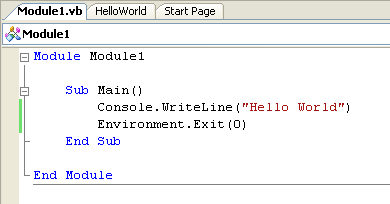
Code Explanation:
Runtime rt = Runtime.getRuntime(); Process pr = rt.exec("c:\\helloworld.exe"); |
Create Runtime Object and attach to system process. In this example, execute the helloworld.exe.
If you want to execute some commands, just modify the string in the rt.exec(“….�?) to command that you want.
For instance, in the comment line; //Process pr = rt.exec(“cmd /c dir”);
Note: that you need to enter “cmd /c …�? before type any command in Windows.
int exitVal = pr.waitFor(); System.out.println("Exited with error code "+exitVal); |
Method waitFor() will make the current thread to wait until the external program finish and return the exit value to the waited thread.
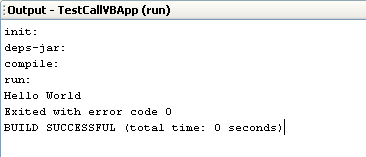
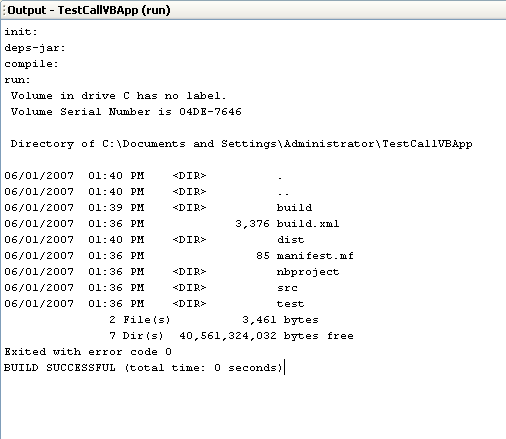
Output example
Process pr = rt.exec(“c:\\helloworld.exe”);
Process pr = rt.exec(“cmd /c dir”);
Summary
This is a simple code to execute external applications. If you want to call functions from other program (ex. C++, Visual Basic DLL), you need to use JNI (Java Native Interface) which you can find a nice tutorial at codeproject.com.
If you need more information, below are some sites that talk about executing external code.
For Java users
- Execute an external program – Real’s Java How-to.
http://www.rgagnon.com/javadetails/java-0014.html - When Runtime.exec() won’t – Java World.
http://www.javaworld.com/javaworld/jw-12-2000/jw-1229-traps.html - Trouble with Runtime.getRuntime().exec(cmd) on Linux – Java.
http://www.thescripts.com/forum/thread16788.html - Runtime.getRuntime().exec (Linux / UNIX forum at JavaRanch).
http://saloon.javaranch.com/cgi-bin/ubb/ultimatebb.cgi?ubb=get_topic&f=13&t=001755 - Java’s Runtime.exec() and External Applications.
http://www.ensta.fr/~diam/java/online/io/javazine.html
For C++ users
- How can I start a process?
http://www.codeguru.com/forum/showthread.php?t=302501 - Executing programs with C(Linux).
http://www.gidforums.com/t-3369.html
Great 🙂 Helped me a lot 🙂 Thanks 🙂
How about executing a command from UNIX? i.e.
cat test.txt | mailx [email protected]
What does my string look like?
As from your string, you do not need output line so you can comment out the while loop that print output and if I reference from the source code in my post, the code will look like
try {
Runtime rt = Runtime.getRuntime();
String[] cmd = {“/bin/bash”,”-c”,”cat test.txt | mailx [email protected]“};
Process pr = rt.exec(cmd);
BufferedReader input = new BufferedReader(new InputStreamReader(pr.getInputStream()));
String line=null;
/*while((line=input.readLine()) != null) {
System.out.println(line);
}*/
int exitVal = pr.waitFor();
System.out.println(“Exited with error code” +exitVal);
} catch(Exception e) {
System.out.println(e.toString());
e.printStackTrace();
}
If you want more information, try to follows the links that I’ve just added at the bottom of the post.
I’m a java beginner,I have an error that on running java using editplus&jdk1.6.0_02 version cannot disply output.What I can do
Also please give me goodlink in java for developing software
How add a data into database using java
To Mubarak,
1. What is your error message?
2. If you are a beginner, I recommends text book “Core Java 2, Volume I–Fundamentals”. You can find one at amazon.com
3. That depends on which database you are using.
Next time, please don’t separate comment.
Good article. Can you give suggestions for remote login using java programs.
thanks a lot…
Yo!
Wasjust serfing on net and found this site…want to say thanks. Great site and content!
Hi,
This helped me a lot…
Hey Linglom,
Nice article. Helped me a lot. Thx!
I’m kind of new to the topic, and would really appreciate if you did a comment on how to use the outputstream for a process.
– OMG
Hi,
My Java class will execute the linux CAT command to join files as:
Process p = Runtime.getRuntime().exec(“cat a.txt b.txt > e.txt”);
I always receive error:
cat: >: No such file or directory
Note: a.txt and b.txt is existed.
Could anyone help me?
Thanks,
Ringo
I would Just like to say that this has been gloriously helpful to me today, and that I very much appreciate you for helping out the general community.
Very helpful linglom, thanks.
Here is an example that sends an email, where the body of the mail is in a text file.
static private void remote_call_11 () {
System.out.println(“\nstatic private void remote_call_11 ()” );
try {
Runtime rt = Runtime.getRuntime();
String subject=” TestSubject11″;
String pipeFile=”/tmp/test2.out | “;
String email=”[email protected]”;
String cmdline=”cat ” + pipeFile + ” mail -s ” + subject + ” “+email;
String[] cmd = {“/bin/bash”,”-c”,cmdline};
Process pr = rt.exec(cmd);
BufferedReader input = new BufferedReader(new InputStreamReader(pr.getInputStream()));
int exitVal = pr.waitFor();
System.out.println(“Exited with error code ” +exitVal);
} catch(Exception e) {
System.out.println(e.toString());
e.printStackTrace();
}
} // remote_call_11
Hello, Thomas.
Thanks for your sharing.
Very Helpful! Thanks.
do you know a way to interact with cmd without “/c”.
Im asking this because im trying to interact with gdb debugger, but the /c command its not available so i cant pass my arguments correctly.
thanks
Hi, John
“/c” is a parameter of cmd command. Why it doesn’t available?
So what exactly do you want to do with gdb debugger?
thanks for posting….i want to debug a C file from a java application.
But when I interact with gdb like this from java:
String cm[] = {“gdb”,”file C:/programm.exe”,”run”};
p = Runtime.getRuntime().exec(cm);
i cant because everything passed after gdb is passed like arguments so i get an error, and i cant use the “/c” or “&&” comand i would use with cmd to pass multiple commands.
Basically i want to debug a C file from java.
Do you know any tip?
Is it possible to put your gdb parameters after /c command?
Like this, pr = rt.exec(“cmd /c gdb …your gdb parameter goes here…”);
If it doesn’t work, what about batch (.bat) file. Write the gdb command in the batch file. I have provide some links in the summary section. Some of them has example about batch file.
thanks for the tip linglom, i wrote the commands in a .txt file and used the -x command, like this:
String cmd[] = {“cmd”,”/c”,”gdb -batch C:/codigo.exe -x C:/orden.txt”};
p = Runtime.getRuntime().exec(cmd);
BUT I GOT AN ISSUE….WHEN I EXECUTE THE JAVA PROGRAM, A CONSOLE WINDOW APPEARS VERY QUICKLY, JUST LIKE THE ONE THAT APPEARS WHEN YOU USE GDB FROM COMMAND LINE, IT CLOSES VERY FAST BUT IN THE END IT APPEARS, IS THERE A WAY TO OBVIATE THIS EVENT.
thanks
To John,
You can set the batch file to pause until you press any key by add ‘pause’ to the end of a batch file.
For example, “test.bat”
thanks linglom, you have been very helpful, another question. I want to interact with cmd from java, an example: supose you have a program in C with a “scanf();” line and i want to execute that program and interact with it from inside my java program.
I do this:
String cmd = â€cmd /c myCprogram.exe”;
p = Runtime.getRuntime().exec(cmd);
but it wont work because it will stay blocked expecting that i enter a value to the “scanf();”. How can i solve this???
PS. A batch file is too complicated because i dont always now how many “scanf();” will be in the C program.
linglom, your suggestions to John have been very helpful. I’ve tried applying your script recommendations but am having a small issue.
I have a series of SQL commands that are performed on a database table. This string is called within a batch file.
I would like to execute it within java. This is what I have written using your previous suggestions. String cmd[] = {“cmd”,”mysql -h host -u user -p pass clientexport<‘c:\\generate.sql'”};
No errors are thrown but no updates take place. Am I just missing a step?
Thanks
To John,
Your problem seems to be complicated. If you have to interact with external application many times in different way, it may not good to write application to interact with it. I think it’s hard to debug and maintain your application. I have better way. Try AutoIt, it is a tool to create script that interact with Windows GUI. It is easy to use. Let’s see it yourself – AutoIt v3.
To Harris,
I think the best way is to try to run the code outside the batch file first to test if the command is correctly or not.
This is a very good topic,thanks linglom.
I was trying to copy files from one folder to another folder and it worked well.
But when i tried to execute a DOS del from Java, the program was hanged. I am sure that was because DOS command promt will ask for a confirmation before it does the delete :
Are you sure (Y/N):
Can you guys help me out? Thanks
Regards
I’ve solved the problem by putting /Q (Quiet mode, do not ask if ok to delete on global wildcard) parameter for del command.
Process pr = rt.exec(“cmd /c del /Q C:\\Laser\\*.*”);
Hi, Kevin Do
Thanks for your sharing.
hi
I am able to run DOS command from JAVA in following way
String fullPath = “cmd /c start D:\\tool\\citi\\bin\\properties\\build os “;
Runtime rt= Runtime.getRuntime();
try{
Process p=rt.exec(fullPath.toString());
}catch (Exception exception){
}
But now i want to close the command prompt window . How to do this. Please help me out ..
Hi, Nikhil
Try to modify the command by add “” after start command as the example below,
From:
cmd /c start “C:\Program Files\WinRAR\WinRAR.exe”
To:
cmd /c start “” “C:\Program Files\WinRAR\WinRAR.exe”
Hi Linglom,
It didnt worked.
is there any other way out to close the command propmp window .
Following is the command which am firing to open the command prompt
String fullPath = “cmd /c start D:\\tool\\citi\\bin\\properties\\build.bat /c ”
Runtime rt= Runtime.getRuntime();
Process p=rt.exec(fullPath.toString());
What if you remove the text “cmd /c start”?
String fullPath = “D:\\tool\\citi\\bin\\properties\\build.bat /c”
i have to run this command in windows…
i have a folder containing two files named “a” and “b”
the command is
t2mf -r a b
how do i do that pls tell
continued….
by cmd i m doing like this …
i m going inside that folder by cd commmand …
and typing this command
t2mf -r a b
where a is input file already existing and b is output file generated..
Hi, Amit
Try to modify the code in the post.
“cmd /c t2mf -r a b”
thanks a lot for this article
i am planning to develop a playlist app for mplayer in linux using this techinque
Do you have articles on Qt development.
If yes , please send link to : [email protected]
Hi all, thanks for your advice; these comments have been very helpful to me. I am trying to get Java to run the following Mac OS X terminal command:
pdflatex /Users/username/Desktop/test.tex
That command successfully runs from the terminal to turn the .tex file into a .pdf.
I have used your strategies with
String[] cmd = new String[]{“open”,pathname};
Runtime rt = Runtime.getRuntime();
Process proc = rt.exec(cmd);
so that Java will for example successfully execute
open /Users/username/Desktop/test.pdf
but when I try to use pdflatex, I get the following error:
java.io.IOException: pdflatex: not found
at java.lang.UNIXProcess.forkAndExec(Native Method)
at java.lang.UNIXProcess.(UNIXProcess.java:52)
at java.lang.ProcessImpl.start(ProcessImpl.java:91)
at java.lang.ProcessBuilder.start(ProcessBuilder.java:451)
at java.lang.Runtime.exec(Runtime.java:591)
at java.lang.Runtime.exec(Runtime.java:464)
Clearly, the pdflatex command is not supported by the runtime exec bit, but since both commands work as expected from the Terminal, I was wondering if you knew any way to instruct the Terminal directly to execute the command.
Thanks!
Hi everybody,
I am executing a XOG utility like this on commmand line…
C:/MyWorks/xog -propertyfile test.properties
I am getting this output
—————————————-
Using https
Configuring context for TLS
———————————————————–
Clarity XML Open Gateway ( version: 12.0.1.5063 )
———————————————————–
Login Succeeded
Request Document: rsm_resources_read_xog1.xml
Writing output to Outputrsm_ShipraResource_read.xml
Request Succeeded
Logout Succeeded
———————————————–
But If I try the following code snippet
String [] cmdarray = {“D:/MyWorks/xog”, “-propertyfile”, “D:/MyWorks/test.properties”};
Then I get the below exception …
java.io.IOException: CreateProcess: D:\MyWorks\xog -propertyfile D:/MyWorks/test.properties error=193
at java.lang.ProcessImpl.create(Native Method)
at java.lang.ProcessImpl.(ProcessImpl.java:81)
at java.lang.ProcessImpl.start(ProcessImpl.java:30)
at java.lang.ProcessBuilder.start(ProcessBuilder.java:451)
at java.lang.Runtime.exec(Runtime.java:591)
at java.lang.Runtime.exec(Runtime.java:464)
at com.Test.main(Test.java:49)
I have tried with giving the extension to ‘xog’ command but it doesn’t help. I also have tried to run the resultant process string on the command line i.e.
D:\MyWorks\xog -propertyfile D:/myworks/test.properties
I get the following output
——————————-
Using https
Configuring context for TLS
———————————————————–
Clarity XML Open Gateway ( version: 12.0.1.5063 )
———————————————————–
No valid input files specified
Usage: xog
Arguments:
-username
-password
-servername
-portnumber
-input input
-output output
-propertyfile (used in place of any or all parameters above)
——————————————————
I think there is some problem with properties file. Process is not able to read that file while both files are same!!!
Can anybody help me?
Thanks.
Hello Linglom and All
Could you please help me about a java code which will run in windows for executing some shell script in Some Sun Machine?
Usually I telnet , input user name and password and run a script. I need to do it from my windows java application.
Thanks
Hi, Ashikur Rahman
If you use telnet command, it will need to interact with a user. So I suggest you create a script which do your task first and then call the script from your java application later.
To create a script, you can try autoit which is a free software helps you to create scripts to automate tasks on Windows. See, AutoIt
Hi linglom,
I tried to execute this
Process p = Runtime.getRuntime().exec(“cat ABCD.* > filejadi2.txt”);
BufferedReader in = new BufferedReader(new InputStreamReader(p.getInputStream()));
it is run but there isn’t result file (filejadi2.txt)
help me please.
thanks.
Hi, Sifa
Try with a basic command such as listing directory to see if there is any result or not.
Thanks for the nice article. I also found it extremely helpful!
Dear All,
This thread is very useful, but it misses one important issue that I was not able to find a solution for.
Does anybody know which default username is used by JVM when it runs the external shell scripts via Runtime.getRuntime().exec ?
Is there a way to set this username somewhere?
I’m trying to run an external script containing privileged system commands using sudo, but I have no idea which user I should give the privilege to…
Many thanks for your help.
Very informative. Nice article.
Hi, tokared
I’m not sure but I think it’s the same user as you run the java application.
If it is on Windows and you want to run the command as a specified user, I will use Runas command.
Hi
This works fine for jobs that finish and give it’s feedback immidiately and then closes. But how shall I do it for jobs that run “for a while”, for example a “tar -tvf” to tape drive ?
Excellent and very helpful article, Linglom. Thank you for posting it. For me the comments may be even more helpful…
I have a similar problem as Kevin (above) but some of the os-agnostic applications I am launcing do not have a /q or “quite mode”. Is there any way to create a 2-way interactive process or thread?
I have the following:
String line="";

BufferedReader br;

br = new BufferedReader(new InputStreamReader(System.in));

StringBuffer s2 = new StringBuffer();

Runtime oShell = Runtime.getRuntime();

String oSysName = System.getProperty("os.name" );

if(oSysName.toUpperCase().startsWith("WIN")) {

  // We need to make this OS Agnostic

  line = "cmd.exe /c "+getPath(sCommand)+".cmd"; // Shell Out to Win32

  } else { line = "/bin/sh -c "+getPath(sCommand); } // Shell to UNIX, Linux or MAC

String args[] = line.split("[ \t]+");  // tokenize the commandLine into an array for exec()

System.out.println("\n SHELL> Type any additional parameters, end with ^D (UNIX) or ^Z (Win32) + [Enter] \n\n");

do {

  line = br.readLine();

  if (line != null) { args = addArrayNode (args, line); }

 } while (line != null);

System.out.print(" SHELL> Executing Command, Please Wait... ");

System.out.print("\n\n The Following String is being sent to "+oSysName+ " for processing:\n\t"+Arrays.toString(args));

Process oProc = oShell.exec(args);  //Process Launcher

// create reader to get errors as a character stream from the child process...

final BufferedReader errorHandler =

  new BufferedReader(new InputStreamReader(oProc.getErrorStream()));
// create reader to get standard output as a character stream from child process...
final BufferedReader outputHandler =
new BufferedReader(new InputStreamReader(oProc.getInputStream()));
Then I launch threads to capture and display the output. such as:
//Get and display the standard output produced by the child process...(for non-ERRORs)

Thread stdoutThread = new Thread() {

  public void run() {

    try { int l; String line;

      for(l = 0; (line = outputHandler.readLine()) != null; ) {

         if (line.length() > 0) { l++; outputLines.addElement(line); }

         System.out.println(line);

       }

     if (l >0) System.out.print("\n\nRead " + l + " lines (above) from stdout.");

     outputHandler.close();

   } catch (IOException ie) { System.out.println("SHELL> IO exception on stdout: " + ie); }

  }

 };//end-sddoutThread-def
I’m having a hard time getting my head around the (interactive scenario’s) thread handler. How do I know if it needs a response? Which thread should I watch? Both? Maybe use: getOutputStream ???
not sure if my code snippits will be formatted properly, but any help would be greatly appreciated..
Joe
Helo, i’m beginner in java. How to run this coding in xml, bacauce i want to create web page that can execute this code. Anybody can give idea about this.
Hi, Aravin
You should use Java applet if you want to develop Java application on web.
Hi linglom,
I have following code:
String cm = ” rmdir /q /s ” + dir;
Process process = Runtime.getRuntime().exec(“cmd /c ” + cm);
int exitVal = process.waitFor();
If I try to run it from Eclipse, it executes well.
If I generate a (fat) jar from it, and start it from the
DOS window, it hangs forever.
Do you have any hint?
Cheers / Gabor
Hi,
I’ve found a solution in the meanwhile here:
http://www.javaworld.com/javaworld/jw-12-2000/jw-1229-traps.html?page=1
But thanks anyway for the great article & thread!
Hi,
does anyone know how to run a cmd prompt with administrative privilleges through a java program?
Thanks in advance!
THanks for this article… Saved me a lot of time while making my Java app.
Hi, Arnie
You can use runas command to run the command prompt as administrator but you need to specify password after run the command:
“runas /user:Administrator cmd”
Reference: Runas
Hi linglom ,
I know this cmd but it doesn’t give you access if the “Administrator” account is not password protected and if it is or if you try the same cmd with other administrator account which supports a password , a new cmd prompt will appear but actually it doesn’t run as administrator, so this cmd doesn’t change anything (if you tried it you know what I m talking about)
But thanks for your interest!
Hi Linglom,
I went into your program and i tried to relate this with my program . I want to run a simple script(contains some code) which is in text file and execute the output of that text in Java or any other language. How can i do that ? Please help me ,it’s really urgent.
Respected Sir
I have a shell script(interactive_terrier.sh ) which when run should give the following output
Setting TERRIER_HOME to /home/student/terrier-3.0
Setting JAVA_HOME to /usr
INFO – Loading document lengths for document structure into memory
INFO – Structure meta reading lookup file into memory
INFO – Structure meta reading reverse map for key docno directly from disk
INFO – Structure meta loading data file into memory
INFO – time to intialise index : 0.417
Please enter your query:
waiting for the user to enter some query.
Now I want a java program to achieve the same thing by invoking this shell script. I wrote a java progr but this is the outpput that I recieve:
Setting TERRIER_HOME to /home/student/terrier-3.0
Setting JAVA_HOME to /usr
What could be the reason for this? Kindly help.
Regards
Saurabh
Hi Linglom,
how to execute other application(ex:snort,wireshark,metasploit) from java?
thanks for your help n_n
Hi, Dian
If a program has command line, or be able to run in background mode, it shouldn’t be any problem. Simply apply code from the post.
ThanQ very much.
These r very helpful to me.
Hi,
I need to run a sas program from java.i dont need to access sas datasets/tables, but just run/execute a sas programCan someone help me what should be the code to do this?
Thanks,
Kiran
Hi,
I’m a java beginner. I need to run a fortran program from java in linux. Now, a little explanation how I’m doing it without java. I have 2 files in the same folder: test.inp and test.msh. Then a open a terminal in the same folder and give in the path of the executable (from the program) and the name of the executable and finally the filename: path_executable/name_executable test
Now I don’t no how to bring this in my exec.
Now I tried this
Runtime rt = Runtime.getRuntime();
String[] cmd = {“//home//newfolder//test”}; // this is the path of my folder
Process pr = rt.exec(“cmd/c path_executable/name_executable test
“); //this is the command
I don’t no what I’m doing wrong or how to manage it.
Can anyone give me some advices?
java in cmd helps me lot!!!!!
it so cool!!!!
Beginner in Java here too..
I want to create a class to call xjc to create classes from xml documents.
I created a CallXJC class, which essentialy just executes xjc.bat without any arguments.
The problem is of course that I want it every time to call xjc on xml documents from inside another class. How can I pass file names as an argument? thanks and sorry if the question is silly but I ve been learning Java for 2 days, so… 😀
Hi linglom,
I am trying to fetch out the output of the remote machine’s .exe file. For that am trying to open the command prompt of my machine using Runtime.getRuntime.exec() . Using PSEXEC.exe which is a windows sysinternal utility am trying to open the .exe file that is located in the remote machine.
My command prompt is opening out and the command that am giving as input is also fetched over there.. but am not getting the output in my java output screen. I am using InputStreamReader to read the content displayed in the cmd prompt. but my output is empty in the screen.
I have tried to write it in a seperate file using FileWriter. Even that doesnt works. Can anyone please make it out wats the problem with it ????
The overall process involved is i need open an .exe file located in a remote machine using my machine’s command prompt and the results of the .exe file that is generated in my command prompt should be readed and should get replicated in my java output screen.
Thanks in advance.. — Sridhar Narasimhan
Im trying to run this code.. “MainBatch.bat”
contains.. calls to an application.. multiple times..
for example..
application 1 call
application 2 call
application 3 call
i only get the result for the first application call.. there is no error.
Also, how can i show the cmd window, to show that the application is being called.. i output the parameters for each application call through the use of ECHO.
Process proc = Runtime.getRuntime().exec(“cmd.exe /c start \”D:\\RAMJET project\\RAMJET SOURCE\\” +
“RAMJET\\bat\\MainBatch.bat\””);
InputStream stderr = proc.getErrorStream();
InputStreamReader isr = new InputStreamReader(stderr);
BufferedReader br = new BufferedReader(isr);
String line = null;
System.out.println(“”);
while ( (line = br.readLine()) != null)
System.out.println(line);
System.out.println(“”);
int exitVal = 0;
try {
exitVal = proc.waitFor();
} catch (InterruptedException e) {
// TODO Auto-generated catch block
e.printStackTrace();
}
System.out.println(“Process exitValue: ” + exitVal);
} catch (IOException e) {
// TODO Auto-generated catch block
e.printStackTrace();
}
Thanks for this really helpful post. My question may not be directly related – but does anyone know how I can launch an external program to debug my Java code in Netbeans?
For example, if I have code for a JDBC driver and I want to run a Query tool application (.EXE) that uses this driver, how can I run that EXE through NetBeans to step into my driver code?
Hello,
it is soo usefull, and help me a lot,
i have a question that, when i run “helloworld.exe” i want to close it after 15 seconds automatically, is there any command or way to close helloworld.exe.
Hi Linglom,
I have a requirement of scanning a file for virus using Java and get the result whether file is affected or not.
Using your article we can invoke antivirus tool using Java but to get the result of scan what can be done?
Please share information if you have in this regard.
Thanks,
Shafi
Thanks for the code, it is very helpful. but I have a small problem.
I need the output to appear in text file not on the CMD. I will describe the case in details:
I have a program called dlv.exe. I run it from command prompt as follows: dlv file1.dl and it produce the output on command prompt.
but if i run it as follows:
dlv file1.dl>out.txt
then it produce the output in text file called out.txt
from this java code, I could run the first case correctly: dlv file1.txt and it is working fine
but the second “dlv file1.txt>out.txt” is not producing the output to file.
Can anybody help?
I also tried to create a Printwriter object and write the “line” variable using this object instead of System.out:
—————-
PrintWriter out = new PrintWriter(“output.txt”);
String line = null;
while ((line = input.readLine()) != null)
{
out.write(line);
}
—————–
but it gave me an empty text file called output.txt!
Actung, ich habe ein frage.
How can i execute a process from within a java Applet not a java Program??
Hi linglom, I am struggling with an issue. I have a java program compiled as several .java source files into a single jar called splitter.jar. I need to run it on a windows 2008 server so it runs continually polling a given directory for huge xml files and then splits them into smaller xml files. The java program works correctly and has been running for a few years. Now I need to invoke it from inside a java program ( that runs in a websphere server so when it is invoked it runs forever polling for files and then splitting them). Here is how the original splitter is invoked from a windows command prompt( some parameters are passed to it):
START javaw C:\Data\Splitter.jar C:\Data\Poller 20 YES xml
Now to invoke it from java code running in a websphere server, I use Runtime.exec(“cmd /c START javaw …. xml”). And it results in a process by name javaw.exe in the windows task manager, and works correctly. Is there a way I can make it show up as a task with a different name in the task manager ? The reason I want a different name is I need to run multiple splitter programs each polling a different directory, but all of them show up as several javaw.exe tasks in the windows task manager and I don’t know which is polling which directory to kill them or recycle them individually. Please suggest. Thank you.
hi
how can i use java array and buffferdReader using into cdm..i dont know how to combined the code….please help me,tnx
Disky, it sounds like you should just update your originally program to poll an array of directories, rather than running multiple instances. This would be much more efficient and have a lot less overhead, why have multiple instances running when you can just have one? All you would need to do is to run an extra loop to grab the extra parameters and parse them, (use a 2-D array), then put your poller inside of a loop and run it from i=0 to x where x is the length of the first index of your 2-d array.
Thanks for the help. The source code is “money in the bank”
Hello, I need assistance with being able to run a command prompt through java. I have been working on it for the longest time and I am now stuck.
I am using Runtime but I am trying to use HJSplit.class
The only issue is that HJSplit can only properly run/execute is the class file is within the folder and the command line is at that location.
As in: C:\Documents\username\workspace\hjplsit
I press enter and type HJSplit -j Inputfile.txt
However I wish to bypass this by writing it in the code but I am stuck
I have Runtime.getRuntime().exec(“cmd.exe /c start”); what can I do to make is start at a specifc folder.
Also, If i just open the command promt and type
“cd C:\Documents\username\workspace\hjplsit\HJSplit -j Inputfile” I get a location not found
Hi Linglom,
I’m trying to launch an exe application that accepts parameters from java. This application internally invokes Microsoft Visio. I need to run this application using a particular user. But RUNAS prompts for password which remains hidden. I tried writing the password to the stream but it threw “java.io.IOException: The pipe is being closed”
Here is the code:
List command = new ArrayList();
command.add(“cmd.exe”);
command.add(“/C”);
command.add(“RUNAS”);
command.add(“/user:domain\\userName”);
command.add(“\”D:\\someApp.exe arg1 arg2 arg3 arg4 arg5\””);
ProcessBuilder builder = new ProcessBuilder(command);
builder.directory(new File(“D:\\”));
builder.redirectErrorStream(true);
Process process = null;
String line;
OutputStream stdin = null;
InputStream stdout = null;
try {
process = builder.start();
stdin = process.getOutputStream();
stdout = process.getInputStream();
BufferedReader reader = new BufferedReader (new InputStreamReader(stdout));
BufferedWriter writer = new BufferedWriter(new OutputStreamWriter(stdin));
while ((line = reader.readLine()) != null) {
System.out.println(“[Stdout] ” + line);
}
writer.write(“password”);
writer.newLine();
writer.flush();
reader = new BufferedReader (new InputStreamReader(stdout));
while ((line = reader.readLine()) != null) {
System.out.println(“[Stdout] ” + line);
}
reader.close();
int exit = process.waitFor();
System.out.println(exit);
} catch (IOException e) {
e.printStackTrace();
} catch (InterruptedException e) {
e.printStackTrace();
} finally {
if (process != null) {
process.destroy();
}
}
It prints – [Stdout] Enter the password for domain\userName:
Then exception is thrown when flush() is called.
Please help me in this, it has bugged me since very long now.
Hi ,
i want to save the file in wincvs using process and run command please give me sugestions
Hi All,
I have created a filebrowser using Jfilechooser and get the selected file in a variable filex and the other button variable filey
i have a windows script c:\data\script.exe
file name filex c:\data\debug\filex
file name filey c:\data\debug\filey
i have to execute the command like this
c:\data\script.exe c:\data\debug\filex c:\data\debug\filey and the out put file will be created but this is not happening. could any one please help me on this
Hi Sripal,
Sorry for my delayed response.. What exception are you getting?
Did you try running the same using cmd prompt? What exactly your script except as parameter? Absolute file path ?
Place your code for analysis..
Hi
i want to read last 1000 lines from log file using unix command from java program.can anybody help on this..?
I Have made a notepad++, but i also want add console button throgh which i can run java programme,,please provide me coding for showing console in my notepoad++
thank you
Dear Ajit,
If you are trying to show the Java Console using Java Program launching through ProcessBuilder then you can use this:
Process p = processBuilder.start();
BufferedReader output = new BufferedReader(new InputStreamReader(p.getInputStream()));
String line;
while ((line = output.readLine()) != null)
System.out.println(line);
Let me know if this suffice your requirement.
Thanxx Guys to run CAT command by java …..
Solution is :
String cmdline=â€cat †+ pipeFile + †mail -s †+ subject + †“+email;
String[] cmd = {“/bin/bashâ€,â€-câ€,cmdline};
Process pr = rt.exec(cmd);
PN is bug.. cant log in for 5 hours
If you want to also run asynchronously, read the process output, be able to abort it you can read it at my post at:
http://developer4life.blogspot.co.il/2013/01/executing-command-line-executable-from.html
Hi, I am trying to start a *.bat file , which is capable of running several commands and retrieve the output one by one . Now through Runtime.getRuntime().exec I am passing these commands as an input to PrintWriter. Issue is that after completing all the steps only I can read the output from *.bat but my intention is to process one step get the output and manipulate this output to send second command through PrintWriter. This unfortunately is not working. Any resolution for this
Hi,
I have a java application, a requirement is such that when the user clicks a button it should open the notepad (run an executable say notepad.exe) so my buttons action does this –
java.lang.Runtime.getRuntime().exec(“notepad or i can give path to the notepad.exe”). If i run my application locally and try connect to localhost , click the button it works. But my application is hosted on Linux server and all the users/ user machines of the application have this executable in a certain location, this code gives java.io.IOException: java.io.IOException: error=2, No such file or directory as it trys to interface with the env where the application is running. What is the approach that needs to be taken for this. i believe getRuntime is not the right way to do this.
Hi abdul,
If I understand correctly, you have the program on remote server (Linux) and you want it to execute notepad on local computer (Windows) which I don’t think it would be possible with the command as you understand that it interfaces with the environment that application is running.
You could setup ssh server on Windows and execute command from the Linux server through that service. Or try Winexe. In either way, I don’t think you can interact program to open on user’s screen. But I hope that it may get some idea for you to apply them to your situation.
Hi,
I am trying to insert custom event using New Relic Insights through java program.For this I am using curl command.Please let me know in case anyone has tried to execute curl command using java.
Thank you 🙂
Please post useful answers.
Thanks for the article. I have a question. Can you show an example where the process waits for input from user? Lets say input from user comes after a printf statement. How to do that from java?