(18 Mar 2012) – I wrote an article similar to this topic, but using another tool. It is Offline NT Password & Registry Editor. If this tool doesn’t work in your case, you could try this one. To see the article, visit How to reset administrator password on Windows using Offline NT Password & Registry Editor.
(23 Sep 2008) – There is a new article in this topic using a newer tool which is more recommend than EBCD. It is PC Login Now. The EBCD tool is no longer maintain by author anymore. To see the newer article, visit How to reset administrator password on Windows using PC Login Now.
Last week, my friend told me that he forgot administrator password on his computer and asked me if I knew some way to solve the problem. I heard that there are some ways to reset password so I tried search on the Internet and found many tools and software that can reset password. Finally, I have ended up with EBCD (Emergency Boot CD) which is a useful tools that can reset password and also be your emergency CD in case of system failure. I have test this tool can reset password Administrator and also other account on local system on Windows XP and 2003 Server R2.
Note: You should have experiences on Windows. If you don’t have any background knowledge, I suggest you consult your Administrator before do this. I won’t responsible in any failure or damage if you using this tool.
Step-by-step to reset administrator password
- I recommend you to review all steps before you configure on real system. In this example, I’m going to reset password Administrator on Windows 2003 Server R2 which was installed on first IDE drive(c:\).
- Download EBCD (Emergency Boot CD-ROM) from ebcd-0_6_1-pro-sfx
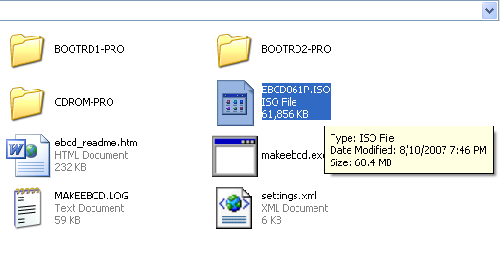
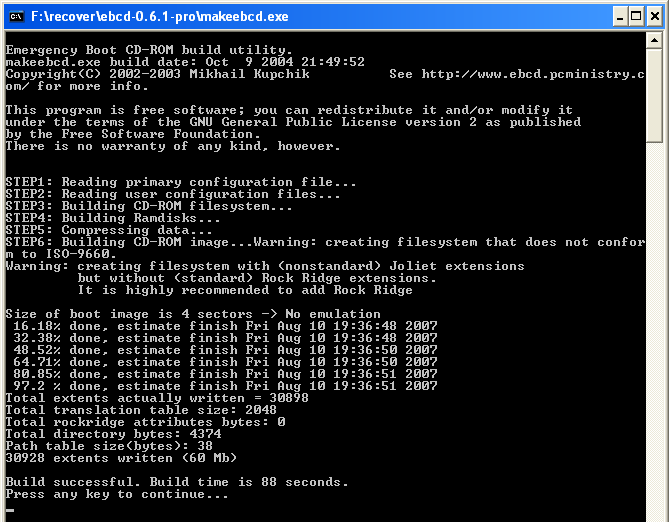
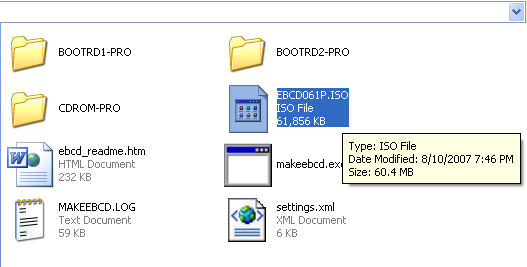
- Extract and run makeebcd.exe. It will automatically create image file (EBCD061P.ISO) for burning to CD.
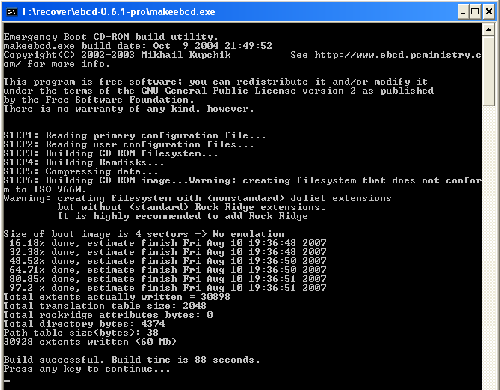
- Burn the file in step 2) to CD.
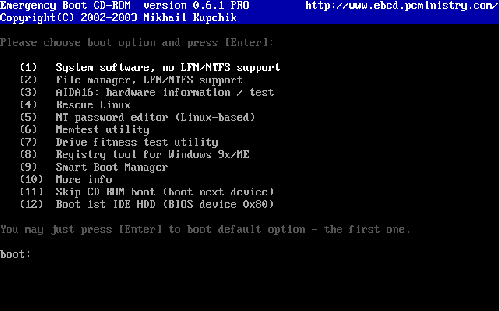
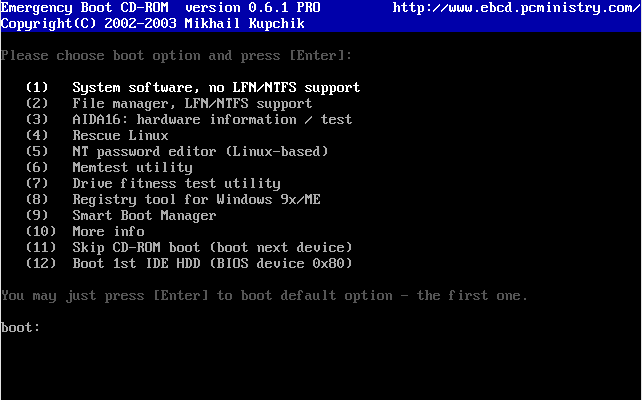
- Boot the computer with CD that you’ve just created. You will see the menu as the figure below. Select (5) NT password for editor (Linux-based) by type ‘5’ (with on quote) and press Enter.
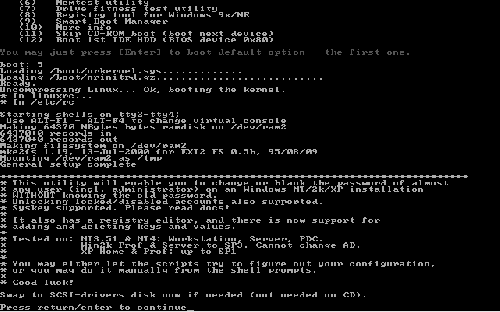
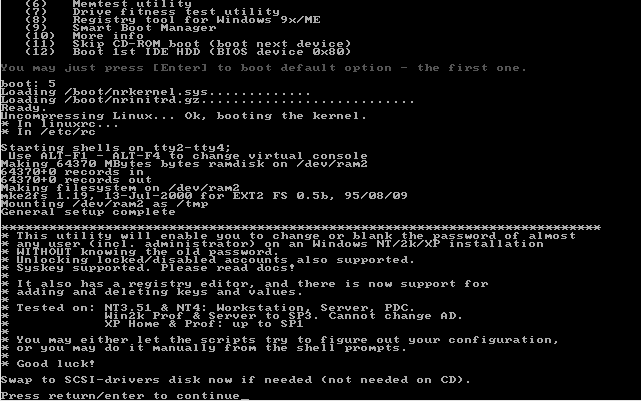
- Press Enter to continue.
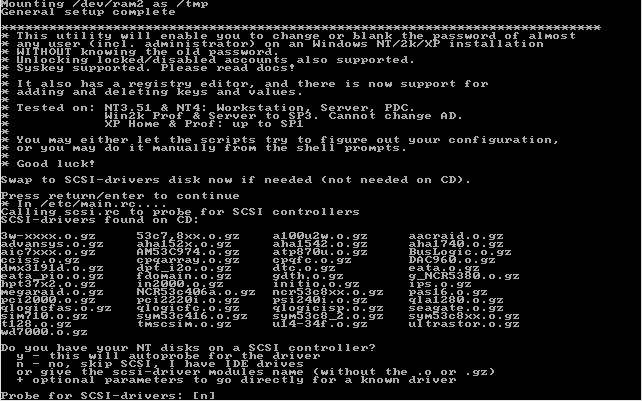
- Press Enter again if you don’t keep Windows on SCSI drive or type ‘y’ if you want to load SCSI driver.
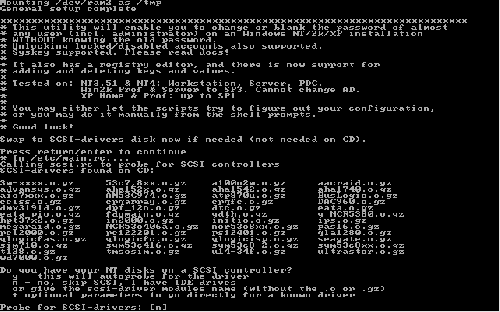
- Now select which partition(drive) that contains Windows system. You can press Enter without answer to accept the default value in bracket []. In this step, the default value is [/dev/hda1]. This is partition in Linux format but you can ignore the detail if you have Windows on C: which is the most cases.

- Press Enter again to accept value in bracket[] again.

- Press Enter.
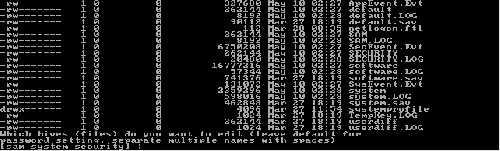
- Now, it’ll show the change NT password menu. Press Enter to accept value in bracket [1] (Edit user data and passwords).
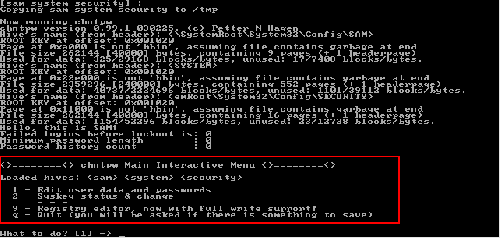
- Select a Username you want to edit. By default value is Administrator which the user that I want to set in this example so I can press Enter without enter any value.

- Enter new password for Administrator. I recommend to set to blank by type ‘*’ and press Enter and change it to something later when you logged in.
Note: I have tried set some password(not blanking) in this step but the password wouldn’t work when log in but the blank password works fine.
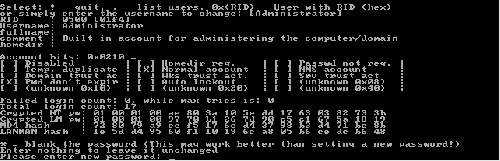
- It will ask your confirmation. Type ‘y’ (without quotes) and press Enter to confirm your changes.

- Type ‘!’ and press Enter to go back to change NT password menu if you finish change password.

- Type ‘q’ to quit.

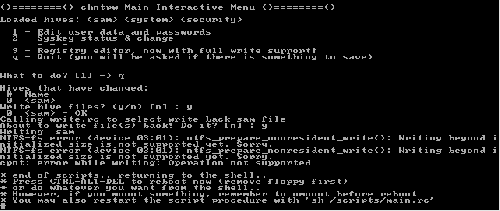
- It lists the things that you’ve done. Type ‘y’ to confirm save those settings.

- Type ‘y’ again and press Enter to confirm copy settings back to your Windows.

- You’ve finished reset Administrator password. Now let test by reboot your PC and log in with a blank password!.
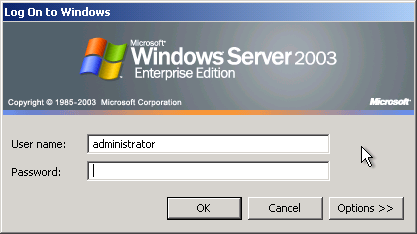
- Type your user name and password.
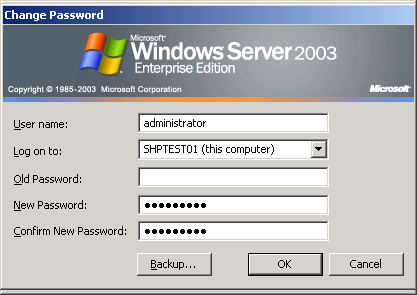
- Login with a blank password succeeded!.

- Now you can change your password as you like.


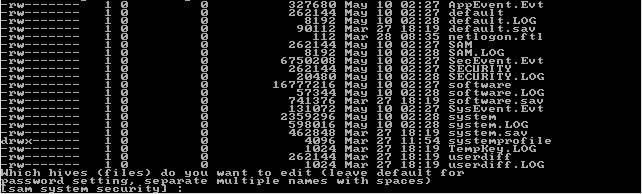
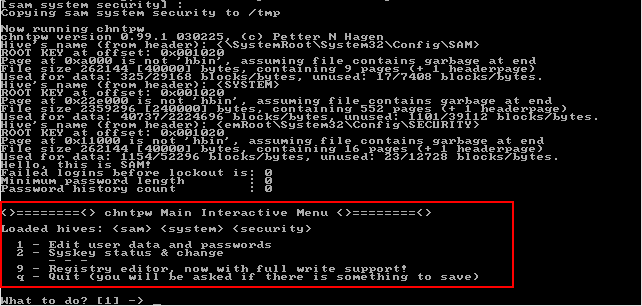






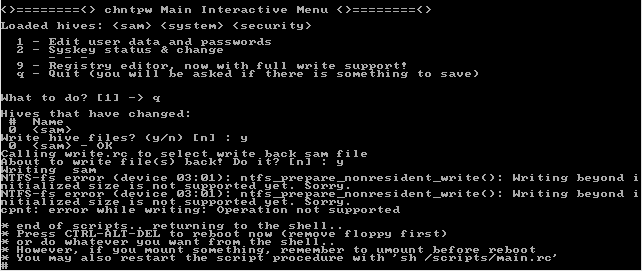
This worked great!
THX
-Lenniex
BRILLIANT!!!!!!!!!!!!!!!!!!!
this was fucking the dogs dodas
in step 7 there is nothing appearing in bracket []
when i press enter it KEEPS ON SHOING THE SAME MESSAGE.
To gurwinder,
Does the line is “Probe for SCSI-drivers” similar as the figure in step 7?
If yes, it ask to probe for SCSI controller. If you don’t have SCSI, you can type ‘n’ for skip probing for SCSI.
If no, what does the message on the line?
WAT ABOUT VISTA ?? WHETHER IT WORKS WITH VISTA ALSO…
PLS HELP…
Sorry, I haven’t test on Vista yet.
i’ve create image file on another pc. It appears that EBCD061P.ISO file is in WinRar type. Do i need to extract before burn or just burn EBCD061P.ISO file only. One more, can i used EBCD061P.ISO that have been extract from another PC.
You can burn the .iso to CD. No need to extract before and you can use the cd on any PC. You can burn by using Nero or UltraISO or any burning software.
hi linglom,
can all the above steps be done on a win svr 2003 having ntfs filesystem partitions?
thank you.
Yes, the example above is on Windows Server 2003 Enterprise with NTFS.
i stucked in step no 8 above. the default value of my server in bracket is [] ie no default value. then i pressed enter and noticed that there were no partitions detected. so,how do i solve this? thanks
Now select which partition(drive) that contains Windows system. You can press Enter without answer to accept the default value in bracket []. In this step, the default value is [/dev/hda1]. This is partition in Linux format but you can ignore the detail if you have Windows on C: which is the most cases.
To Nik,
Is your system on SCSI drive? or some RAID?
It may need to load driver on the previous step (7) to see the partition. If it is on normal IDE or SATA drive, it should be visible.
Are there any error message on the screen?
linglom,
it is scsi drive. in step no 7, i choose ‘y’ to load scsi driver from the cd but it cannot be found. the error message was “…major input output number…” something like that.
please advise.
thanks.
Sorry, I never use EBCD on SCSI drive before so I recommend you go to the forum of this program at http://www.ebcd.pcministry.com/ and post your problem there. May be you get someone that could help you.
I have a problem, step 7
I have win serv 2003, partisions found on disc-there is nothing.
Posible partitions, I tried all of them, none works.
I tried probe for drivers- no luck.
Any clues guys?
Does Windows OS resides on SCSI drive? May be it couldn’t find the correct driver for SCSI controller.
If you don’t sure what the problem is, I suggest you try to follow these steps on pc that has OS on IDE or SATA disk to see if you can pass this step.
So, I’m having trouble with this disc…
I get to boot the disc, and once I select option ‘5’ and hit enter, I freeze at “uncompressing linux…ok, booting the kernel”
any ideas?
I think that problem may be from the disc. Try to boot the disc on another PC to see that the problem persists or not.
Im stuck on step 10. i press enter and it keeps coming back to the same thing. any one know why? im running it on windows 2000(not sure which ver. as its a hand me down)
To RMDan,
Is there any error message after you press enter?
Is there any default value on step 10? I mean the text in bracket[], it is [sam system security] in the example figure.
WOW>..this directions were right on for EBCD0.6. GOt to love it.
ty very much
Have you by any chance tried this on a Windows 2003SBS (Dell Poweredge – SATA drive)
Cheers
Shay
It should works but that depends if EBCD can access your disk or not. Most of the problem is that when boot with EBCD (or other resetting password tools like this), it doesn’t have the driver of the disk because some may setup a software RAID, Mirror, etc. that EBCD don’t have the correct driver.
You have to try yourself but generally I think it will work fine.
I went through all steps fine but still unable to log on. I use window xp
Did you reset the password to blank password? I have tested with blank password and it’s work fine.
I tried making an ISO Cd using Nero and also ImageBurn. The system hangs after hitting 5 for NT password editor,
To Rich,
It could be the problem from the image file itself. Try to download the file again and re-burn the CD again.
Hi, I used the EBCD software to recover the lost password for my Windows 2008 server running on Dell R200. The problem is when I select option ‘5’ to reset password, the uncompresses linux and tries booting the kernel and then there is just a blinking cursor on the screen. My take is the system hangs..any idea what I might be running into?
I tried this on my Windows XP Pro box. I made an update one day, rebooted and found myself at an admin prompt having never actually set an admin password. I followed the instructions here and first time tried to set a password. No joy. Then tried setting a blank password and it worked first time.
THANK YOU!
Thank goodness I had another PC with Nero on it to burn the ISO image to CD….
NOTICE: The link for EBCD is no longer valid. The domain name expired on 11/16/2008 and is pending renewal or deletion.
Please post a working link.
Thanks for the notification. I’ll upload the file and modify the link soon.
But I would recommend you to use another tool which I’ve told at top of the post because this tool (EBCD) is obsoleted, you also saw that its website has gone now.
You can download EBCD 0.6.1.
i have stucked in step 8 can any one help me
even i tried by leaving simply blank by pressing enter
but it is not taking
What value in the bracket? […]
Did you using SCSI drive?
May be EBCD didn’t see your drive.
Hi,
I would like to ask whether you know if an IDE drive connected externally can be detected by ebcd.
thanks
Hi, Alvin
I assumed that you mean connect IDE drive to USB port. I never try that but I think it may not be detected.
Thank you!!! This guide has helped me reset the admin password on an XP machine. And what a handy boot cd that is. Im glad to have found it.
Note: Making a blank password works while trying to make a password in the utility DOES NOT!
Much thanks 🙂
please send me EBCD (Emergency Boot CD) zip file
thanks Naveen singh
Hi, Naveen Singh
You can download in my forum. But you need to register it first to see the download link. The registration requires me to approve each account since there are many spammers try to spoil the forum.
Hi linglom,
can u help me? i having this administrator password problem on windows 2008 server, somebody has change the password and forgot it…is there any other ways to reset those password?
Hi Naveen,
I have stucked in step 10, when I press enter the screen shows “chntpw failed……..” something like that, and “returncode 139”.
Hi, MZman
I haven’t try on Windows Server 2008 either. There is another tool which I’ve mentioned at top of the post. Give it a try.
Hi, George
I recommend you to try another tool. See top of the post.
stuck at step 10 keeps saying no such file as sam system security, wat to do??
Hi, dina
Are you sure that you have select the correct partition on step 8 (if you have more than one partition)?
Hey, THIS WORKED LIKE A CHARM. Somebody gave me a computer and it had XP Pro but the person was unavailable to tell us the password. Well, safe mode wouldn’t work or anything to get past this. BUT THIS WORKED FINE.
i want to software for the hacking of system password. and I hope to you give me the software for hacking.
Hi, Zaheer
There are some but I couldn’t remember the names since I don’t use for a long time. Try search on google, you may find them.
Please note that this will NOT WORK if you use NTFS file system. This is specifically designed for work with FAT.
Once you get to step 8, and in the box all you see is a blank ‘[]’, then chances are you have a NTFS system and this will not work for you.
hi when i am trying to make a cd it copy as a php file ..not EBCD061P.ISO .can you please tell me how to make a cd..i know it is easy but still…
thanks
viral
Hi, Death Tap
It works on NTFS. The example above was demonstrated on NTFS system, see the figure on step 8.
Hi, viral
Have you downloaded the file? Then, you extract and run makeebcd.exe to make an ISO file (step 3).
I used the EBCD software to recover the lost password for my Windows XP SP-2. The problem is when I select option ‘5′ to reset password, the uncompresses linux and tries booting the kernel and then there is just a blinking cursor on the screen.
@linglom: Yeah… I saw that afterwards, but didn’t know how to delete my comment. Anyway, I found out that my Hard-Drive was corrupt, and had to reinstall Windows.
Hi, how if EBCD061P.ISO put into a USB flashdisk ? Is it gonna works ? pls help. thx.
Hi, Rhodes
It should works. You can use Universal Netboot Installer to put the ISO file into USB drive.
Hi,
Could please help me with restting windows 2003 Server Admin Password. I do not want to reinstall every thing again.
With regards
Ramana
Just follow the instructions above, and you won’t have to. The above is just resetting the password and not your system’s data. No reinstalling, etc. I had to reinstall it only because one of my virtual drives was corrupted (hooray for Ghost backups).
Hi, Ramana
Have you follow the tutorial above? Is there any problem?
This worked for me!
I have 0.6.0 version.
I tried to change the password specifying a new one, but didn’t work. After I tried to leave it blank and it worked.
I have Windows 2000 server running as a VM. Will this work on a virtual machine?
Thanks
Hi, Prav
I tried to reset on Windows 2003 on virtual machine and it’s work. So on Windows 2000 should be fine.
Our admin while quit his job, changed the our windows 2008 server admin password, Our Server is two hardsisk using hardware raid – its SATA drive. I tried to use MiniPEboot, hIREN boot cd’s they could see the harddrive in first place.
Does EBCD has solution for above issue.
Hi, Suren
I can’t guarantee that it will work or not. You should try by yourself because some may work but some may not. I recommend you backup your system and data before try to reset the password.
HI this is krish could you any body please help me by sending EBCD full version, not demo. I cant download this. I will be thankful to them.
i have required a little help,i have forgotton a password for my Win server 2008 and i dont have the physcial access of the system i can only access it through remotely from out side the network. is it any chance that i can enter in the system some how or can change the password.please help if possible
@amyee: Not really. There is a way, but it involves exploiting the system (i.e. hacking).
i have required a Big help,i have forgotton a password for my Win server 2008 and i dont have the physcial access of the system i can only access it through remotely from out side of the Server Room. is it any chance that i can enter in the system some how or can change the password.please help me if possible
Hi, Ganapathy
Is the server in domain system? Have you forgot both domain and local accounts?
I have used ebcd in the past many time with success, however i now have a XP Pro box that is not being detected by the software. I thought it might be because its a sata drive, apparently that does not matter. Any ideas?
If this computer was formatted using a backup image (raid/mirror)should this still work? If not what are my options?
Thanx Alot:)) these instructions are great, i followed it and it worked perfectly, pretty straight forward, easy does it, i now have access to my old pc thnx
The EBCD worked for me on a XP OS…will it work on a VISTA OS? Im stucked at “uncompressing linux…ok, booting the kernel”…What’s wrong with it?
I usually use Windows Password Reset Kit for resetting administrator password. EBCD is difficult to use for me.
Is there any way I can burn the iso to a usb stick? The computers that i have (which are a netbook and an HP ThinClient) do not have CD drives.
Hi, Cam
You can use Universal Netboot Installer to put the ISO file into USB drive.
sir i have problem in step 7
on screen:
probable NT partition :
HOME=/
.
.
.
.
IFS=
what partition contains your NT installation ?
[]:
Hi, Piyush
It seems that the program couldn’t find your OS (Windows) partition. Did your OS using SCSI interface? If not, I can’t help you solve the problem. But I suggest you try other tool instead. The other one that you may try is PC Login Now. See this tutorial – How to reset administrator password on Windows using PC Login Now.
Hi,
When i run makeebcd.exe and it tries to create the image i get an error .step4 Building Ramdisks
std library error.Failed to load.
I’m stuck.
thanks
HOPE SOMEONE CAN HELP PLEASE!!…
when i get to the point where it automatically selects the administrator account and hit enter, the next option User Edit Menu:
the letter [q] is preselcted to quit so i cant actually change the password.. any ideas
Works perfectly, thanks so much!!
Dear Linglom!
Words cannot describe how much I want to hug you right now!!! I have tried like a gazzilion softwares to break my Windows XP Administrator’s password (incl. running a repair which the computer wouldn’t carry out), and your guide has been the BEST!
I caught a minor mistake in your guide (which made my first attempt at it fail, I think):
Point 14. and 15 don’t make sense. In point 14. you say press Enter which is agreeing to [n]. However, in your picture on 15. if one looks up, one can see you didn’t press Enter but y, which disagrees with [n].
Thanks for the guide, and I send a thousand grateful thoughts to you :))
Warm regards,
Cathrine W.
Hi, Cathrine
You were right! I did typo on that step, already fixed it. Thank for letting me know.
Regards,
Linglom
Does this work when the OS is installed onto a RAID 0 configuration.
I notice it has a special consideration for SCSI, but does it work with RAID as well?
Interesting, I pretty much just use offline NT. But good to know of this alternative in case the offline NT doesn’t have drivers for the hardware I’m on. Thanks!