Backup and restore database on Microsoft SQL Server 2005
This post will shows a step-by-step guide to backup and restore a database between two Microsoft SQL Server 2005 instances. By using backup, you can backup a database without interrupt any transactions on the database.
In the example below, I will try to backup a database from SQL Server 2005 and restore the database to another SQL Server 2005 Express Edition.
Backup a database
Now I will backup AdventureWorks database on BKKSQL2005 which runs Microsoft SQL Server 2005 to a file.
- Connect to source server. Open Microsoft SQL Server Management Studio and connect to BKKSQL2005.
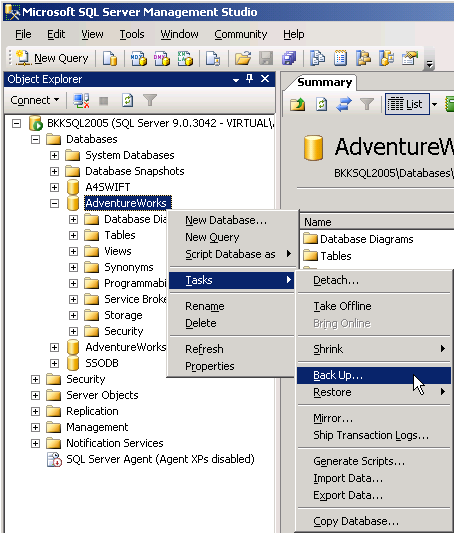
- Right-click on the AdventureWorks database. Select Tasks -> Backup…
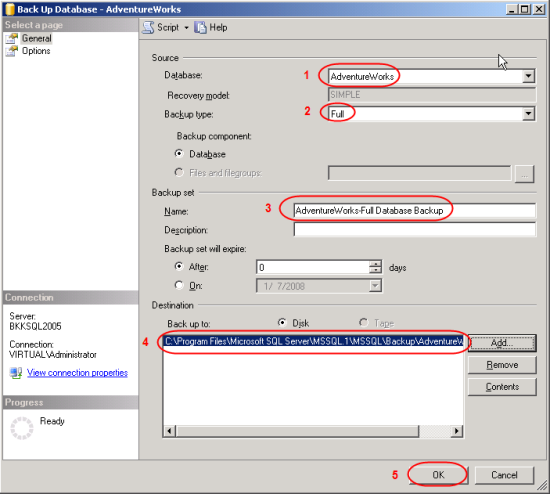
- On Back Up Database window, you can configure about backup information. If you’re not familiar these configurations, you can leave default values. Here are some short descriptions.
- Database – a database that you want to backup.
- Backup type – you can select 2 options: Full and Differential. If this is the first time you backup the database, you must select Full.
- Name – Name of this backup, you can name anything as you want.
- Destination – the file that will be backup to. You can leave as default. Default will backup to “C:\Program Files\Microsoft SQL Server\MSSQL.1\MSSQL\Backup”.
- Click OK to proceed backup.
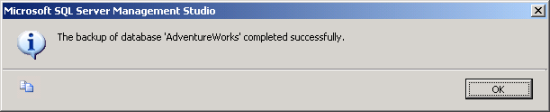
- Wait for a while and you’ll see a pop-up message when backup is finished.
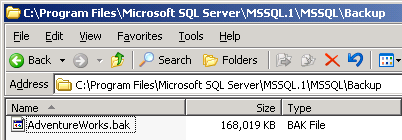
- Browse to the destination, you’ll see a backup file (.bak format) which you can copy to other server for restore in the next step. Default backup directory is “C:\Program Files\Microsoft SQL Server\MSSQL.1\MSSQL\Backup”.
Restore the database
Next, I will restore the AdventureWorks database from a file that I’ve created above to BK01BIZ001 which runs Microsoft SQL Server Express Edition.
- Copy the backup file from source server to destination server. I’ve copied into the same directory as source server.
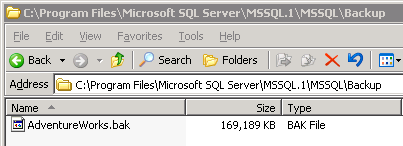
- Connect to destination server. Open Microsoft SQL Server Management Studio Express and connect to BK01BIZ001.
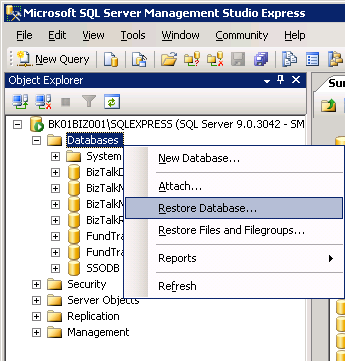
- Right-click on Databases. Select Restore Database…
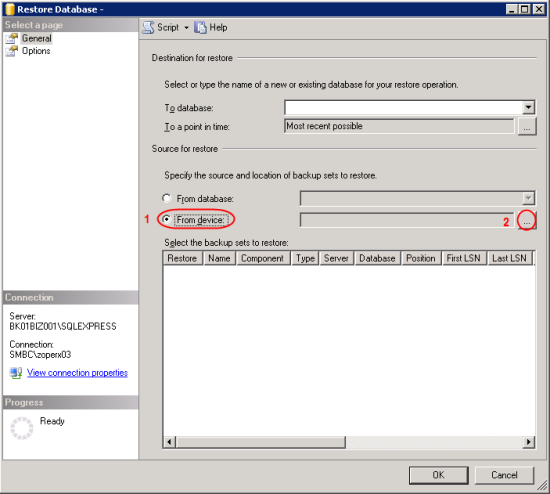
- Restore Database window appears. On Source for restore, select From device and click […] buttton to browse file.
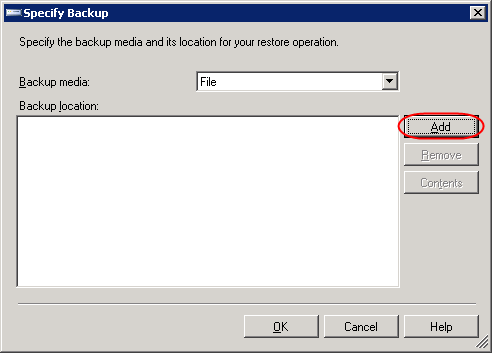
- On Specify Backup, ensure that Backup media is “File” and click Add.
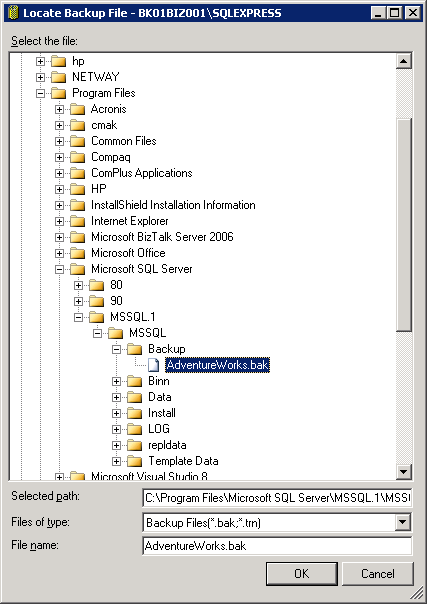
- On Locate Backup File, select the backup file. This is the backup file that was created in Backup a database section and was copied to this server. Click OK. OK.
- Back to Restore Database window.
- On Destination for restore, select “AdventureWorks”.
Note: If you haven’t added the backup file on Source before (step 4-6), you won’t see the database name on Destination. - On Source for restore, check the box in front of the backup name (in Restore column).
- Click OK.
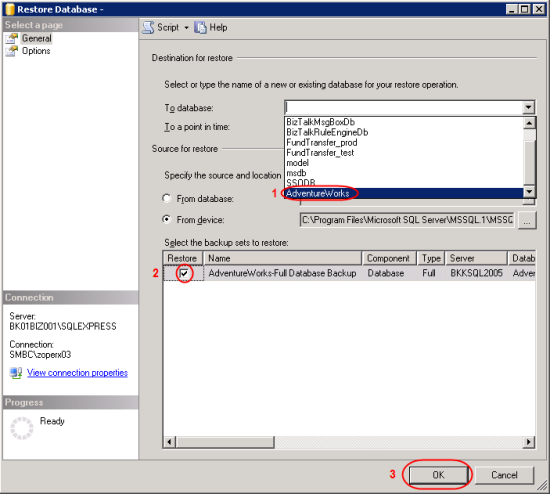
- On Destination for restore, select “AdventureWorks”.
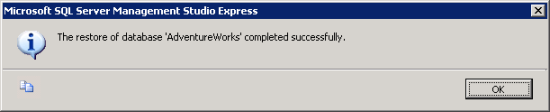
- Wait until restore finish and there’ll be a pop-up message notify.
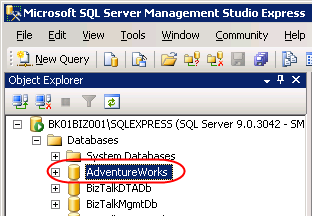
- Now you’ll see the restored database on the destination SQL Server.
Is it possible to restore to SQL Express from a SQL backup?
Yes. The example above is restored to SQL Express Edition.
hi…… please send me inventory project
Hello, Priya
What do you mean “inventory project”? I don’t get it.
You don’t happen to have a step-by-step for an incremental backup and restore by any chance?
Regards from Indianapolis, IN
Sorry, I haven’t plan to write that. But for incremental backup, you can simply change backup type to ‘Differential’ on step 3.2 (Backup a database). When you restore, you’ll see the diffential backup set on step 7.2 (Restore the database).
Thanks!
I have just started studying MS SQL. I had backups of databases that we useon the course and this guide heleped me a lot!
The only thing I had to change is te .mdf and .ldf “restore as” path.
could you provide me the details of taking file group backup and restoring into another database.
Thanks in advance
ranjith
Hi, ranjith
I think the steps should be similar to the post above. Did you encounter any problem?
Hi,
Is there a way this can be automated?
Either via scripting or SQLMGMT Studio?
Thanks
Hi, Dfunky
I’m going to write about that. Next week should be finishes. You can automate backup database operation by create a VB Script. Then, create a task schedule to execute the script at the specific time.
Good article
Hi,
I have a problem when I do the backup from my computer it is make success but when I move back file to another computer to restore it it give my the restore faild and this massege it appear :
Restore failde for ‘ps\k’.(Microsoft.SqlServer.Smo)
Additional information :
system.Data.SqlClient.SqlError:Directory lookup for the file “C:\Program Files\Microsoft SQL Server\MMSQL\DATA\TEST.mdf” faild with the operating system error 3(error not found).
(Microsoft.sqlServer.Smo)
could you please help me to solve this problem and I thank you.
Hi, Safa
I think you’re going to restore to the path that doesn’t existed. You can customize path in Options tab while you’re on Restore Database window – Restore the database file as section.
very very helpful site for me.
thanks
Hi sir,
what is the main difference between transaction logs and differential backups ? how the transaction log file grows?
I m vry much confuse about mdf,ndf,ldf file?
plz solve my problems.
Regards
Hi,
I m trying to restore the differential back up. but I got this message System.Data.SqlClient.SqlError: The tail of the log for the database “aruna” has not been backed up. Use BACKUP LOG WITH NORECOVERY to
backup the log if it contains work you do not want to lose. Use the WITH
REPLACE or WITH STOPAT clause of the RESTORE statement to just overwrite
the contents of the log. (Microsoft.SqlServer.Express.Smo)
i searched a lot in net ,but did not get it..
plz explain how to do this back up.
thanks
Hi
i have deattach a database with the following command (EXEC sp_detach_db ‘test’, ‘false’) ,test as my db name.. now i don’t know where it locates…how should i attach a database file.. i know the command , but don’t know where it locates.
EXEC sp_attach_single_file_db @dbname = ‘test’,
@physname = ”
plz answer
thanks
Hi, Sandeep
See this page SQL Server 2000 Backup Types and Recovery Models, even it’s an SQL Server 2000, the concept is the same.
Hi, Aruna
Have you read this page – MSSQLSERVER_3159? It explain about your error message and provides solution.
Or try this solution. In Restore Database window, select Option tab and check Overwrite the existing database. Then, restore again.
Hi, Pammi
If you have SQL Server on drive C, the default location for the first instance is C:\Program Files\Microsoft SQL Server\MSSQL.1\MSSQL\DATA.
Thanks a lot
I have take backup of sql server 2005 successfully, while restoring it to same database or new database it is giving me error.
Restore failed for Server ‘test’. (Microsoft.SqlServer.Smo)
System.Data.SqlClient.SqlError: The backup set holds a backup of a database other than the existing ‘tempAppDB’ database. (Microsoft.SqlServer.Smo)
what could be the reason.
Restore failed for Server ‘test’. (Microsoft.SqlServer.Smo)
An exception occurred while executing a Transact-SQL statement or batch. (Microsoft.SqlServer.ConnectionInfo)
The file or filegroup “DomesticHRMS_log” cannot be selected for this operation.
RESTORE DATABASE is terminating abnormally. (Microsoft SQL Server, Error: 3219)
Hi, Pankaj
In Restore Database window, select Option tab and check Overwrite the existing database. Then, try to restore again.
Hi,
Is it possible to restore a .bak file that was created from SQL server 2008 to SQL server 2005??
Hi, Vinod
No, you can’t restore the backup file to an older version of SQL Server. But there are some alternatives, see Restore Database From SQL Server 2008 to SQL Server 2005, Part 1: Introduction
It’s a good article! I got a question, is there a way to backup&restore all the databases in the server altogether rather than doing it individually? Thanks.
Hi Sir,
Where the passwords and logins are stored in sql server 2005? Someone told me in master database(syslogins).
But ,I found every system database contains syslogins . Exactly what syslogins stored?
Thanks
Hi, Aruna
Syslogins stores login account information. For SQL account, the password is stored in an encrypted format which is a one-way encryption so there is no way to decrypt it. For Windows account, there is no password stored (NULL).
Hi
I have similar problem as Pankaj and I did check option to overwrite the existing database but still it wont let me restore the database , SQLserver 2005
The file or filegroup “cars2_log†cannot be selected for this operation.
RESTORE DATABASE is terminating abnormally. (Microsoft SQL Server, Error: 3219)
please help what I do?
the backup is of my local host with different user and database name
will appreciate urgent help
Hi, Kiran Khan
Verify that you have chose “Restore Database” instead of “Restore Files and Filegroups”.
If it doesn’t solve the problem, try to create an empty database with the appropriate name and then restore the backup with checked the “Overwrite the existing database”.
I am trying to restore a SQLServer 2005 backup file in SQLServer 2008. I am getting this error “Object cannot be cast from DBNull to Other DB Types”
I hope the person who wrote these procedures is still around. I have a couple of questions.
1. I created a test table on one SQL server and backed that server up. I then did the restore to SQL Server Express and when I looked for the test table on SQL Server Express after the restore was finished I didn’t see the test table. Why didn’t I see the test table?
2. How do I set this up to automate or run on a schedule. Do you have instructions on how to do that?
Thanks
Hi, Sulochana
I’m not sure about this error message.
Hi, Marcus
1. Have you refresh it after the restoration? If there is no error message, the restored database should be there.
2. I wrote an article this. See Automate Backup Database on SQL Server, Part I: Create VB Script
Hi,
i have a question. I have three instnces on one server and I need to restore db from main instance to the other two, it worked perfectly for one but then for the second one it is saying that the ‘The process cannot access the file becuase it is using by another process’
Please let me know what to do.
Hi, Inkus
Have you try to restore the backup file at the same time on both instances? The error message tell that the file is in use, may be you are restoring for the first instance at the same time you are trying to restore for the second instance.
Wait for the first instance to finish the restoration before start the second one.
no i am not doing this at the same time one. it seems like i can only restore the back up once and when i do it another time i have to change the name of the db to something else and then it works. please let me know if you have any other sugestions.
thank you
hi,
it is very help full to me
I am getting this error message. I have also tryed to add a backup to D drive and get the same message. I have followed your instructions but always get the same result. Can you help.
System.Data.SqlClient.SqlError: Cannot open backup device ‘C:\Documents and Settings\Rental Department\Local Settings\Application Data\Microsoft\CD Burning\New Folder\Sunburst2007a.bak’. Operating system error 3(The system cannot find the path specified.). (Microsoft.SqlServer.Express.Smo)
Hi, M Border
It seems that the SQL server doesn’t has permission on the locations that you have specified. Is the SQL server is on this computer or remote computer? If you want to backup to network path, you need to change the account that SQL server service runs under to a user account with the sufficient rights.
The SQL server is on this computer. I am very ignorant about sql server so I don’t have a clue about what to do.
Thanks,
We’re using sql server management studio.. hopefully theres not a huge difference, I’ve backed up, and restored without an interim without issue. However when I try to restore it says
“the tail of the log for the database has not been backed up.”
I did a “full” backup. So I kinda expected the restore to work first time.
Alex
kindly help to search the manual of archiving or cleansing database in SQL Server 2005,
i need it urgently,
thank you
Hi, Mary Border
Have you solve the problem? If not, I want you to change the backup destination to something like C:\Backup\ (Created new one) and give the permission “Full Control” to Everyone. And try to backup again.
Hi, Alex Rigg
For the error message, See [Solved] System.Data.SqlClient.SqlError: The tail of the log for the database “dbName” has not been backed up
Hi ,
I want to degrate DB MSSQL 2000 Enterpries Edition to MSSQL 2000 Standard Producation Enviroment,How to do, What is risk ?
Need Help.
Hi, DM Choudhari
I think there is no wizard help you downgrade on this situation. The best solution is to setup a new SQL Server 2000 Standard and restore databases from the Enterprise to it.
Why don’t you upgrade to a higher version instead. It would be easier.
but i have done the same thing with .bak file which contains datewise backups and when i have selected last day/most recent backup to restore from .bak file i am getting following error :
backup set holds the backup of database ‘testing’ other than existing database .
please help me any body to resolve this problem
Hi, Ravi Kore
See [Solved] System.Data.SqlClient.SqlError: The backup set holds a backup of a database other than the existing ‘dbName’ database
Note: My problem is solved, simply in the options you have to select overwrite existing backup…
hi,
I have updated table with update query,
now i want to restore previous data.
and we dont have database backup,
can sql server Log file will for this ??????????
if Yes, then how
Thanks,
Mahesh
U made me restore and backup database so easy
Thanks mukky
How to change path backups & restore
Hi, Madan
On backup, you can change destination path on step 3.4.
On restore, see step 7, click on Options tab locate on left side. Then, you will see ‘Restore As’ where you can change destination path.
Hello ,
somebody make read of the below problem and fix it.
TITLE: Microsoft SQL Server Management Studio Express
——————————
Restore failed for Server ‘CLIENT193\SQLEXPRESS’. (Microsoft.SqlServer.Express.Smo)
For help, click: http://go.microsoft.com/fwlink?ProdName=Microsoft+SQL+Server&ProdVer=9.00.2047.00&EvtSrc=Microsoft.SqlServer.Management.Smo.ExceptionTemplates.FailedOperationExceptionText&EvtID=Restore+Server&LinkId=20476
——————————
ADDITIONAL INFORMATION:
System.Data.SqlClient.SqlError: The backup set holds a backup of a database other than the existing ‘sa’ database. (Microsoft.SqlServer.Express.Smo)
For help, click: http://go.microsoft.com/fwlink?ProdName=Microsoft+SQL+Server&ProdVer=9.00.2047.00&LinkId=20476
——————————
BUTTONS:
OK
——————————
TITLE: Microsoft SQL Server Management Studio Express
——————————
Restore failed for Server ‘CLIENT193\SQLEXPRESS’. (Microsoft.SqlServer.Express.Smo)
For help, click: http://go.microsoft.com/fwlink?ProdName=Microsoft+SQL+Server&ProdVer=9.00.2047.00&EvtSrc=Microsoft.SqlServer.Management.Smo.ExceptionTemplates.FailedOperationExceptionText&EvtID=Restore+Server&LinkId=20476
——————————
ADDITIONAL INFORMATION:
System.Data.SqlClient.SqlError: Directory lookup for the file “C:\Program Files\Microsoft SQL Server\MSSQL.2\MSSQL\DATA\MedicalStore.mdf” failed with the operating system error 3(The system cannot find the path specified.). (Microsoft.SqlServer.Express.Smo)
For help, click: http://go.microsoft.com/fwlink?ProdName=Microsoft+SQL+Server&ProdVer=9.00.2047.00&LinkId=20476
——————————
BUTTONS:
OK
——————————
Hi,
I created a dummy database and then right cilck on dummy database. In source of restore I selected from database and from drop down list I selected Main database.
But after doing this data was from my Main database was lost. Can anyone help me understanding how it happened and how can I (if possible) restore the lost data.
Thanks
Hi, Puneet
Can you describe more detail about your problem? Are you trying to backup a database and the database is lost?
Normally, backup a database shouldn’t make any changes to the database.
Hi,
I restored my database from my previous day’s backup and after restoration i found that i only had half the data on my restored database, can anyone explain how is that possible and how can i retrieve the remaining data?
Below is a success message indicating that my DB was successfully restored:
Processed 827792 pages for database ‘Test’, file ‘test_Data’ on file 1.
Processed 2 pages for database ‘Test’, file ‘test_Log’ on file 1.
RESTORE DATABASE successfully processed 827794 pages in 515.806 seconds (13.146 MB/sec).
Hi, Fibrecode
There is no error on that message. Is it possible that your backup file is not complete at first? Was there any error message when you backup?
Hi Linglom,
thanks for your quick response, I think the backup file was complete and there were no error messages, but i’ll double check that today…
Hi all, I just realized that i had restored a wrong backup tape that didnt have the complete data…I reloaded/restored the right tape and everything was fine…
hi thank u so much for helping me to take backup and restore of database
Hi all. Need help in restoring database from sql 2005 down to sql 2000. Can someone give me the steps on how to do it? Thanks!
hii all….here i’m facing a problem, i want to take backup of a sqlserver 2000 database from vb.net(VS 3.5) application.but i’m only able to take backup in the backup folder under MSSQL folder, but that’s not what i want.i want to take the backup to my desired location/folder in the system. Please help me great guys, how do i do this now by vb.net coding? send your replies to my given mail-id. Any help is appriciated in advance, thank u all
Hi, Janet
See How to restore SQL 2005 DB to SQL 2000.
Hi, John
Try to apply this script to your application, Automate Backup Database on SQL Server, Part I: Create VB Script.
Hi, on my old server HD room are limited and one of the steps updating my software req. SQL 2005 server prior to move to new 2008 R2 on new server, so my Studio did not install and is any way i can backup my database FULL without studio(comand promt) without srewing up? Thanks
hi,
thanx dear…
really to much useful..
HI I have a problem please help me. I have a database that is belonging to my website. it is located on a net.Yesterday I Got a backup and Downloaded it in my PC. I want to restore it in my Pc’s Database But I can not.
I get This Error:
TITLE: Microsoft SQL Server Management Studio
——————————
Restore failed for Server ‘SERVER2’. (Microsoft.SqlServer.Smo)
For help, click: http://go.microsoft.com/fwlink?ProdName=Microsoft+SQL+Server&ProdVer=9.00.1399.00&EvtSrc=Microsoft.SqlServer.Management.Smo.ExceptionTemplates.FailedOperationExceptionText&EvtID=Restore+Server&LinkId=20476
——————————
ADDITIONAL INFORMATION:
System.Data.SqlClient.SqlError: The backup set holds a backup of a database other than the existing ‘alborzdb’ database. (Microsoft.SqlServer.Smo)
For help, click: http://go.microsoft.com/fwlink?ProdName=Microsoft+SQL+Server&ProdVer=9.00.1399.00&LinkId=20476
——————————
BUTTONS:
OK
——————————
please Help .
Thanks
Hi
when I posted my problem ,I search other part of restore Database windows and finally i solve my problem.
I will post my solution maybe it helps others
(link is already dead – edited by Linglom)
thank you
I want to take sql backup and restore it is there any free software available for it or I want that software plz give me path
hi,
I am trying to restore back up of a database from one instance to other instance as per above steps.
but in step 6 in my case it didn’t show any back up file in the list.
I can restore my back up by typing back up file name but i want to know why it is not showing me in list(locate back up file).
if anyone can address that issue please point it out.
i m using same version of sql server instance.
it working nice
thks
i know i should work fine, but in my case it is facing above issue. so if u know what is causing it or where i might doing something wrong, guide me.
thank you
hi, through backup process ok button is dimmed , i have to write file name and when backup complete the problem is file without extention (****.bak) and after taht restore not working
pls help me
Eyy…
after i finished back-up,
the file extension of backed-up is not .bak
i recieve file with an extension of .file which is not restorable in mssql server management studio express.
anybody please help :))
Hi, Jay
Is your backup file has .bak extension? On Locate backup window, it will show only file that has extension as file of types column which is .bak.
Hi, Ahmed
Did you mean the OK button on step 3 in my tutorial? If it is dimmed, it means that you may mis-configure on the window.
Hi, Anth0ny989
It could be any error while backing up, try to check Application event log to see if there is any error and post it here or Microsoft forum.
Hi when i want to taking back of my database,i have face so many problem but you have to describe very simple way thanks very much
thanks
Hi when i want to taking back of my database,i have face ——–
System.Data.SqlClient.SqlError: The backup set holds a backup of a database other than the existing ‘dbabhidir19’ database. (Microsoft.SqlServer.Express.Smo)
plz send me the solution of that as soon as possible
hi
when i want to restore backup of my database,showing this error
Restore failed for Server ‘Brian-BWG-PC’. (Microsoft.SqlServer.Smo)
ADDITIONAL INFORMATION:
System.Data.SqlClient.SqlError: The media set has 2 media families but only 1 are provided. All members must be provided. (Microsoft.SqlServer.Smo)
what must be do .
please send a message to solve that soon.
Hi,
I want restored my database back and after restoration i found that Restore failed for Server ‘HOME-B00DD89814’. (Microsoft.SqlServer.Smo)
For help, click: http://go.microsoft.com/fwlink?ProdName=Microsoft+SQL+Server&ProdVer=9.00.1399.00&EvtSrc=Microsoft.SqlServer.Management.Smo.ExceptionTemplates.FailedOperationExceptionText&EvtID=Restore+Server&LinkId=20476
——————————
ADDITIONAL INFORMATION:
System.Data.SqlClient.SqlError: The media set has 3 media families but only 1 are provided. All members must be provided. (Microsoft.SqlServer.Smo)
For help, click: http://go.microsoft.com/fwlink?ProdName=Microsoft+SQL+Server&ProdVer=9.00.1399.00&LinkId=20476
NOTE–I USE SQL 2005 server.(BACK UP IS TAKEN FROM COLLAGE COMPUTER).
plz send me the solution of that as soon as possible. Yours sincerely.
suhas
NOTE == PLZ HELP ME URGENTLY…
Hi Suhas,
When you restore, have you select all backup files?
If you’re not sure, I suggest you try backup again. And ensure that on step 3, you have only 1 destination file. If you have more than 1 destination file (for example, 2 files), you have use both files when you restore the database.
hai ,
i have a error message during restore.like the database in use.what to do?
this is my first time to loging and restore backup of database on sql server this doc is very helpful for the backup restoration
many thanks,
satish
Hi,
Could someone help me how to restore a database when there is no back up?
Eagerly waiting for a response.
Thanks!
Hi Rupali,
If you don’t have any back up ,then what thing from database you want to restore?
Please describe your problem.
If one accidently deletes the database without taking a back up, can it be restored?
how to back up type ” different ” and auto schedule back up diff ?? plz
I need to do something like:Set AliasName for dbo.RealNameso sql query lieseelkct * from AliasName.dbo.MyTablewill workI think many people need to do itThank youMassimo Bizzarro
i done successfully backup but restore process finally occur error
System.Data.SqlClient.SqlError: The media set has 3 media families but only 1 are provided. All members must be provided. (Microsoft.SqlServer.Smo)
please give the solution…
hi is it possible to restore 2008 R2 back up file in 2012
Excellent example.