- Getting started with Microsoft ISA Server 2006, Part 1: Introduction
- Getting started with Microsoft ISA Server 2006, Part 2: Environment Setup
- Getting started with Microsoft ISA Server 2006, Part 3: Installation
- Getting started with Microsoft ISA Server 2006, Part 4: Service Pack 1
- Getting started with Microsoft ISA Server 2006, Part 5: Network Layout Concept
- Getting started with Microsoft ISA Server 2006, Part 6: Configure Network Layout
- Getting started with Microsoft ISA Server 2006, Part 7: Create DNS Lookup Rule
- Getting started with Microsoft ISA Server 2006, Part 8: Create Web Access Rule
- Getting started with Microsoft ISA Server 2006, Part 9: Client Configuration
- Getting started with Microsoft ISA Server 2006, Part 10: Logging
- Getting started with Microsoft ISA Server 2006, Part 11: HTTP Filtering
- Getting started with Microsoft ISA Server 2006, Part 12: Block Windows Live Messenger
Block Windows Live Messenger
From Part 11: HTTP Filtering, you learn about HTTP filtering concept. Now let’s apply it with a real world example, Windows Live Messenger. On this post, I show you how to block Windows Live Messenger on ISA Server 2006. Windows Live Messenger is a popular instant messaging application, many people using it regularly. But sometimes, people use it at work place and unintentionally receive a file containing virus. Then, they execute it, so the virus spread on the network. Therefore, it is a task of an IT staff to secure the system and prevent this issue. The best and effective solution is to enforce strictly firewall policy. But sometimes, you cannot do that. For example, users on research department want access to any websites (HTTP) because they do not know what websites they want to access until they need. Then, you have to create an access rule to allow HTTP to from Internal to External for these users. Now they can use Windows Live Messenger because Windows Live Messenger communicates with its servers through either of these ports:
- MSN Messenger protocol (TCP: 1863).
- HTTP protocol (TCP: 80).
If you block only MSN Messenger protocol, users still can use Windows Live Messenger through HTTP protocol. Now what should you do? Block HTTP protocol? Doing that will also block users to access websites so you cannot do that. Here it comes, HTTP filtering. You can block only Windows Live Messenger on ISA Server without blocking the HTTP protocol if you know the signature. HTTP header is also the signature.
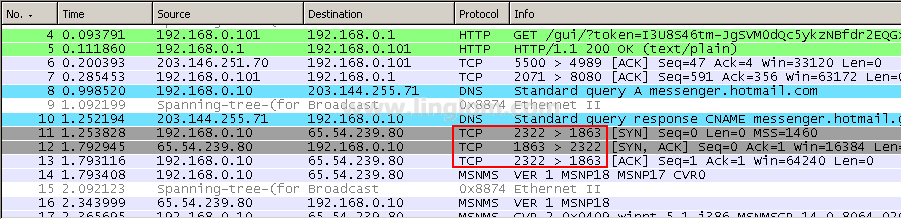
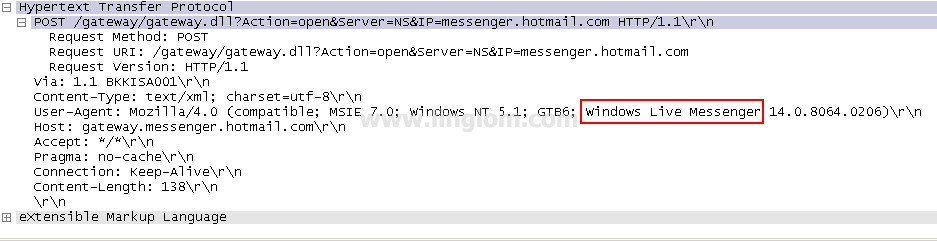
So what is the signature of Windows Live Messenger? I have sniffed HTTP packets while I signing to Windows Live Messenger. Here are the signature and protocol port of Windows Live Messenger:
- The client communicates with the server of Windows Live Messenger using TCP outbound port 1863.
- While the client requesting information from the server (request header), one signature of it is User-Agent: Windows Live Messenger.
Now I show you how to configure to block Windows Live Messenger on ISA Server 2006.
Step-by-step
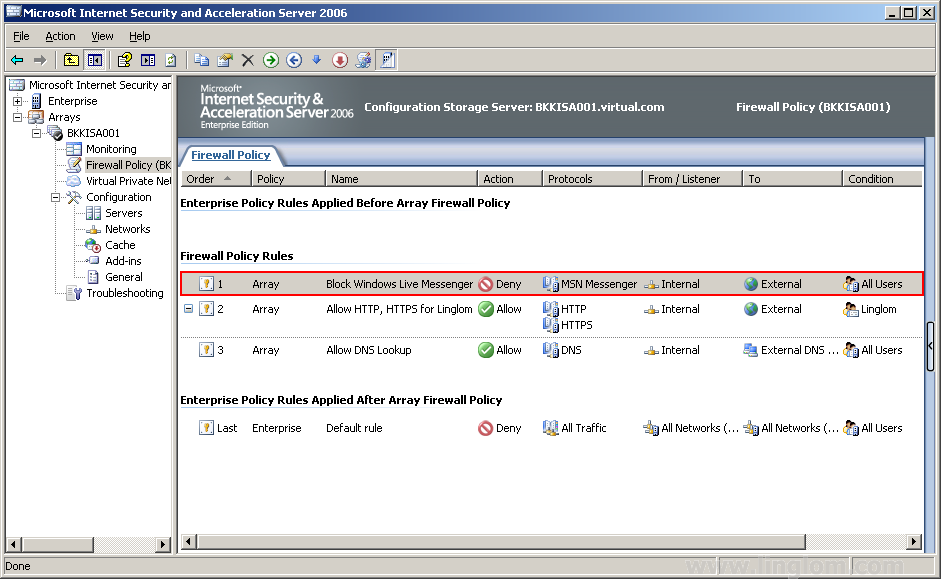
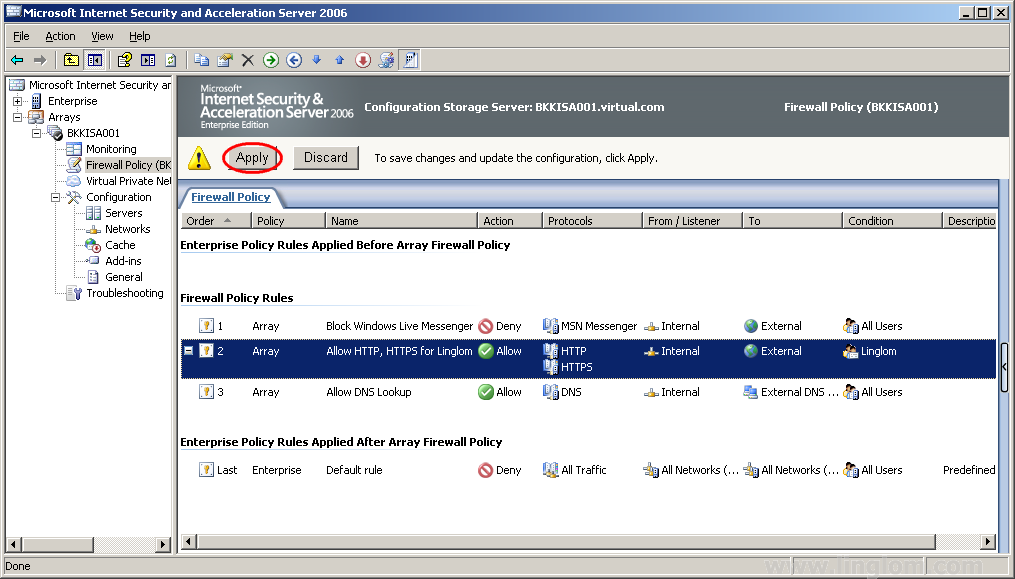
- Create an access rule to block TCP outbound port 1863. ISA Server 2006 already has pre-defined this port as MSN Messenger protocol. I am not going to show detail steps on creating an access rule. You can review them at Part 7: Create DNS Lookup Rule and Part 8: Create Web Access Rule.
- Rule Name: Block Windows Live Messenger
- Action: Deny
- Protocol: MSN Messenger
- From: Internal
- To: External
- Condition: All Users
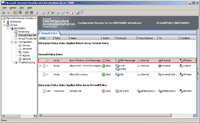
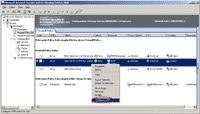
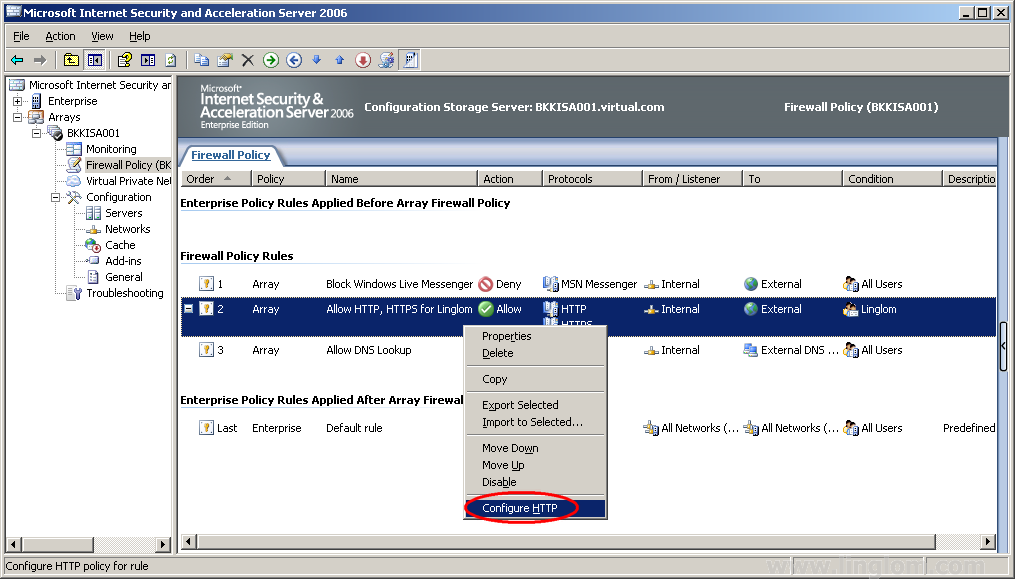
- Next, configure HTTP filtering to block the signature of Windows Live Messenger. Right click on “Allow HTTP, HTTPS for Linglom” and select Configure HTTP.
Note: This menu option available on an access rule that contains HTTP protocol only.
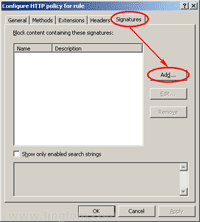
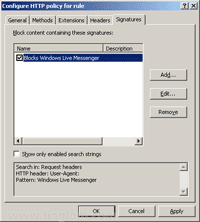
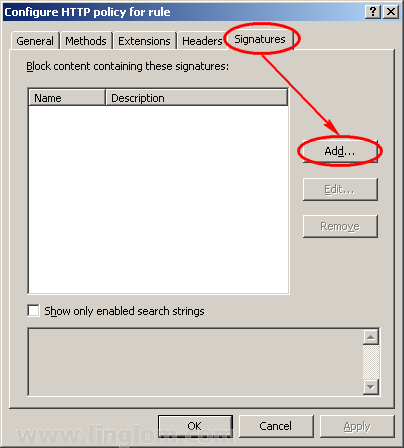
- On Configure HTTP policy for rule, click on Signatures tab and click Add.
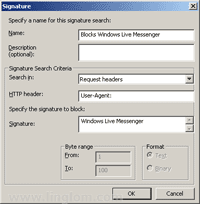
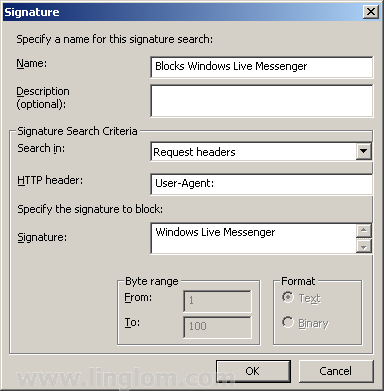
- On Signature, enter these information below to block Windows Live Messenger and then click OK.
- Name: Blocks Windows Live Messenger or any name as you want.
- Search in: Request headers
- HTTP header: User-Agent:
- Signature: Windows Live Messenger
Note: Don’t forget semi-colon (:) after User-Agent text.
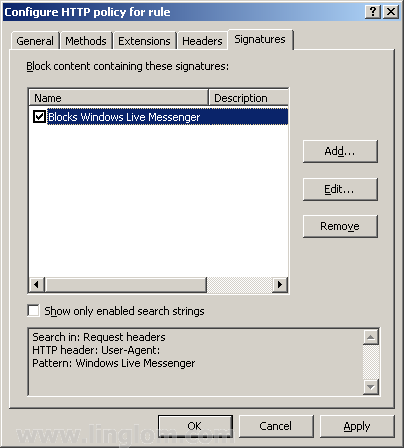
- Back to Configure HTTP policy for rule, you see the signature has been created for this rule. You also can disable the signature by un-check it. On this example, leave it as checked to enable the signature. Click OK.
- Don’t forget to click Apply to update the configuration.
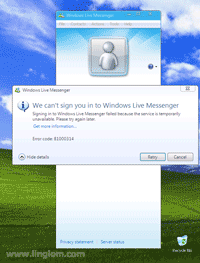
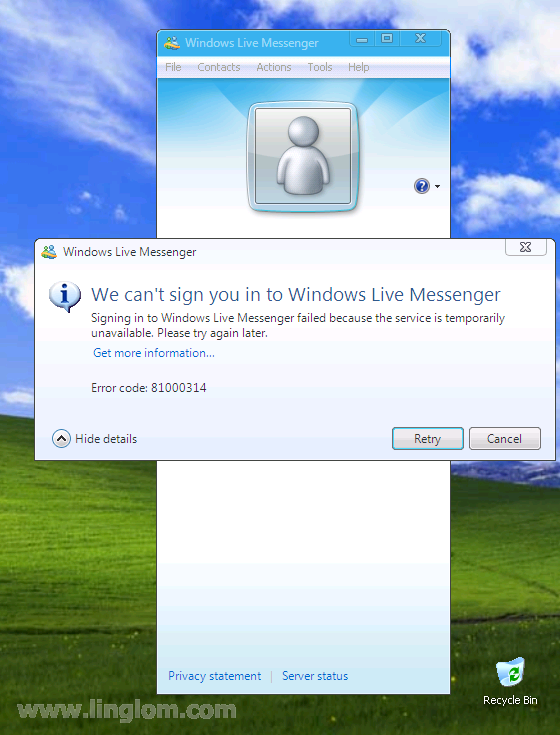
- Let’s try to sign in Windows Live Messenger on the client computer, you see that I cannot sign in any more.
Summary
Now You have reach the end of Getting started with Microsoft ISA Server 2006 series. This series contains 12 parts: it gives you an introduction of ISA Server 2006, how to install and configure ISA Server 2006 on simple environment, how to create an access rule, and how to use some useful features on ISA Server 2006. I hope you get what you want on this series. If you have any comment or suggestion, feel free to leave it below.
Hi there
thank you veryyyy much for your training courses
i want to know how can i limit band width for users through ISA, please post your comment to my email address.
Regards
Hi, Kamran
ISA Server can’t limit bandwidth. You need third party extension. See Bandwidth Splitter.
hello Sir,
I m new to isa 2006, i want just to see the browsing site with particular user. i had try in creating report in monitoring but not able to see. please post your comment to my email address.
hello sir,
How to use http filter to block facebook, orkut etc.. in isa 2006. i had configure the http filter in header tab but still user is able to browse facebook.
Hi, Santosh
I suggest use Logging to see activity of users would be better. It allows you to filter with your own criteria and it can export to excel format.
Have you try to block the websites by create an access rule to deny traffic to those sites?
hello sir,
Thanks for yur reply.
I had created http/https protocol for employes & alloutbond trafic for manager. i want to block porn, chating gaming, facebook, orkut etc for employes without distrubing manager policy. pls help me, waiting for yur suggestion.
Hi, Santosh
You could block websites by create an Domain Name Set object which value contains websites that you want to block on the deny rule. For example, *.facebook.com, *.restrictedsite.com, etc.
hello sir.
i do the same has u said. but i want to block all sex site.Also i want to customized the default error page of ISA as( you are not authorized to view this page)at every client side.
Thanks for your support.
hello sir.
I want to block all sex site and some particular website.Also i want to customized the default error page of ISA as( you are not authorized to view this page)at every client side. Please can u assit me by telling me how to do this on ISA 2006.
Thanks for your support.
Hi Sir!
Very informative guide!
I am a network engineer and recently,I’v been tasked to migrate ISA 2K to 2006 which is new to me. I have searched but there is no straight migration for this. I have tried to migrate using migrate tool from 2004 ISA CD but still it’s not importing properly. Anyways.
In ISA 2K, a proxy pac file is being used for proper routing. If it’s internal site, go here.. If external , pass here. Correct me if I’m wrong… in 2006 there is no need for this file since ISA 2006 firewall rules handles this right? I am more comfortable working my way around the firewall rules as this is similar to Cisco firewalls.
Any info is much appreciated.
Thanks so much!!
Best regards,
pkdip
Hi sir,
Fyi.
I am using a single NIC only.
Thanks again!
pkdip
Hi,
This is very usefull and learn very easily ?please give the notes block website through IP or computer name. and give me all the ISA Features and configuration
Thanks
Ramesh
Hi !
Thanks So Much ! And a question
My Friend Says This only Works on HTTP And not HTTPS
Is That True ? (Maybe Because HTTPS Packet Contents Can Not Be Read)
Very helpfull ! Congratulations!
merci pour information
hello sir,
I had created http/https protocol for employes & alloutbond trafic for manager. i want to block porn, chating gaming, facebook, orkut,all sites blocke in one rule only etc for employes without distrubing manager policy. pls help me, waiting for yur suggestion
Can you add please another part? I would like to know how can you setup ISA 2006 to access your mail provider using Outlook on Windows 7, but not public mail providers.
Thanks!!
I need to pass the ‘x-forwarded-for’ header through to a Palo Alto device to allow teh device to see the ip address of he user doing the request. How can this be done cheaply using ISA 2006 please?
Hi,
Thanks a lot for valuable information.
I have a small network with a domain controller,Active Directory,DHCP,DNS installed on one computer.
I have a modem router for internet connection.
Please suggest me your great ideas regarding implementing the ISA server 2006 enterprise edition on another pc.
and is it must to join the ISA server in domain before installing.
Please help me.
I have 100 users out of which i have to give internet access to 30 users only.Please send me a rule procedure.
Thanks in advance
Regards
Hi again,
please try to reply as soon as possible.
so for the above urgent request but i am helpless.
thank you
Sir,
Please tell how to block Skype using ISA server 2006???