- Restore Database From SQL Server 2008 to SQL Server 2005, Part 1: Introduction
- Restore Database From SQL Server 2008 to SQL Server 2005, Part 2: Generate SQL Server Scripts Wizard
- Restore Database From SQL Server 2008 to SQL Server 2005, Part 3: Export Data Wizard
Restore Database From SQL Server 2008 to SQL Server 2005, Part 1: Introduction
When you restore or attach a database which is created from SQL Server 2008 to SQL Server 2005 or SQL Server 2000, you will see some error messages as the examples below.
Backup and Restore
You have backup a database from SQL Server 2008. If you try to restore the backup database file to SQL Server 2005, you will receive the error message:
An exception occurred while executing a Transact-SQL statement or batch. (Microsoft.SqlServer.ConnectionInfo)
Additional information:
-> The media family on device ‘the backup file‘ is incorrectly formed. SQL Server cannot process this media family.
RESTORE HEADERONLY is terminating abnormally. (Microsoft SQL Server, Error: 3241)

Detach and Attach
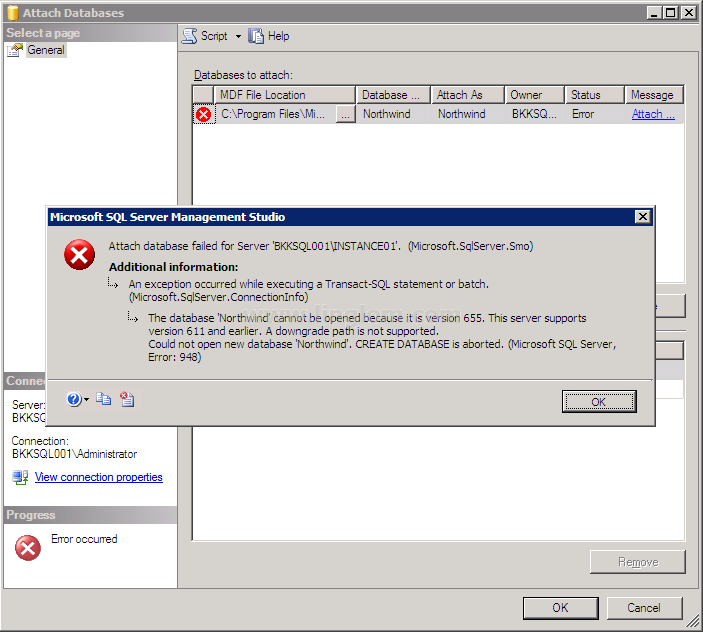
You have detach a database from SQL Server 2008. If you try to attach the detached database file to SQL Server 2005, you will receive the error message:
Attach database failed for Server ‘SQL Server name’. (Microsoft.SqlServer.Smo)
Additional information:
-> An exception occurred while executing a Transact-SQL statement batch. (Microsoft.SqlServer.ConnectionInfo)
–> The database ‘database name’ cannot be opened because it is version 655. This server supports version 611 and earlier. A downgrade path is not supported.
Could not open new database ‘database name’. CREATE DATABASE is aborted. (Microsoft SQL Server, Error: 948)
Solution
These problems occur because a backup or detach database file is not backward compatible. You cannot restore or attach a database which is created from a higher version of SQL Server to a lower version of SQL Server.
But there are some alternatives which can help you to restore a database to a lower version of SQL Server. I divide into separate parts.
- Part 2: Generate SQL Server Scripts Wizard. The solution creates a SQL Server script file using a wizard. Then, you simply execute the script file on SQL Server 2005 or SQL Server 2000. So you will get everything as same as the source database on the destination. But there are some disadvantages:
- If the source database contains lots of data, you will have a large script file.
- The generated file is a plain text. Anyone who has access to the file can read it. So you should delete the script file after the restoration.
- Part 3: Import and Export Wizard. This solution exports data to the targeted SQL Server using a wizard. It is more secure and effective than the first solution. But you can only export tables and views only.
I had the same issue, and exporting from the source development server running SQLServer 200) to the target production server running 2005 worked fine. Thanks for your post!
i really was impressed in the detail for the total related query language ,thanks.
HI…
I am having sql server 2008 db file…and I am having sql server 2005 . I am unable to attach the file .Plz let me know the procedure and if any body can help by Converting the script file plz mail me at [email protected] ..
Its very urgent to me…
This link has more details on this error:
http://sqlserverlearner.com/2011/the-media-family-on-device-is-incorrectly-formed-sql-server-cannot-process-this-media-family-error-3241
I have to restore databse from sql server 2008 r2 to the same platform at client side
DATA12.MDF’ cannot be opened because it is version 655. This server supports version 612 and earlier. A downgrade path is not supported.
sql server error 948
Hi Aziz,
It seems you’re attaching a database which is created by different SQL Server version compare to the SQL Server you’re working on. If you’re using Visual Studio, make sure that it connects to corrected SQL Server instance.
Or if you want to attach a database created by SQL Server 2008 to SQL Server 2005, check Part 2 and Part 3.