- Accessing MS Access 2007 on NetBeans 6.5 using JDBC, Part 1: Introduction
- Accessing MS Access 2007 on NetBeans 6.5 using JDBC, Part 2: Prepare Sample Database
- Accessing MS Access 2007 on NetBeans 6.5 using JDBC, Part 3: Create Connection
- Accessing MS Access 2007 on NetBeans 6.5 using JDBC, Part 4: Perform SQL Operations
Perform SQL Operations
On this post, you see how to perform basic SQL operations such as SELECT, INSERT, DELETE and UPDATE to the Customers table on Northwind database.
Retrieve data from database
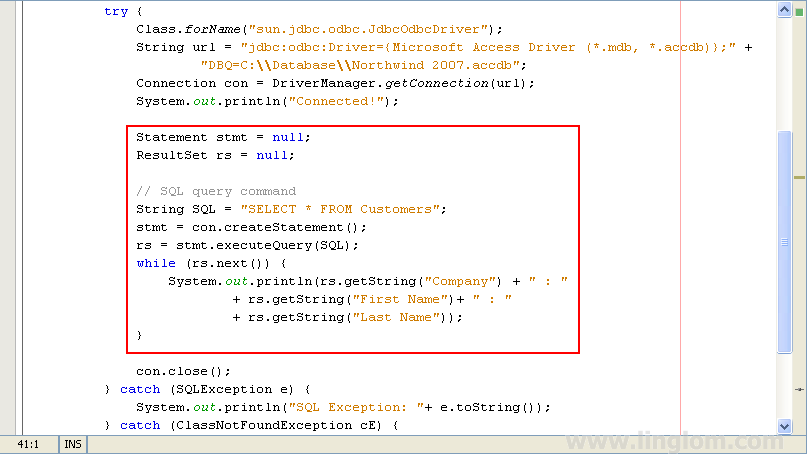
Copy and paste the code below on main method between these lines:
System.out.println("Connected!"); |
and
con.close(); |
The Code
1 2 3 4 5 6 7 8 9 10 11 12 | Statement stmt = null; ResultSet rs = null; // SQL query command String SQL = "SELECT * FROM Customers"; stmt = con.createStatement(); rs = stmt.executeQuery(SQL); while (rs.next()) { System.out.println(rs.getString("Company") + " : " + rs.getString("First Name")+ " : " + rs.getString("Last Name")); } |
Code Explanation:
- Line 1-2: Declare some variables.
- Line 5: Define SQL query string.
- Line 6: Create a statement object for sending SQL statements to the database.
- Line 7: Executes the SQL statement and returns a single ResultSet object.
- Line 8-12: Iterative in the ResultSet object to show results on output window
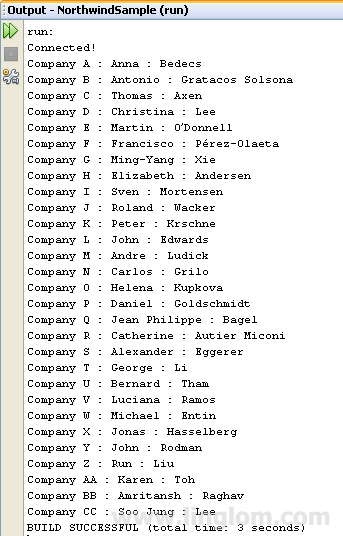
Next, run the project. You see the result on the output window. It displays records from Customers table.
Back to top
Update data on database
To insert, update and delete records on MS Access 2007 databases, you can re-use the code from the previous section. But you need to replace the SQL statement and code on this line:
rs = stmt.executeQuery(SQL); while (rs.next()) { System.out.println(rs.getString("Company") + " : " + rs.getString("First Name")+ " : " + rs.getString("Last Name")); } |
to
int rowsEffected = stmt.executeUpdate(SQL); System.out.println(rowsEffected + " rows effected"); |
Code Explanation:
Executes the given SQL statement which may be INSERT, UPDATE or DELETE statement and returns the row count for the update.
INSERT command
// SQL INSERT command String SQL = "INSERT INTO Customers (Company,[First Name]," + "[Last Name]) VALUES ('MyCompany','Linglom','My Last Name')"; int rowsEffected = stmt.executeUpdate(SQL); System.out.println(rowsEffected + " rows effected"); |
UPDATE command
// SQL UPDATE command String SQL = "UPDATE Customers SET [Last Name] = 'New Last Name'" + "WHERE [First Name] = 'Linglom'"; int rowsEffected = stmt.executeUpdate(SQL); System.out.println(rowsEffected + " rows effected"); |
DELETE command
// SQL DELETE command String SQL = "DELETE FROM Customers WHERE [First Name] = 'Linglom'"; int rowsEffected = stmt.executeUpdate(SQL); System.out.println(rowsEffected + " rows effected"); |
Summary
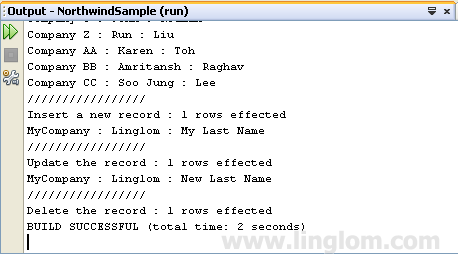
You can download the source code of this series at SampleAccess2007. The example code will create a connection to Northwind database on Microsoft Access 2007. Then, retrieve records, insert a new record, update and delete the record from Customer table. Here is output of the example code.
Back to top
Thanks a lot !
this excellent tip was very useful !
Very important series for a beginner.
really saved me a lot of time.
// SQL DELETE command
String SQL = “DELETE FROM Customers WHERE [First Name] = ‘Linglom'”);
int rowsEffected = stmt.executeUpdate(SQL);
System.out.println(rowsEffected + ” rows effected”);
——————————
in this code after ‘Linglom'” there is a closing brackets which is not required.
the correct code is
———————
// SQL DELETE command
String SQL = “DELETE FROM Customers WHERE [First Name] = ‘Linglom'”;
int rowsEffected = stmt.executeUpdate(SQL);
System.out.println(rowsEffected + ” rows effected”);
Hi, Madhu
Thanks for correcting the error, it was my mistake. Already fixed.
how to create separate class to cannect , reade , write , update the data base ????
This article is super best..helped me a lot..
Thank you so much! This has been very helpful. I was so confused before I read this serie of articles!
How to crate complete java class to only the data base action such as read,write,update,and delete
hi sir….
this tutorial is very goood n helping for beginners thank you so much
[Microsoft][ODBC Microsoft Access Driver]General error Unable to open registry key Temporary (volatile) Ace DSN for proces how to decide this error
why this is giving error cannot find method executeQuery()….please anyonr tell me..
why this is giving error cannot find method executeQuery()….please anyone tell me..
Hi all,
I liked the tutorial very much. It is very helpful and the first one which worked for me, however, I need one more help. I have a jFrame form which has 4 textboxes, one combo and one list box. I have 4 jbuttons (add, edit, delete, search). I would like to display data in the text boxes. I dont know how to proceed with this tutorial to achieve that. I am new in Java and NetBeans both.
It has been more than a month that I am trying something or the other from google but nothing works.
Please help.
thanks……….friend this is very helpfull for me……i learn lots of from this artical…………very good……
hi sir……….i have problem…i m trying to run insert query….then
SQL Exception: java.sql.SQLException: No ResultSet was produced
BUILD SUCCESSFUL (total time: 1 second)
why this error occure?
sir i want to really thanks you U have solved my 5 days running problem.Hope to communicate further.
Thank you a lot Sir..
Helped a great deal.
hi sirr..thanks a lott for this tutorial..can u tell me how do i display the same data into an html page now in netbeans…
i need this data to be displayed into a webpage..can u pls help me..
This code help me to solve my problems.Thanks
thanks a lot …
Thank you
Thank you so much!
This is a fantastic tutorial. Extremely helpful to see basic commands and step by step directions to set up access to MSACCESS! Other tutorials have to much information for an entry level developer to process. Thank you for taking the time to help others along!!!!
This is very good. however, my insert does not work i dont know why.
I had a visit to various websites that teach and claim easiest solution for database connectivity in java.After going through all the 3 parts of this tutorial i really enjoyed jdbc and got its practical feel.Thanks a ton!!
This tutorial set is well prepared with proper screenshots. It worked out well.
Respected Sir,
I have created the same application in netbeans module application platform.
Its working fine and I have even made a setup file for it.
The problem arises when i change the location of database file…
My database file is not getting embedded in the setup.
In source code I have created connection using following statements.
private static final String DRIVER = “sun.jdbc.odbc.JdbcOdbcDriver”;
private static final String URL = “jdbc:odbc:Driver={Microsoft Access Driver (*.mdb)};DBQ=D:\\database1.mdb;}”;
Kindly help me out to solve this proble.
Yours faithfully.
Mayur
Finally something that works!
Thank you very much!
hello sir, thanks for this enlightening tutorial, but i still don’t seem to get what i need.
i created a frame in netbeans that is supposed to collect data like name, password, date of birth, contact number, etc and submit them to an access database when the SUBMIT button is clicked. and the name and password will then be used to login on the other side of the page.
though i am new to programming, but i have wearied myself out with little success. please can you help me? i appreciate. thanks a lot.
who to select any tables in access to 1form netbeans
Hi
I have one problem,
I created one java project using ms access, its completely works but,
How to create jar file for this..
Help me..
Hi,
To create JAR file,
1. Open project properties.
2. Select Build -> Packaging menu.
3. Check the option “Compress JAR file”.
4. Clean and build the project. You will get a JAR file in dist folder.
When you use the JAR file, your machine must have Access database, too. If you want to have a database in JAR file, you should use embedded database, for example Derby, HSQLDB, H2 Database Engine.
H2 Database Engine
http://h2database.com/html/main.html
HSQLDB
http://hsqldb.org/