You have backup a database on SQL Server 2005. Then, you try to restore the backup file on an existing database and receive the error message below:
Restore failed for Server ‘SQL Server name‘. (Microsoft.SqlServer.Smo)
Additional information:
System.Data.SqlClient.SqlError: The backup set holds a backup of a database other than the existing ‘dbName‘ database. (Microsoft.SqlServer.Smo)
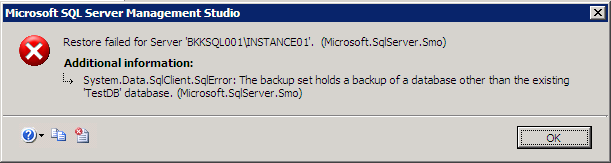
This error message indicates that you are going to restore a database on another database which are not the same database. For example, you have backup Northwind database and try to restore the backup to AdventureWorks database, the error will occur.
Solution
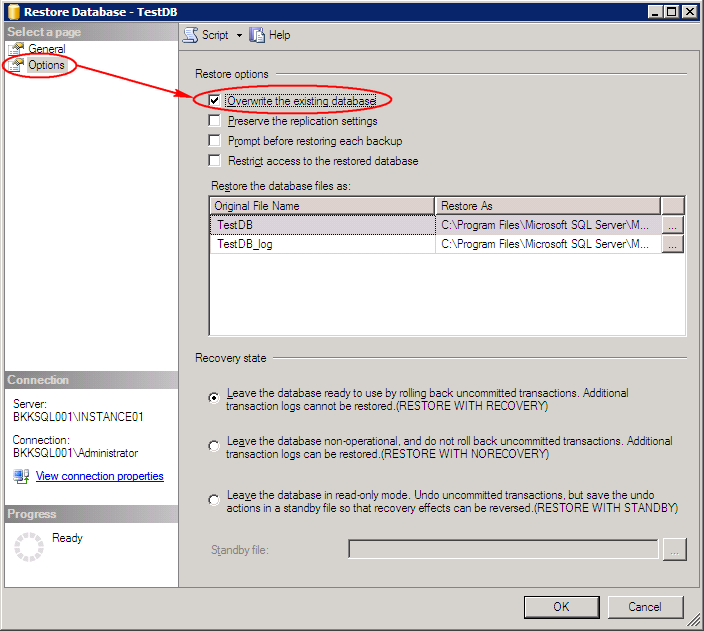
To solve the problem, you can use the overwrite the existing database option while you’re restoring.
- On Restore Database, select Options tab on the left menu. Then, check Overwrite the existing database on Restore options.
Note: This option will overwrite any existing data on the targeted database.
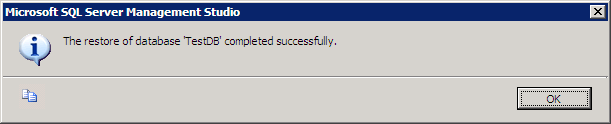
- Try to restore the database, the problem should be gone now.

Note: you can also delete the targeted database before perform restore a database. This way also gives the result as same as the solution above.
Thanks for the solution.. 🙂
thank u very very much
Thanks a lot..
Thank u …God Bless you…
Thnaks….
thankyou so muchhhhhhhhhhh
This process of giving answers (with images) is so nice.
Thanks for the solution.
It’s great!!!
Thank you
Te amo sos un groso
desde Argentina Entre Rios , Parana
TE AMOOOOOOOOOOOO
ohhhh I will marry you!!!! tnx sooo much!!!!
thanks buddy..good point
This is a great solution. Keep up the great work and thanks a bunch!!!
Carlos D.
Its working. thanks
great…works fine for me
Thanks a lot, this post helped me
This would work if an existing database did NOT use the same .mdf file of another database that is currently driving the LIVE IIS webpages… how to I work with this situation?
JAaronAndersonDotcom…I had the same problem…try using the “Restore Database…” option under the “Databases” folder in the Microsoft SQL Server Management Studio IDE. Select the backup file in the “From Device…” option and type in the database name you want it to create. Also, make sure under the “Options” section that the “Restore As” file paths under the “Restore the database file as:” section are valid paths, otherwise, it will fail. You can also select the “Overwrite the existing database” option as well but I don’t think it is necessary. Hope this helps!
I have tried all instructions but still gives the same error for database set,
Please assist asap, i am very desperate
Thanks alot……you are so going to heaven!
Thank you very much, worked like a charm.
No dude this answer dint work for me i got another error saying operating system error 5 !!!
Hi, Jeet
Operating system error 5 is about permission issue. Check if you have enough permission.
ERROR 3154,
PLEASE ASSIST ASAP
Hi, Dee
Couldn’t you solve the problem by follow this post?
thank u very much…great job..
you are just too much
Nice explanation
Thanks!!!
Muchas gracias!
СпаÑибо большое )
thxxxx…………
You saved my life….
Thank you so much . =D
Thank you so much… Thank you Thank you…
Thanks for the solution. You had solved my problem that I had stuck for weeks. =D
Thanks a lottttt…….
problem solved in sec…..
Great! Thanks for ur solution! It works fine for me…:)
Great solution…!
Thanks!
Thank YOU!!!
Thank you very much it works
Thankyou very much………….
Thank you dude. your solution is very help me.
Thanks dear good answer to the post thanks you so much
eres un capo hermano muchas gracias
Thank you it worked.:)
Thanks a lot. It has solved my problem
Asante Sana……thanks again
simply awesome answer….
Thanx for the solution..Just marking Overwrite checkbox solved my problem..thanx for the screen shot
thanx…
Thank You!
It worked, the .bak files got restored properly.
Thank You.
Your solution solved my problem.Thanks again.
Hello Dude…
Thanks for your article
I solved my problem with the help of your article.
Thanks & Regards
Venkat
Hello,
Thanks for your post. Looks like Im missing out some settings/permissions. I am facing operating system error 3 as below. Any suggestions is well appreciated.
” System.Data.SqlClient.SqlError: The operating system returned the error ‘3(error not found)’ while attempting ‘CreateFile’ on ‘C:\Program Files\Microsoft SQL Server\MSSQL.1\MSSQL\FTData\” ..
Cheers,
Karthik
Tnx alot. u solved a big problem
thanks a lot
Thanks a lot, brother.
excellent
Great great and great. Soooooooooooo much thank you.
Allah(God) Bless you
Thanks a lot… Very useful solution
Thanks!! 🙂
Thanks…it helped!
Thanks Buddy !!
Thanks a 1000 Buddy! Blessings.
Thanks.
You rock man! 🙂
Thanks!
thanks… feel silly though.
So simple, yet effective. Deleting the database was the solution. Thanks!
Thanks a lot.
You are great
Thank you ALL for the posting. This information has lead me in the right direction and I finally got my database where it needs to be.
Thank you so much. your solution works fine…
Thanks for your explanation of the problem and solution.
Thank you very much, great solution 🙂
Thank you very much
Thanks a ton… I have been trying for this since last 2 days… Thanks a lot for ur solution 🙂
Best, keep it continue
Thanks
THANKS MAN! 😀
Thank you man!! It solved my prblem.
Thanks, Gracias.
We will use your solution
Have a good one!
Thanks it works!
God Bless You!
Thanks its working fine..
Thanks its working fine !!!
tkss 🙂
Thanks yr maja aa gya
very thnks
Magnificent web site. Plenty of useful information here. I am sending it to some friends ans additionally sharing in delicious. And naturally, thanks to your effort!
Thanks a lot! keep it up, man
Thank You!!!
Thanks a lot my problem solved
Thank you!
СпаÑибо!
Thanks. It worked
Thaaaank youuuu very very mmuch much :)_
thanks
thanks ! it works !
thanks (y)
This one rocks! TY ^_^
Thanks! It helped
Thank you, being a newbie myself in MSSQL- this article really helped 🙂
Thanks!!! 🙂
Thanks a lot! it helped a lot
BIG THANKS FOR U BRO…
thanx
thank you
Tnk alot .U sole My solution dear 🙂
still having issues, solved my problem once, but when i again tried this with my new database, problem persists. Help me asap.
Thank you very much for the solution 🙂
Solution WorkS!
Thank you very much….!
Thanks a lot…:-) It helped me..:-)
Thanks a lot and this helped me a lot 🙂
it works………thnx
Still failed. appears error: ‘system.data.sqlclient.sqlerror:the backup set holds a backup ofn a database other than the existing ‘name_database’ database.(microsoft.sqlserver.smo)’
Restore from .bak sql server 2000 to 2005.
thanks a lot. it works,,,,,,,,
thanks a lot. it works and saved a lots of time… Keep up the good work…. You kind of geeks are always needed by us…
Thankz a lot…
This process of giving answers (with images) is so nice.
Thanks for the solution.
thank you so much….
ThX.. it’s saved my ass 🙂
Bom dia a todos.
Eu já tinha realizado todos esses procedimentos. De substituir e a mensagem continua.
Sei que esta utilizando algum arquivo que nao esta me permitindo mas como resolver isso? Já parei todos os serviços q poderia estar utilizando o bando de dados que quero copiar e mesmo assim nada.
Alguém tem alguma outra sugestão?
Obrigada.
hello everyone, I get a strange error it says system.data.sqlclient.sqlerror: The media set has two media families but only 1 are provided. All members must be provided. (Microsoft.SqlServer.Smo).
Can anyone please help me out with that????
Sorry for inconvenience guys. I have solved my problem.
Thanks dude!
Thank you very much
ohhhhh thank god bro. u really helped me by giving that solution. Thanks again
thankyou n God Bless
Thanks you, finally able to solve my problem.
Thanks sir… You save my time… Thanks
Thank you very much!!
thanks
Thanks a lot
a big “grazie mille” for your simple and effective answer – saluti from Switzerland 🙂
Thanks
When im restoring ..at 90% i got below error.
The file on device — is not a valid Microsoft Tape Format backup set.
Thanks alot.
realy thanks.
Thanks you mate!! te amo!!! me puedes hacer un hijo?? o mejor q sean dos, para tener la parejita
Hey…thanks….its working fine for me 🙂
thanks duuuuuude ………… 🙂
thank you now i am really happy.bcoz i just face this problem from last 5 days.
thankx a lot…
Funny that I have just come across this issue. Thanks a million!
thanks a lot 🙂
This is awesome. Thanks for the solution
thanks for your wonderful solution keep it up
Thank you so much and it looks so simple when I followed your instructions.
Thank you 🙂
Thank you ……
Thank you so much it really worked 🙂
Thanks a lot for this Great solution.
Thanks alot
thanks…
thanks
Excelente respuesta, me sirvió.
It’s great solution !!!
Thank you…..
iam trying your telled process but again error is coming like this
system.data.sqlclient.sqlerror:Directory lookup for the file
Thanks alot.. Works charm.
You are a life saver!
IT WORKED PERFECTLY!!!