- Getting started with Microsoft ISA Server 2006, Part 1: Introduction
- Getting started with Microsoft ISA Server 2006, Part 2: Environment Setup
- Getting started with Microsoft ISA Server 2006, Part 3: Installation
- Getting started with Microsoft ISA Server 2006, Part 4: Service Pack 1
- Getting started with Microsoft ISA Server 2006, Part 5: Network Layout Concept
- Getting started with Microsoft ISA Server 2006, Part 6: Configure Network Layout
- Getting started with Microsoft ISA Server 2006, Part 7: Create DNS Lookup Rule
- Getting started with Microsoft ISA Server 2006, Part 8: Create Web Access Rule
- Getting started with Microsoft ISA Server 2006, Part 9: Client Configuration
- Getting started with Microsoft ISA Server 2006, Part 10: Logging
- Getting started with Microsoft ISA Server 2006, Part 11: HTTP Filtering
- Getting started with Microsoft ISA Server 2006, Part 12: Block Windows Live Messenger
Environment Setup
In the first part, you learn an overview of ISA Server 2006. Before going to the real example on ISA Server 2006, you should know system environment which I’m going to use on this series. On this post, you will know the hardware and software requirements for ISA Server 2006. And you will see the server and network configurations.
System Requirements
Below is the minimum requirements for ISA Server 2006 Standard Edition or ISA Server 2006 Enterprise Edition.
- Pentium III 733 MHz or higher.
- 512 MB of RAM or more.
- 150 MB of free hard-disk space.
- Microsoft Windows Server 2003 32-bit operating system with Service Pack 1 (SP1) or Microsoft Windows Server 2003 R2 32-bit.
Server Configuration
There are three servers which I will use throughout this series. I already have the following servers in the network:
- BKKPDC001 which runs under Windows Server 2003 R2 with Service Pack 2. It runs these services:
- Active directory
- DNS
- DHCP
- Address pool: 192.168.10.101-192.168.10.150
- Scope option: DNS Servers – 192.168.10.2, 203.144.255.71, 203.144.255.72
Note: The IP address 203.144.255.71 and 203.144.255.72 are the IP addresses of my ISP’s DNS servers.
- IP Configuration:
- IP address: 192.168.10.2/24
- Gateway: 192.168.10.10
- DNS Server: 192.168.10.2, 203.144.255.71, 203.144.255.72
Note: The IP address 203.144.255.71 and 203.144.255.72 are the IP addresses of my ISP’s DNS servers.
- BKKNET001 which runs under Windows XP Professional. This is a client PC for test Internet access. The IP address is obtained from the DHCP server.
- BKKISA001 which runs under Windows Server 2003 Standard edition with Service Pack 2. I am going to setup ISA Server 2006 on this server. There are two network interface cards on this server.
- Internal network (LAN):
- IP Address: 192.168.10.10/24
- Gateway: 192.168.10.2
- DNS Server: 192.168.10.2, 203.144.255.71, 203.144.255.72
Note: The IP address 203.144.255.71 and 203.144.255.72 are the IP addresses of my ISP’s DNS servers.
- External network (the Internet):
- IP Address: 192.168.0.10/24
- Gateway: 192.168.0.1
- DNS Server: None
- Internal network (LAN):
Network Configuration
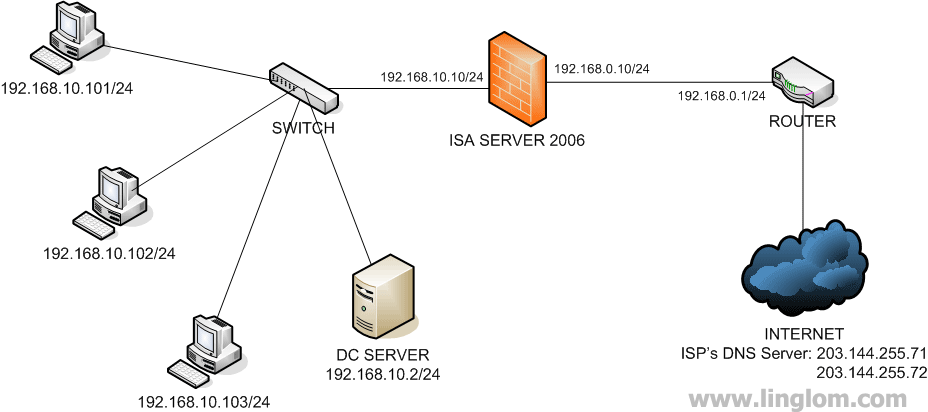
I try to keep the network configuration simple as possible. You will see on the left side of the ISA Server 2006 server are my internal network (LAN). It contains clients and a server of my network. On the right side of the ISA Server 2006 server is the external network. It connects to the router which connects to the Internet.
The image below is the network diagram of my example.
What’s Next?
Next, I will show how to install ISA Server 2006 on the server.
Hello LingLom,
Great walkthrough, it has been very helpful. I was just wondering though, could you just bypass your router all together and run the internet connection straight to your ISA Server box, and use the NAT in Server2k3 and/or ISA 2006?
Hi, Dicky
Yes, you can connect to the Internet on ISA Server and share the Internet to clients.
Hi LingLom,
I’m curious as to why you setup external DNS servers as secondary and tertiary servers on the internal side of the isa server…
Wouldn’t it be preferable to just relay ALL dns requests to your DC and allow that to use root hints if external resolution is needed?
Also, did you experiment at all running DNS directly on the ISA server? I’ve seen this recommended numerous times for ISA Client routing.
Hi, Devin
I believe that there are many configuration types to make ISA Server operates. On the example, I want most configurations on the ISA Server as possible and there are few clients on the network so I assume most communication will access to the Internet.
Running DNS on ISA Server? I have never try once. I should be suitable in small organization which has limited budget.
Hi,
I am just new to this ISA 2006 technology and I want to install ISA2006 server but I have some doubt.
can I install ISA 2006 in windows 2003 server with 1 NIC card?
Regards,
Palanikumar
Hi, Palanikumar
Yes, you can install ISA Server 2006 on a server with a NIC card. However, ISA Server can perform as a proxy server only.
Thank you so much for such a nice informative web site.
Hi ling lom ,
My name is hakoo, working as a system administrator here I have success fully configured ISA 2006 server for my 80 users everything is working fine users can browse properly schedule is working fine my each & every rules are working fine except email receiving issues, even I send email to any person trough outlook without any problem (that mean problem related only sending issues ),let me explain my first email server environment this mail server is hosted in USA Normally we are accessing trough outlook or thunderbird by POP3 .
Due to this case I have created new firewall rule for pop3 , in that rule it is allowing for all users internal network to any where full time ,and I have created external DNS lookup rule also but still the same issues , we cannot receive any email from outside trough outlook
After my experiment I found that problem related in DNS, for testing purpose we configured on client user side manual IP address and internal DNS server plus alternate DNS server( alternate DNS server I put public DNS server something 4.2.2.2.5) after that I can receive email trough outlook without any problem In this case how we can solve the issues,your great help highly appreciated.
With regards
Hakoo
Hakoo,
I’m not sure if I understand correctly, but it sounds like you have your internal DNS setup incorrectly. Your internal DNS server should be forwarding DNS externally and all clients should be using the internal DNS server for resolution.
For this reason, the isa server would need to allow dns requests from the dns server internally to send outgoing dns requests.
It sounds like you may also allow all outgoing requests from the internal network (this is setup by default in some situations). If this is the case, you shouldn’t need to setup another rule. Otherwise, if access is being filtered more stringently, you will need to take care about what rules you setup, and how you set them up.
Lastly, I cannot tell entirely, but I think you may be mixing up POP3 with SMTP. If users are receiving via POP3, they should be sending via SMTP. This is a separate rule you will need to take care of (only if you aren’t already allowing all outgoing traffic).
Hi devin,
Thanks for your reply , here my confusion is If my internal dns server configuration is wrong means how it is resolving web sites and other services , trough my ISA Proxy server I can browse successfully . The problem related only for mail receiving trough outlook. when I check outlook status I can see sending is completed and receiving getting failed , The same dns server environment I have experience with my previous Linux based proxy server , it was working fine and users can access email trough outlook .any idea ?
Hi, Hakoo
I think the same as Devin. You need to ensure that your DNS Server is configured to forward queries to external DNS Server or not. Or you may add alternate IP Adddress of the external DNS as you are doing, using DHCP to assign would be easier than manually configure each computer as the same as the sample of this post.
Hakoo,
It sounds to me like you have DNS issues primarily because you fixed it by manually specifying external DNS servers on the clients. This isn’t correct though and as Linglom stated, the internal dns server should be forwarding the requests externally for the clients.
If your servers network adapter is using external ip addresses, then ofcourse you will resolve internet addresses – this isn’t correct though. Your server’s network adapter should have its own ip address set for the dns server. This sounds a bit counter-intuitive, but I assure you it is standard procedure. This works because the DNS Server configuration should be set forward DNS to root servers (or another up-river dns server).
I am somewhat taking a stab in the dark here since I don’t actually know your configuration – I’m making some assumptions based off of what you already told us.
With all that said – what I described is a fairly standard setup and by no means the be-all-end-all. Your configuration will depend on what you are doing and how you are doing it. There are many, many ways to configure things.
Hope that helps,
Devin