- Accessing MySQL on VB.NET using MySQL Connector/Net, Part 1: Introduction
- Accessing MySQL on VB.NET using MySQL Connector/Net, Part 2: Setup MySQL Server
- Accessing MySQL on VB.NET using MySQL Connector/Net, Part 3: Install Sample Database
- Accessing MySQL on VB.NET using MySQL Connector/Net, Part 4: Create & Grant MySQL User Account
- Accessing MySQL on VB.NET using MySQL Connector/Net, Part 5: Install MySQL Connector Net
- Accessing MySQL on VB.NET using MySQL Connector/Net, Part 6: Create Connection
- Accessing MySQL on VB.NET using MySQL Connector/Net, Part 7: Perform SQL Operations
- Accessing MySQL on VB.NET using MySQL Connector/Net, Part 8: Display Result on GUI
Perform SQL Operations
From the previous part, I have successfully connect to world database on MySQL Server from VB.NET. Next, I try to perform basic SQL operations (SELECT, INSERT, UPDATE and DELETE) on the world database.
Note: This post is continued from the previous part. If you start a new project, you’ll need to add MySql.Data reference. See the previous post for more detail.
Declare a Connection String
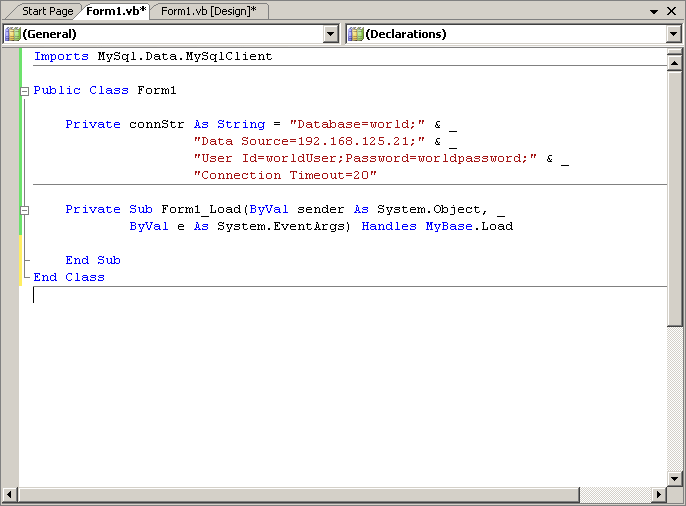
If you continue from the previous part, you simply move the connStr variable from TestConnection() method to global scope. Otherwise, declare a new global variable as connection string with the value below.
Note: For more detail about how to build a connection string, see the previous post.
1 2 3 4 | Private connStr As String = "Database=world;" & _ "Data Source=192.168.125.21;" & _ "User Id=worldUser;Password=worldpassword;" & _ "Connection Timeout=20" |
The code will look similar as the figure below.
Retrieve data from database
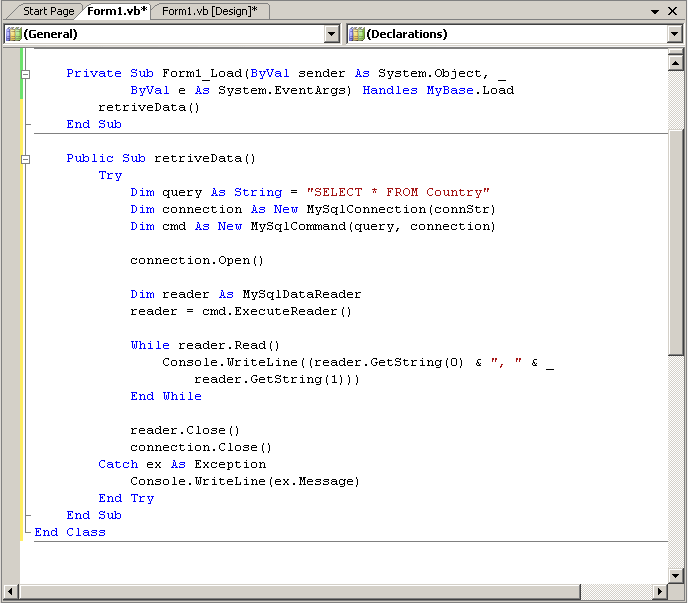
To retrieve data from MySQL, I’ll use MySqlDataReader Class from MySql.Data library. First, I open the connection to the world database on MySQL Server. Then, executes the query command by using ExecuteReader method and assigns to MySqlDataReader object. After that, looping on MySqlDataReader object to get result. Let’s see the code below.
19 20 21 22 23 24 25 26 27 28 29 30 31 32 33 34 35 36 37 38 39 40 | Public Sub retriveData() Try Dim query As String = "SELECT * FROM Country" Dim connection As New MySqlConnection(connStr) Dim cmd As New MySqlCommand(query, connection) connection.Open() Dim reader As MySqlDataReader reader = cmd.ExecuteReader() While reader.Read() Console.WriteLine((reader.GetString(0) & ", " & _ reader.GetString(1))) End While reader.Close() connection.Close() Catch ex As Exception Console.WriteLine(ex.Message) End Try End Sub |
Code Explanation:
- Line 21: Create a query variable as string.
- Line 22: Create a MySQLConnection object with the defined connection string in global as parameter.
- Line 23: Create a MySQLCommand object with previous 2 variables as parameters.
- Line 25: Open a connection to MySQL Server using the defined connection string.
- Line 27-28: Call ExecuteReader() method and assign the result to MySqlDataReader
object. - Line 30-33: Looping on MySqlDataReader object to get results to the console.
- Line 35-36: Close the reader and connection. I recommend to close these objects after using everytime.
- Line 38: If there is any error in the method, send to console.
The code will look similar as the figure below.
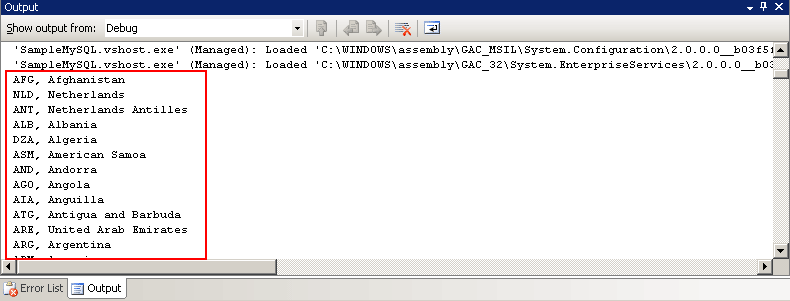
The result of the query shows the first and second columns in the output window.
Update Record on Database
Coding on INSERT, UPDATE and DELETE SQL operations are identical except only sql command that is executed. When I perform these operations to database, there is no need to get records from the database. So I use ExecuteNonQuery() Method from MySqlCommand Class. For INSERT, UPDATE and DELETE statements, the return value is the number of rows affected by the command. For all other types of statements, the return value is -1.
Note: You can use ExecuteNonQuery to perform any type of database operation, however any result sets returned will not be available.
Update Function
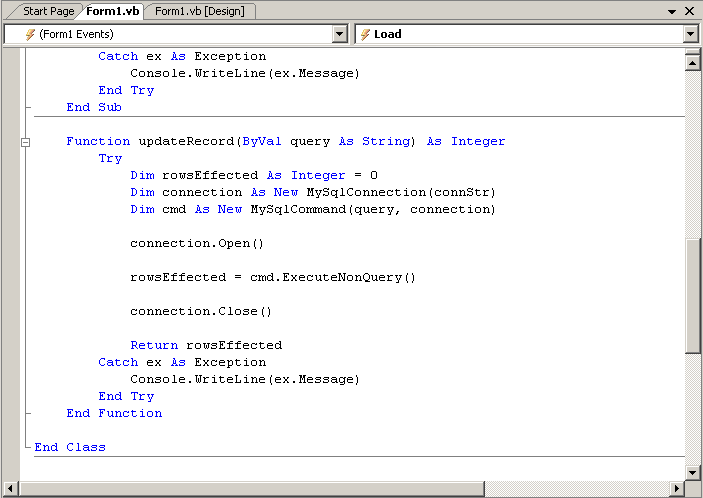
This function accepts a parameter as sql command and send to execute on MySQL Server. So the function can be use for INSERT, UPDATE and DELETE operations also any operation that doesn’t need a return result sets. Also, it returns an integer value of affected rows.
42 43 44 45 46 47 48 49 50 51 52 53 54 55 56 57 58 | Function updateRecord(ByVal query As String) As Integer Try Dim rowsEffected As Integer = 0 Dim connection As New MySqlConnection(connStr) Dim cmd As New MySqlCommand(query, connection) connection.Open() rowsEffected = cmd.ExecuteNonQuery() connection.Close() Return rowsEffected Catch ex As Exception Console.WriteLine(ex.Message) End Try End Function |
Code Explanation:
- Line 50: The code is similar to retrieve data section only it call ExecuteNonQuery() method and the return value is affected rows.
The function code will look similar as the figure below.
Example INSERT
To execute INSERT command, try the statement below. The sql command will insert a new record to Country table on world database. Then, output the affected rows to console.
14 | Console.WriteLine(updateRecord("INSERT INTO Country (Code, Name) VALUES ('AAA','Test Name')")) |
Example UPDATE
The UPDATE command belows change Name to ‘Test2’ on row which has code = ‘AAA’. And output the affected rows to console.
15 | Console.WriteLine(updateRecord("UPDATE Country SET Name='Test2' WHERE Code ='AAA'")) |
Example DELETE
The DELETE command deletes a record which has code equals ‘AAA’. And output the affected rows to console.
16 | Console.WriteLine(updateRecord("DELETE FROM Country WHERE Code ='AAA'")) |
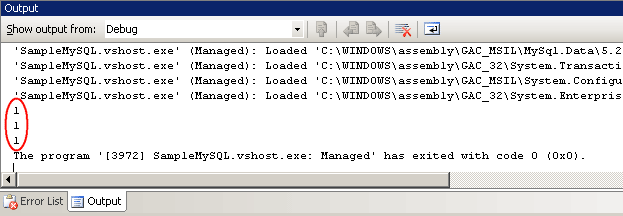
When I have run the application with the 3 statements above, the output window shows the row affected of each statement as the figure below.
Download Code
You can download a complete project file at here – SampleMySQL (zip format). The project was created on Microsoft Visual Studio 2005.
Summary
Now you have reach the end of the article. After 7 parts, you should be able to develop an simple application to access MySQL Server on your own. I think that the article is quite clear than other accessing database server articles that I wrote last year. If you have any question, feel free to leave a comment below.
hi i justwant to know that if we want to make a code in vb for inserting in an sql database for makina login form like user name and password so what will we do
Hi, Deepti bhatt
Simply develop project as Windows Form Application. Then, you design the login form and implement the code from this article. That’s it.
Thank you for everything….this is sweet
But insteadof getting everything on Console I want it on text box or in a table form
could yopu help me
Anyways you have done a great job for sophomore
Thank you Sir!
nice one,
but if i want to retrieve it on a datagrid??? could u help me out??
Hi, iam very gratefull that you did this article!
I have been searching fr such for days
cheer
Best Regards
liku
thanks, a concise, accurate tutorial!
how do i make a report on using component one in vb.net…
please show me the basic step
Thank you, again an excellent article! 🙂
Hi Linglom,
Thank you for all your help.
I have a small problem. The previous tutorial worked fine for me and I got the “Connection okay” message.
But after trying this code several times, I still get the following error:No symbols are loaded for any call stack frame. The source code cannot be displayed.
I have tried to google responses to this error because I’m new at using Visual Basic (2010) and don’t understand the error.
Please help!
Hi, after trying this code several times (To retrieve data from MySQL), I can’t see the result, I’m using VisualBasic 2010 express, I have NO errors but I couldn’t see the register.
Thanks
Hi, Daemon
Check on your console windows when it runs, there may be an exception.
Thanks for tutorial its helps me a lot, I’ve got some question. how to insert data using using the textbox. Actually a novice in VB.NET I am using VS2010 and MySql as backend.
Hi Cris
Try this:
INSERT INTO table_name (field_name) VALUES (‘” & TextBox1.Text & “‘)
i got this error on function update using vb 2010 express
Function ‘updateRecord’ doesn’t return a value on all code paths. Are you missing a ‘Return’ statement?
actually the return statement was there.. i just copy and paste your code
Great job! nice article
One doubt, if I want consult values inserted by me on a table? (like a textbox)
For example, insert is like that:
Console.WriteLine(updateRecord(“INSERT INTO Criminoso (Nome,BI) VALUES (‘” & TextBox1.Text & “‘,'” & TextBox2.Text & “‘);”))
And to consult? I try with select.. but I couldn’t!
any idea or solution?
Many folk forget about a ‘ in a text box.
This will cause many problems with SQL insertion/Updateing.
You MUST clean these out in order to ensure stability!!!
You may think to encde teh value, and whilst that does work, it is fraught with danger so best to remove.
The case is worse with HTML Editors as they rairly encode the value and crash your code.
So PROCESS EVERYTHING before using it in your SQL
Why not write a cleaning function and call that!!!
It works.
You also need to cater for SQL injection in URLs
Example
sqld &= ” Title_Meta = ‘” & CustomFunctions.CleanTextFields(itemTitle_Meta.Text.ToString) & “‘ “
Updateing from a Datalist control:
wrap the lot in a try/catch with finally closing the data connection
#############################
Dim sqld As String = “Update Refreshment_Items set ”
Dim itemTitle_Meta As TextBox = CType(e.Item.FindControl(“EdTextBox_Title”), TextBox)
Dim itemFileName_1 As TextBox = CType(e.Item.FindControl(“EdTextBox_FileName_1″), TextBox)
sqld &= ” Title_Meta = ‘” & CustomFunctions.CleanTextFields(itemTitle_Meta.Text.ToString) & “‘ ”
sqld &= ” where Items_ID = ”
sqld &= DataList1.DataKeys(e.Item.ItemIndex).ToString()
conn.Open()
Dim cmd As New MySqlCommand(sqld, conn)
cmd.ExecuteNonQuery()
You get the idea
PS.
Pututting the Close Connection in teh Finally ensures that the connections are always close, otherwise you get connection leakage and problems ensue.
Remember, if you Open the connection Manually you MUST close it
However, I got the solution 😉
I prefer with insert in textboxes because is to insert on database, and is better in this form.
Now, I need do the same with selects for a complex query lol
I am pleased you have the solution that you are happy with.
I would urge you to check that it cannot be broken by the use of SQL syntax characters, if it can then you have a major security risk to the site and potentially folk can get to your data, edit/delete it.
So please as a minimum –
Make sure that the text boxes can handle a ‘ and ; as these are potentially the biggest problens that I have found over the years of programming in asp and .net vb.
If it does break than as a minimum you need to prevent their entry in the text box by a validation control.
I go down the route of a custom function to clean these and others & I use validation controles in order to close all gaps.
Hope this helps you produce a truely secure page.
pls help me with the code to retrive mysql data into a textbox created in vb.net
thanx for the help 🙂
Great I did a few changes with listbox and combobox and it works very well
im having this problem.. could someone please help
Function ‘updateRecord’ doesn’t return a value on all code paths. Are you missing a ‘Return’ statement?
Greatly appreciated.. thanks ^_^
Hi Nevin,
In Catch block, you may add “Return Nothing” (after line 56 in the example above).
hi,
I am trying to “select * from table where field = textbox1.text and where field2= textbox2.text” in vb.net2010 with mysql database, but I could not. Please help me.
Thanks all in advanced.
Hello
i catch a variable from excel with vb and want to insert this variables in mysql. My Problem is , in which syntax i must do the vb variabel in the mysql syntax ?
Thanks for your help
Hello
i have found ist “& &” and it works
hai john
how to store image in ms access
Thank u very much. It’s well explained and very hepful
Thank you! Excellent tut… struggle to find decent ones.. cheers all way from South Africa
Thank you!
Aw, this was a really nice post. In idea I want to put in writing like this additionally – taking time and actual effort to make a very good article… but what can I say… I procrastinate alot and under no circumstances seem to get one thing done.